
Manual work is not always difficult, but it is often repetitive, inconsistent, and expensive to scale. Employees copy information between applications, monitor inboxes for updates, create reminders, reconcile spreadsheets, and follow up on tasks that could be triggered automatically.
These are practical opportunities for business workflow automation. A well-designed workflow connects an event to a series of controlled actions: a trigger, validation rules, data transformation, system updates, notifications, an audit trail, and an exception path.
For example, a website enquiry can create a CRM record, notify a salesperson, send an acknowledgement, and schedule a follow-up without anyone re-entering the same information. The same principle can be applied to finance, customer service, operations, marketing, and employee administration.
This article explains 12 business workflow automation examples, including the manual problem, the automated process, likely integrations, benefits, and points where human approval remains important.
How business workflow automation works
Most workflows begin with an event. This may be a form submission, a payment, a status change, a new email, a scheduled time, or a webhook from another application. The workflow then validates the event, applies business rules, transforms data, performs one or more actions, and records the result.
A typical workflow can be represented as:
Trigger → Validate → Transform → Act → Notify → Log → Handle exceptionsNot every workflow requires artificial intelligence. Predictable actions such as updating a status, sending a payment notification, creating a task, or synchronizing a field are usually handled most reliably with rules, scheduled jobs, webhooks, and REST APIs. AI is more useful when the input is less structured, such as an email, scanned document, support message, or content brief.
1. Website enquiry and lead capture automation
The manual problem
A prospect submits a website form. An employee reads the notification, copies the contact details into a CRM, identifies the lead source, forwards the enquiry to sales, and tries to remember when to follow up. Delays and duplicate records are common when enquiry volume increases.
An automated workflow
The form submission can trigger validation for required fields, email format, consent, and spam indicators. The workflow then checks for an existing contact, creates or updates the CRM record, attributes the lead source, creates a deal or enquiry, and assigns the appropriate salesperson.
The prospect can receive an immediate acknowledgement while the assigned employee receives a Slack, Teams, email, or CRM notification. A follow-up task with a due date can also be created automatically.
Applications and integrations
- Website forms or a custom web application
- CRM contact and deal APIs
- Email, Slack, or Microsoft Teams notifications
- Calendar booking tools
- A database for consent, attribution, and workflow logs
CRM platforms commonly expose object APIs and webhooks. For example, CRM contact objects can be created or updated programmatically, while webhooks can notify an integration when a record changes.
Benefits and approval points
This approach reduces duplicate data entry, shortens response time, and gives sales staff the context they need. Human review may still be required for strategic accounts, lead qualification, pricing, or routing enquiries to specialist teams.
2. Sales pipeline updates and follow-up reminders
The manual problem
Salespeople often update opportunity stages manually and rely on personal calendars or memory for callbacks. As a result, opportunities may remain inactive, forecasts may be based on stale data, and follow-up activity can be inconsistent.
An automated workflow
A completed meeting, customer email reply, quote creation, contract signature, or period of inactivity can trigger an action. The workflow might update a CRM field, create a follow-up task, send a reminder, or alert a manager when an opportunity has not changed for a defined period.
A scheduled job can inspect opportunities every morning, while email and calendar integrations provide event-driven updates. Idempotent logic is important so that repeated events do not create multiple identical tasks.
Benefits and approval points
Automation makes follow-up more consistent and improves pipeline visibility. A salesperson or manager should approve stage changes that affect forecasts, commissions, contractual commitments, or sales reporting. Automation should recommend or prepare these changes rather than silently making high-impact decisions.
3. Customer onboarding and document collection
The manual problem
After a client signs a proposal, an employee sends a checklist, creates folders, requests documents, monitors replies, renames files, and updates project status. Missing documents can delay delivery and create repeated email exchanges.
An automated workflow
A signed agreement or confirmed payment can create an onboarding record and secure customer portal checklist. The workflow can create a Drive or SharePoint folder, generate upload links, assign internal tasks, send reminders, and update the CRM when each item is received.
For small service businesses, a practical sequence may be:
- Approved proposal triggers a client record and onboarding checklist.
- Secure upload links are sent for identity, project, or billing documents.
- Uploaded files are stored against the correct customer record.
- Missing items generate reminders after a defined period.
- Completion creates a project workspace and internal handoff task.
Google Workspace provides APIs for services such as Drive and Gmail integration. Human approval remains appropriate for identity verification, contract review, compliance exceptions, and incomplete submissions.
4. Invoice generation, payment notifications, and accounting synchronization
The manual problem
Staff prepare invoices from spreadsheets, email them to customers, check payment portals, and re-enter information into accounting software. This creates delays and increases the risk of mismatched customer, tax, and payment records.
An automated workflow
An approved work item, subscription event, or paid order can call a billing API to create an invoice. The workflow sends the invoice, records its identifier, and listens for payment events. A successful payment can update the CRM, project database, or customer portal, while an overdue payment can create a task or notification.
Payment services such as Stripe expose invoice and event APIs, and accounting systems such as QuickBooks Online provide REST-based integration options. Payment events should be verified, stored, and processed asynchronously rather than trusted solely because an HTTP request was received.
Benefits and approval points
Automation reduces re-entry and provides a consistent payment status across systems. Human approval should remain in place for tax treatment, refunds, credit notes, write-offs, unusual payment mismatches, and high-value invoices.
5. E-commerce order processing and inventory updates
The manual problem
Employees export orders, confirm payment, check stock, create fulfilment records, update inventory, and send shipping information. Manual handling becomes especially risky when several sales channels share the same inventory.
An automated workflow
A paid-order webhook can trigger payment validation, inventory reservation or decrementing, fulfilment creation, warehouse notification, and customer communication. When a carrier provides tracking information, the workflow can update the order and send a shipping email.
A typical integration may connect an e-commerce platform, inventory database, warehouse or fulfilment system, accounting application, and email service. Shopify documents order and inventory webhook events that can support this type of event-driven design.
Benefits and approval points
The workflow keeps customers and fulfilment staff informed while reducing overselling and delayed shipping. Human review is still useful for suspected fraud, stock conflicts, substitutions, cancellations, and international shipping exceptions.
6. Email notifications and internal task assignments
The manual problem
Employees forward emails, interpret requests, and create tasks from memory. Important messages may sit in a shared inbox, and the eventual task may lack the original context or a clear owner.
An automated workflow
An inbound email, form submission, or system status change can be matched against rules such as sender, subject, keywords, customer, or urgency. The workflow can assign a queue, create a task with a due date, attach a link to the source message, and notify the responsible team.
For less predictable messages, an AI classifier can suggest a category, but deterministic rules should handle clear conditions. Gmail offers APIs for filtering, sending, and push notifications, while task applications can expose APIs for creating assignments.
Benefits and approval points
This reduces inbox monitoring and makes ownership visible. Employees should approve sensitive recipients, escalation priority, and external communications before an automated message is sent.
7. Employee onboarding and administrative workflows
The manual problem
HR emails forms to a new employee, IT separately creates accounts, managers request equipment, and payroll receives details through another channel. These disconnected steps can cause missing access, delayed equipment, or unnecessary administrative work.
An automated workflow
An approved hire record can create an onboarding checklist, request identity-provider accounts, schedule orientation meetings, open an equipment ticket, collect documents, and notify payroll. A central workflow database can track each task and show whether the employee is ready for their start date.
Possible integrations include an HRIS, identity provider, email and calendar systems, equipment or ticketing software, payroll, and a custom internal application.
Benefits and approval points
Automation gives HR, IT, and managers a shared status view. Approval must remain with authorized people for employment eligibility, compensation, access permissions, sensitive data, and final account activation. Least-privilege access and separate development, staging, and production credentials are essential.
8. Document processing and structured information extraction
The manual problem
Staff read invoices, applications, forms, or scanned documents and retype fields into a database or accounting system. This is slow and error-prone, particularly when document layouts vary.
An automated workflow
A file upload can trigger malware checks, OCR, document classification, field extraction, validation, and routing. Extracted values such as invoice number, supplier, date, total, or purchase order can be sent to a database or accounting system.
Services such as Google Document AI support document understanding and structured extraction. A custom PHP or Node.js service can coordinate uploads, API calls, validation, and review queues.
Benefits and approval points
Document automation reduces retyping and creates a searchable, structured record. It should preserve confidence scores and source references. Human review is necessary for low-confidence fields, ambiguous documents, legal terms, and financial records above a defined threshold.
9. Marketing campaign and content production workflows
The manual problem
Campaign briefs move through email, writers create drafts, reviewers leave comments in different tools, and approved content is copied into several channels. UTM parameters, publishing dates, and performance information may be managed inconsistently.
An automated workflow
A campaign status change can create a brief template, project tasks, an asset folder, review assignments, UTM tags, and CMS scheduling tasks. An optional AI service can help produce outlines, summaries, or first drafts, while the approved version is sent to the CMS or email platform.
Performance data can later be collected into a reporting database. Integrations may include a CRM, project management tool, CMS, email platform, analytics service, and content storage.
Benefits and approval points
The workflow keeps deadlines, ownership, and campaign metadata together. Human approval is required for brand voice, factual claims, regulated language, imagery, audience targeting, and final publication. AI should assist production rather than bypass editorial controls.
10. Business reporting and data consolidation
The manual problem
Before a weekly or monthly report, operations staff export data from sales, finance, support, and e-commerce systems. They combine spreadsheets, resolve inconsistent names, and investigate totals manually.
An automated workflow
Scheduled API jobs or webhooks can load source records into a normalized database or warehouse. Transformation jobs standardize fields, validate totals, and refresh dashboards. An exception report can highlight missing records, duplicate identifiers, failed imports, or unexpected changes.
Node.js or PHP workers are suitable for API orchestration, queue processing, database access, and custom validation. Scheduled workflows are generally preferable for batch reporting, reconciliation, and financial close processes.
Benefits and approval points
Reporting becomes more repeatable and less dependent on spreadsheet manipulation. Humans should define metric ownership, investigate outliers, approve financial close data, and review executive reports before publication.
11. Customer support enquiry classification and response assistance
The manual problem
Agents read every message, identify the issue, search internal documentation, populate ticket fields, and decide where to route the enquiry. Repetitive questions consume time, while urgent or sensitive cases may require faster escalation.
An automated workflow
Rules or AI can classify the topic, language, urgency, sentiment, and customer. The workflow can populate ticket fields, assign a team, suggest an answer from approved knowledge, and escalate messages that match defined risk conditions.
Support platforms such as Zendesk provide custom ticket fields and condition-based triggers. AI-generated suggestions should include confidence information and should be restricted to approved knowledge sources where possible.
Benefits and approval points
Automation improves routing and reduces repetitive triage. Agents should review refunds, complaints, security incidents, legal threats, vulnerable customers, low-confidence classifications, and customer-facing responses that require judgment.
12. API-based application integration and data synchronization
The manual problem
Employees copy customer, order, project, invoice, and support information between systems because native integrations are incomplete or unavailable. Over time, records become inconsistent and no one can easily determine which value is authoritative.
An automated workflow
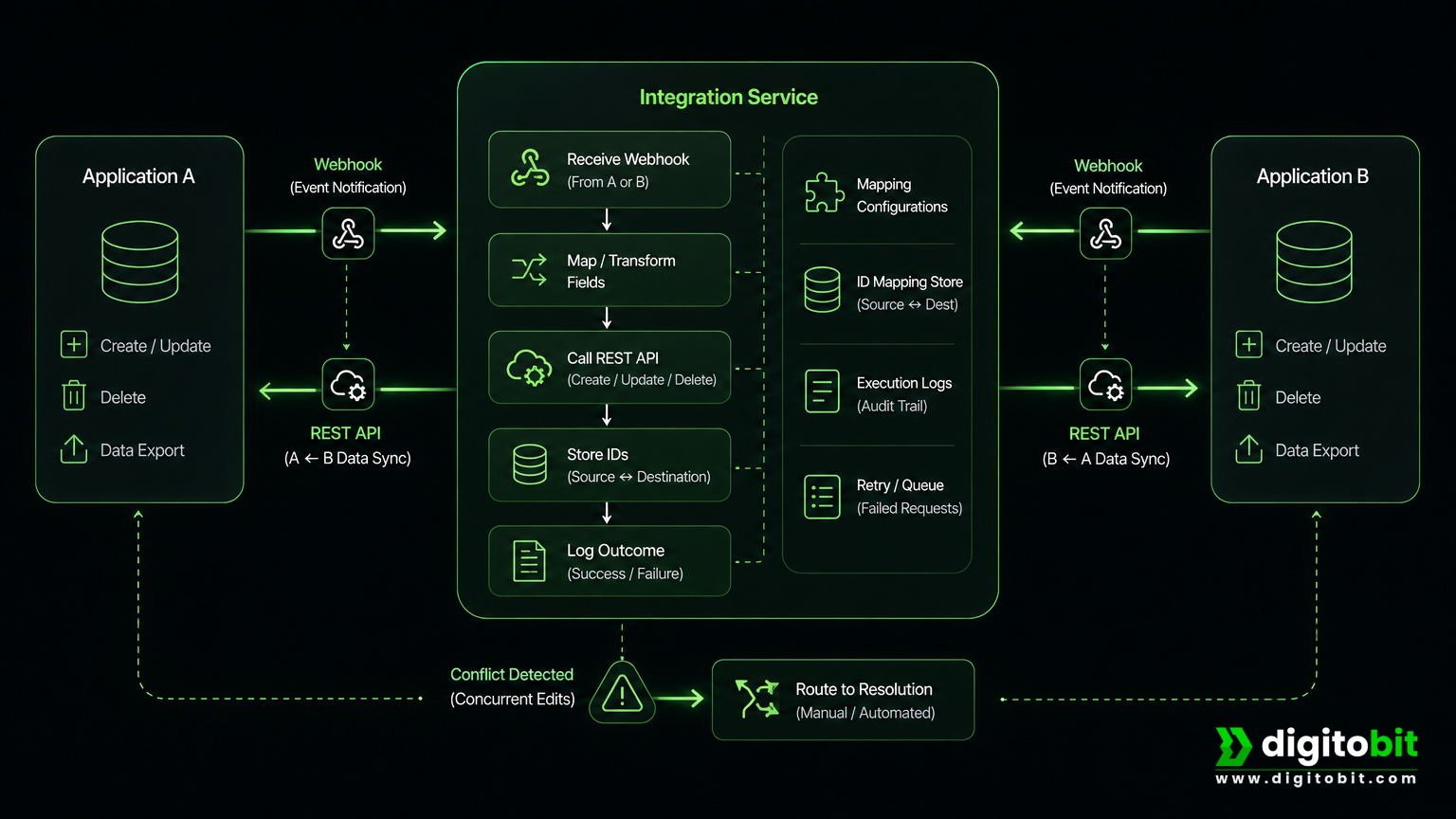
An integration service can receive webhooks, map fields, call REST APIs, store source and destination identifiers, and record each synchronization result. A custom Node.js or PHP service is useful when the workflow requires bidirectional synchronization, custom validation, legacy-system connectivity, or complex approval rules.
For example, a CRM customer update might synchronize selected fields to a billing system, while a payment event updates the CRM. The integration should define which system owns each field rather than attempting to synchronize everything in both directions.
Benefits and approval points
Reliable integration removes duplicate entry and gives teams a consistent operational view. Humans should resolve conflicting edits, approve destructive updates, manage permission changes, and authorize data deletion.
Rules, webhooks, scheduled jobs, APIs, and AI: choosing the right approach
| Approach | Best suited to | Important consideration |
|---|---|---|
| Rules | Status changes, field mapping, due dates, and notifications | Clear conditions and predictable outcomes |
| Webhooks | Real-time lead, payment, order, and support events | Verify signatures, deduplicate events, retry failures, and log delivery |
| Scheduled jobs | Reporting, reconciliation, polling, and batch processing | Handle pagination, rate limits, time zones, and change detection |
| REST APIs | Creating, reading, updating, and synchronizing application data | Use secure authentication, stable identifiers, and version-aware integrations |
| AI | Classification, extraction, summarization, and draft generation | Use confidence thresholds, source references, and human review |
Webhooks generally reduce delay and unnecessary API requests because the source system pushes an event when something changes. Polling is still useful when a system has no webhook support, but it needs scheduling, reliable change detection, rate-limit handling, and duplicate protection.
Implementation considerations for reliable automation
- Define ownership: Decide which system is authoritative for customers, invoices, orders, employees, and other key records.
- Prevent duplicates: Store stable source IDs and use idempotency so a repeated event does not create a second invoice, shipment, or task.
- Design for failure: Use queues or background workers for slow external calls, retries for temporary errors, and alerts for failed workflows.
- Secure integrations: Validate webhook signatures, use OAuth where supported, encrypt secrets, restrict permissions, and rotate credentials.
- Keep an audit trail: Record source IDs, destination IDs, timestamps, workflow versions, actors, inputs, and outcomes.
- Provide a manual fallback: Staff need a way to review, correct, retry, or complete a workflow when an API or automated decision fails.
- Reconcile periodically: Even event-driven systems should compare source and destination records to detect missed events or incorrect mappings.
- Measure quality: Track processing delay, exception rate, duplicate records, approval time, and data accuracy—not only whether a task completed.
A common mistake is automating an unclear process before documenting its ownership, exceptions, and intended result. Another is creating a disconnected copy of operational data instead of updating the system of record. Start with a stable, bounded process and expand after observing real exceptions.
How to choose the first workflow to automate
The best first project is not necessarily the most technically impressive. It is usually a frequent, well-understood process with clear inputs, repeatable rules, accessible systems, and a reversible outcome.
- List repetitive workflows: Include lead handling, data entry, reminders, reporting, onboarding, fulfilment, and invoice administration.
- Estimate operational exposure: Consider frequency, manual effort, error risk, customer impact, and delays.
- Check process stability: Avoid automating a workflow that changes every week or lacks a clear owner.
- Map available integrations: Identify APIs, webhooks, database access, authentication requirements, and rate limits.
- Define approval boundaries: Separate low-risk actions from financial, legal, employment, security, and customer-impacting decisions.
- Choose measurable outcomes: Examples include fewer duplicate records, faster routing, reduced exception volume, or more complete data.
- Build the smallest useful version: Automate one trigger and one outcome first, then add notifications, approvals, and reconciliation.
Digitobit develops custom software, web applications, REST APIs, application integrations, and tailored business automation solutions for workflows that existing tools do not fully support. If your team is ready to identify and implement a practical automation opportunity, explore our AI & Business Automation Solutions.

Author: Neeraj Mourya
Founder, Systems Architect – Digitobit
Specializing in scalable backend architecture and performance-focused SaaS systems