
AI automation vs traditional automation is not a choice between old technology and new technology. The two approaches solve different classes of problems. Traditional automation excels when a process has known inputs, explicit rules, and predictable outcomes. AI automation adds value when software must interpret language, documents, images, or other less structured information.
In many business systems, the strongest architecture combines both. An AI model can interpret a customer message, while conventional application code validates the result, applies permissions, updates the database, and controls the next business action.
This guide compares the two approaches for business owners, operations managers, developers, and IT decision-makers. It explains their capabilities, limitations, implementation requirements, operating considerations, and practical use cases.
What is traditional business automation?
Traditional business automation is the deterministic execution of predefined instructions. A trigger starts a workflow, conditions determine which path to follow, and actions perform known operations.
For example, an order system might execute the following logic:
- When payment status changes to paid, check inventory.
- If inventory is available, create a fulfilment task.
- If inventory is unavailable, notify the operations team.
- Update the order status and record an audit event.
The system does not need to understand the meaning of an email or generate an interpretation. It evaluates structured values against explicit business rules.
Traditional workflows can be implemented using application code, workflow platforms, scripts, scheduled jobs, queue workers, database procedures, webhooks, and API integrations. A scheduled task may run a report every night. A webhook may notify an application when a payment or order event occurs. A REST API may synchronise CRM and accounting records.
These patterns are supported by common web architecture. HTTP APIs exchange requests and responses between client and server applications, while webhooks provide event-driven notifications. Polling is an alternative in which an application checks for changes periodically. Microsoft’s documentation provides a useful overview of workflow triggers and actions.
Typical components of rules-based automation
- Triggers: form submissions, database changes, schedules, queue messages, payment events, or incoming webhooks.
- Conditions: comparisons such as status, amount, department, date, inventory level, or customer type.
- Actions: sending messages, updating records, creating tasks, calling APIs, generating files, or changing workflow state.
- Validation: type checks, required fields, permitted values, range checks, and referential integrity.
- Failure handling: retries, timeouts, dead-letter queues, alerts, and manual exception states.
- Auditability: logs showing which rule ran, what data it used, and which action was taken.
Traditional business automation is particularly effective when inputs are structured, the process is stable, and the business needs consistent results.
What is AI-powered automation?
AI-powered automation adds a model-based interpretation or generation step to a workflow. Instead of requiring every possible input to match a predefined rule, the system can process natural language and other variable information.
Depending on the model and implementation, AI can support:
- Classifying enquiries, support tickets, documents, or transactions.
- Extracting names, dates, order numbers, addresses, products, and other fields.
- Summarising long emails, documents, conversations, or case histories.
- Translating and detecting the language of customer communications.
- Generating drafts such as product descriptions, replies, reports, and metadata.
- Performing semantic search across internal knowledge or stored content.
- Identifying possible anomalies or relationships that are difficult to express as fixed rules.
For example, a rules-based system may route a support request according to a selected department field. An AI-assisted system can read a free-text message, infer that the customer is asking about a delayed delivery, extract the order number, and suggest the appropriate category.
AI automation is probabilistic rather than strictly deterministic. Similar requests may not produce identical wording or classifications, and a confident response is not proof that the response is correct. AI should therefore be treated as a bounded processing component, not as an unrestricted replacement for business logic.
This broader approach is often called intelligent automation. It commonly combines AI with business process management, conventional software, and robotic process automation rather than replacing those components.
AI automation vs traditional automation: the fundamental difference
The central distinction is how the system determines what to do.
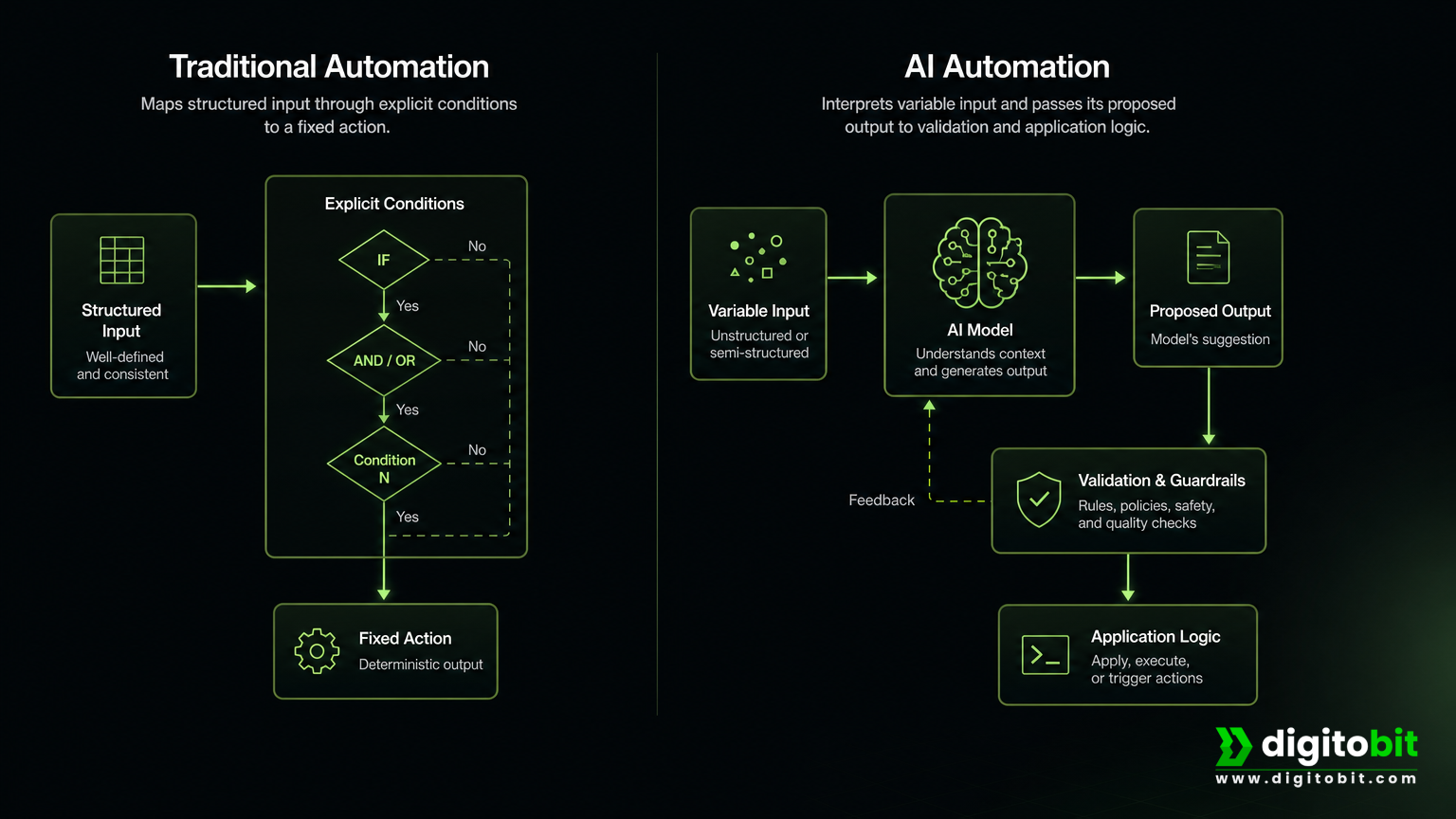
- Traditional automation follows explicit conditions written by developers or configured by process owners.
- AI automation estimates meaning, categorises information, or generates content based on patterns learned from data.
A traditional workflow can usually answer, “Which rule matched?” An AI workflow may instead answer, “What interpretation did the model produce, and how did the application validate it?”
This does not make AI less useful. It means the architecture must account for uncertainty. AI output should generally be represented as a proposed classification, extraction, summary, or draft. Backend code then decides whether that output is complete and acceptable for the next step.
Practical comparison
| Area | Traditional automation | AI automation | Hybrid approach |
|---|---|---|---|
| Flexibility | Limited to programmed cases and known data structures. | Handles varied language, documents, and less structured inputs. | AI interprets variation while application code controls execution. |
| Predictability | Highly predictable when inputs and rules are defined. | Variable and context-dependent. | Predictable business outcomes with narrowly scoped AI steps. |
| Accuracy controls | Schemas, validation, tests, and deterministic calculations. | Prompts, grounding, evaluations, schemas, confidence checks, and review. | AI output is validated against enforceable business rules. |
| Complexity | Workflow, integration, data, and failure-path complexity. | All of those plus model, prompt, privacy, evaluation, and monitoring concerns. | Higher initial design effort, but clearer separation of responsibilities. |
| Operating costs | Infrastructure, maintenance, workers, and platform or API charges. | Traditional costs plus model usage, retries, latency, and monitoring. | AI costs are limited to steps where interpretation creates value. |
| Implementation | Define states, rules, schemas, permissions, integrations, and recovery paths. | Also select models, create prompts or tools, prepare test data, and define evaluations. | Expose narrowly scoped AI services behind stable application interfaces. |
| Maintenance | Rule and integration changes are usually explicit and testable. | Prompts, model versions, source data, and output behaviour may change. | Stable domain rules remain independent from replaceable AI components. |
| Suitable use cases | Payments, inventory, approvals, calculations, exports, and synchronisation. | Classification, extraction, summarisation, drafting, translation, and semantic search. | Support triage, document intake, CRM enrichment, and knowledge workflows. |
Examples across common business processes
Customer enquiries
Traditional automation works well when enquiries arrive through a structured form. A selected department, product code, priority, and customer type can determine routing through ordinary conditions.
AI becomes useful when customers write free-form messages. A model can classify intent, identify urgency, extract a reference number, summarise the issue, and suggest a response. The application should still verify the reference number, check that the category is permitted, and route the case using conventional rules.
Document processing
Rules-based automation is reliable for known CSV, XML, or JSON formats. Fixed columns can be mapped directly to database fields and validated before import.
Invoices, contracts, email attachments, and PDFs often have variable layouts. AI can extract fields from these sources, but extracted values should be checked for types, ranges, required fields, totals, supplier identity, and other domain constraints. Exceptions should go to a person rather than being silently accepted.
Data entry
Direct field mapping is preferable when source data is already structured. AI adds value when staff would otherwise read natural-language messages or inconsistent documents and manually enter the information.
A sensible design stores both the original source and the derived fields. This makes it possible to review, correct, and reprocess an extraction without losing the evidence behind it.
Reporting
Scheduled SQL queries, aggregation, calculations, dashboard refreshes, and exports should generally remain deterministic. These tasks need consistent numbers and reproducible results.
AI can add a presentation layer by summarising verified metrics, explaining changes, or drafting a narrative for management. The model should not be the source of financial totals. Those should come from the reporting database or approved system of record.
Content production
Templates and database-driven publishing are appropriate when formatting and wording must remain consistent. AI can assist with product descriptions, email variations, summaries, metadata, and initial drafts.
Editorial review remains important for brand voice, factual accuracy, legal claims, accessibility, and policy compliance. Digitobit’s Content Automation development project is an example of combining structured application development, MySQL research storage, and OpenAI API integration. It should be understood as an AI-assisted content application example, not as a completed production-scale autonomous automation platform.
E-commerce
Conventional automation should control stock levels, prices, tax logic, payments, refunds, order states, and fulfilment events. These operations are consequential and should be auditable.
AI can classify support requests, enrich product information, generate merchandising copy, recommend related products, or help staff search a catalogue. Any suggested action that changes inventory, price, payment, or customer records should pass through normal authorization and validation.
Internal workflows
Leave approvals, payroll calculations, access permissions, compliance checks, and SLA timers are usually better handled by explicit rules. The consequences of an incorrect interpretation can be significant.
AI can interpret an employee’s request, search approved internal knowledge, summarise a case history, or draft a response for an HR or operations professional.
A realistic hybrid workflow: automating customer enquiries
Consider a business that receives customer enquiries through a website form and email. The objective is to reduce manual triage without allowing a model to make unrestricted changes to the CRM.
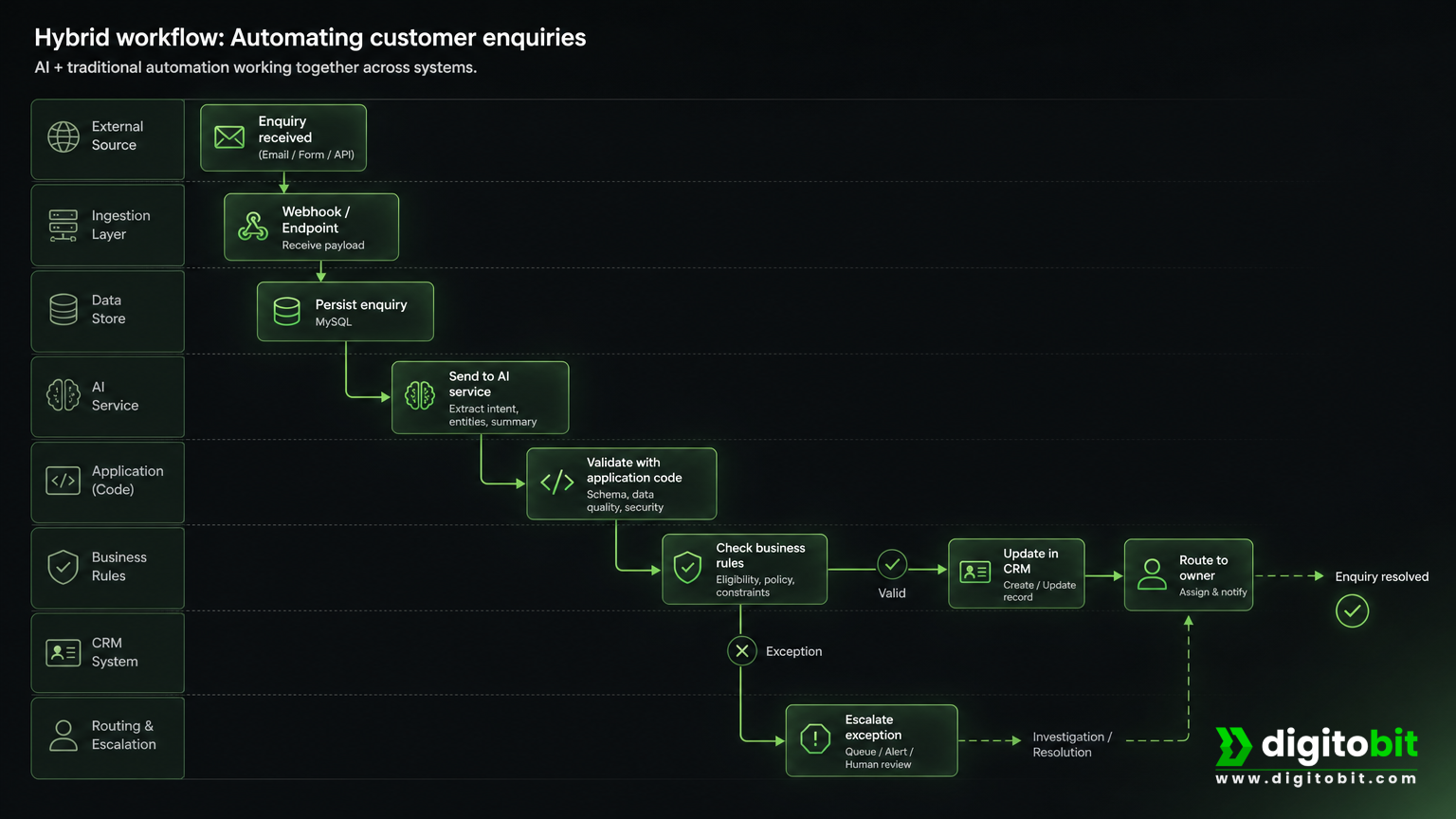
- Receive the event: a website request or email creates an enquiry event. A webhook or application endpoint receives it.
- Persist the source: backend code stores the original message, sender details, timestamp, and processing status in MySQL.
- Call the AI service: the application asks a model to classify intent and extract fields such as order number, product, urgency, and requested action using a defined output schema.
- Validate the result: application code checks required fields, permitted categories, identifier formats, confidence or review thresholds, and consistency with existing records.
- Apply business rules: the system checks customer status, support queues, working hours, language coverage, and escalation policies.
- Update the CRM: a REST API creates or updates the CRM record. The CRM, not the model context, remains the system of record.
- Assign ownership: deterministic routing assigns the case to an appropriate employee or queue.
- Handle exceptions: missing data, conflicting fields, low-confidence classifications, failed API calls, or high-impact requests enter a human-review queue.
- Record an audit trail: the system stores processing status, model and prompt metadata, validation results, API responses, retries, and review decisions.
In this design, AI handles interpretation. Conventional software controls persistence, authorization, routing, state transitions, and irreversible actions. The result is more flexible than a purely rules-based workflow without making the model responsible for the entire process.
Technical implementation with Digitobit’s software stack
AI-powered workflows still require ordinary software engineering. Models do not replace databases, APIs, access controls, queues, or domain logic.
PHP, CodeIgniter, and Laravel
PHP applications built with CodeIgniter or Laravel can receive webhooks, validate requests, call external APIs, manage CRM integrations, and persist workflow state. CodeIgniter can provide controllers and request handling for integration endpoints. Laravel offers useful patterns for scheduled jobs, queues, retries, delayed dispatch, HTTP clients, and background processing.
Slow model calls should generally be isolated from user-facing requests. A Laravel queue can accept an enquiry, return a tracking response, and process the AI step asynchronously. Job records should include an idempotency key so retries do not create duplicate CRM records.
Node.js and Java/Spring Boot
Node.js is well suited to event-driven integrations, webhook consumers, streaming responses, and lightweight workers. Java and Spring Boot are useful for strongly typed enterprise services, security controls, scheduled processes, and integration-heavy systems.
Regardless of language, the service should place an explicit interface around the AI capability. For example, an application may expose an internal operation called classifyEnquiry that returns a validated domain object. Other components do not need to know the prompt format or model provider.
MySQL and REST APIs
MySQL can store source messages, normalized fields, validation status, review decisions, retry state, audit events, and model metadata. Original inputs should be kept separately from derived AI fields so corrected outputs can be compared or regenerated.
REST APIs connect the workflow to CRMs, ERPs, help desks, payment services, and internal applications. AI models may use function or tool calling to describe a requested operation, but the application should execute and authorize the function. A model should not receive unrestricted database credentials or direct authority to change business records.
Structured output formats can improve type consistency by requiring a JSON Schema. However, a schema only confirms that a response has the expected shape; it does not prove that an extracted order number or date is correct. Values still require business validation. The relevant structured output guidance makes this distinction important.
Limitations and risks of AI automation
Incorrect or incomplete outputs
AI can misclassify an enquiry, invent a detail, omit a field, or misread ambiguous language. Validation, source grounding, representative testing, and human review are necessary for consequential workflows.
Variability
Model output can change with wording, context, model versions, prompts, and provider behaviour. Applications should not depend on exact prose. They should evaluate bounded outputs and enforce domain rules.
Latency and availability
An AI call may be slower than a local conditional check and can be affected by provider rate limits or outages. Use timeouts, retries with backoff, fallback states, provider-failure handling, and asynchronous queues where appropriate. Workflow systems commonly provide retry and catch mechanisms for this purpose, as illustrated by AWS workflow error-handling guidance.
Usage costs
AI introduces model usage charges in addition to normal infrastructure, maintenance, integration, and monitoring costs. Cost depends on volume, input size, output size, model selection, retries, and evaluation activity. A sound business case should measure cost per completed task and downstream exception handling rather than assuming AI is always cheaper.
Privacy and security
Customer, employee, financial, health, and proprietary data should not be sent to an AI provider without reviewing data-processing terms, retention settings, access controls, and data-minimisation requirements. Applications should use least-privilege credentials, scoped tools, secrets management, and audit logs.
Untrusted instructions can also be embedded in emails, webpages, uploaded documents, or CRM notes. The OWASP guidance for LLM applications highlights prompt injection, insecure output handling, sensitive information disclosure, excessive agency, and overreliance as important risks.
These concerns align with NIST’s AI risk guidance, which includes validity, reliability, safety, security, resilience, accountability, transparency, explainability, privacy, and fairness among relevant trustworthiness characteristics. Human intervention may be required when the system cannot detect or correct an error.
Common mistakes to avoid
- Using AI for deterministic calculations: tax, payment, inventory, payroll, reconciliation, and permission logic should remain enforceable in code.
- Allowing unrestricted agency: never let a model directly approve refunds, change permissions, or write arbitrary database records without authorization and validation.
- Confusing structure with correctness: valid JSON can still contain incorrect values.
- Ignoring failure paths: implement timeouts, retries, idempotency, dead-letter handling, alerts, and manual escalation.
- Testing only ideal examples: include ambiguous, incomplete, multilingual, adversarial, and malformed inputs in evaluations.
- Measuring only model quality: track routing errors, duplicate records, unresolved exceptions, latency, cost per task, and downstream business impact.
- Confusing automation categories: AI versus traditional automation describes the processing approach. It is different from custom-built versus off-the-shelf automation, which concerns how a solution is delivered and owned.
How to choose the right approach
Classify each process step before selecting technology. Is it deterministic, interpretive, generative, or consequential?
Choose traditional automation when:
- Inputs are structured and stable.
- Rules and calculations are explicit.
- Identical outputs and strong auditability are required.
- The task involves permissions, payments, inventory, tax, or other consequential actions.
- Low latency and predictable operating behaviour matter more than language flexibility.
Choose AI automation when:
- Inputs are natural language, documents, or other variable formats.
- The task involves classification, extraction, summarisation, translation, search, or drafting.
- Human staff currently spend significant time interpreting information.
- The output can be reviewed, validated, or safely bounded.
Choose a hybrid approach when:
- AI can reduce manual interpretation but the business still needs controlled execution.
- The workflow must update a CRM, ERP, database, or other authoritative system.
- Low-confidence and high-impact cases can be escalated.
- The organisation wants to replace or improve the AI component without rewriting core business rules.
Before implementation, assess task frequency, input quality, error cost, data sensitivity, latency, integration availability, reliability requirements, and expected return on investment. Begin with a narrowly defined workflow and measurable outcomes such as field-level extraction accuracy, classification errors, escalation rate, processing time, cost per task, and downstream corrections.
Final perspective
AI automation vs traditional automation is best understood as interpretation versus enforcement. Traditional automation determines what to do through explicit rules. AI helps software understand varied information and produce useful suggestions or drafts.
Reliable business systems usually use both: AI where language or ambiguity creates genuine value, and conventional application logic for validation, authorization, calculations, persistence, routing, audit trails, and irreversible actions.
Digitobit can help evaluate and implement this architecture through AI & Business Automation Solutions, AI integration with existing business software, business automation development, and API development and integration. Contact Digitobit to identify where AI adds measurable value and where dependable rules-based automation remains the better engineering choice.

Author: Neeraj Mourya
Founder, Systems Architect – Digitobit
Specializing in scalable backend architecture and performance-focused SaaS systems