
Table of Contents
- 1. Introduction
- 2. What Determines Website Development Cost?
- 2.1 Type of Website
- 2.2 Number of Pages and Content
- 2.3 Custom Design and User Experience
- 2.4 Custom Features and Functionality
- 2.5 Third-Party Integrations
- 2.6 Content Management System (CMS)
- 2.7 Performance and Scalability
- 2.8 Security Requirements
- 2.9 Search Engine Optimization (SEO)
- 2.10 Ongoing Maintenance and Support
- 3. Website Cost by Business Type
- 4. Website Cost Breakdown
- 4.1 Planning and Requirement Analysis
- 4.2 UI/UX Design
- 4.3 Frontend Development
- 4.4 Backend Development
- 4.5 Database Design
- 4.6 Third-Party Integrations
- 4.7 Testing and Quality Assurance
- 4.8 Deployment and Launch
- 4.9 Documentation and Training
- 4.10 Ongoing Maintenance and Support
- Sample Website Development Budget Allocation
- 5. Static vs Dynamic Website Cost
- 6. WordPress vs Custom Website Development Cost
- 7. Hidden Website Costs Most Companies Ignore
- 7.1 Domain Name Renewal
- 7.2 Website Hosting
- 7.3 SSL Certificates
- 7.4 Website Maintenance
- 7.5 Security Monitoring
- 7.6 Backup and Disaster Recovery
- 7.7 Content Updates
- 7.8 Search Engine Optimization (SEO)
- 7.9 Third-Party Services
- 7.10 Feature Enhancements
- Total Cost of Ownership (TCO)
- Budgeting Beyond Launch
- Key Takeaway
- 8. Why Cheap Websites Become Expensive Later
- 8.1 Poor Planning Leads to Expensive Changes
- 8.2 Technical Debt Increases Maintenance Costs
- 8.3 Limited Scalability
- 8.4 Performance Problems Affect Business
- 8.5 Security Vulnerabilities
- 8.6 Plugin and Theme Dependency
- 8.7 SEO Limitations
- 8.8 Lack of Documentation
- 8.9 Complete Rebuilds Cost More Than Building Correctly
- Think Beyond the Initial Quote
- The Cost of a Cheap Website
- Key Takeaway
- 9. How to Reduce Website Development Cost Without Sacrificing Quality
- 9.1 Clearly Define Your Requirements
- 9.2 Start with a Minimum Viable Product (MVP)
- 9.3 Prioritize Features Based on Business Value
- 9.4 Reuse Proven Solutions Where Appropriate
- 9.5 Invest in Scalable Architecture
- 9.6 Prepare Content Before Development Begins
- 9.7 Choose the Right Technology
- 9.8 Plan for Maintenance from the Beginning
- 9.9 Choose a Development Partner, Not Just the Lowest Bidder
- 9.10 Think in Terms of Return on Investment (ROI)
- Common Mistakes That Increase Costs
- Key Takeaway
- 10. Questions to Ask Before Hiring a Website Development Company
- 10.1 Who Will Own the Website and Source Code?
- 10.2 What Technology Will Be Used?
- 10.3 What Features Are Included in the Quotation?
- 10.4 Is the Website Mobile Responsive?
- 10.5 What Security Measures Are Included?
- 10.6 Is Technical SEO Included?
- 10.7 What Happens After the Website Launches?
- 10.8 Can the Website Scale as My Business Grows?
- 10.9 What Is the Development Process?
- 10.10 Can You Show Similar Projects?
- Quick Evaluation Checklist
- Final Thoughts
- Conclusion
- Frequently Asked Questions (FAQ)
- 1. How much does website development cost in India?
- 2. Why do website development prices vary so much?
- 3. Is WordPress cheaper than custom website development?
- 4. What is included in website development?
- 5. What are the ongoing costs after launching a website?
- 6. How long does it take to build a website?
- 7. Can I upgrade my website later?
- 8. Should I choose the cheapest website development company?
- 9. Is website maintenance really necessary?
- 10. How can I reduce website development costs?
1. Introduction
If you’ve ever requested quotes for a new website, you’ve probably noticed a huge difference in pricing. One company might offer to build a website for ₹15,000, while another quotes ₹2 lakh or more for what appears to be the same project. This often leaves business owners wondering why website development costs vary so much and whether paying more actually delivers better value.
The truth is that there is no single price for website development. The cost depends on several factors, including the type of website, the number of pages, design complexity, custom functionality, integrations, security requirements, performance expectations, and long-term maintenance. A simple informational website requires a very different level of planning and engineering than an eCommerce store, a customer portal, or a SaaS platform.
Another common misconception is that a website is a one-time expense. While development is a significant investment, businesses should also consider ongoing costs such as hosting, domain renewal, security updates, backups, maintenance, content updates, and search engine optimization. Ignoring these recurring costs can lead to unexpected expenses later.
In this comprehensive guide, we’ll break down everything that influences website development costs in 2026. You’ll learn how different types of websites are priced, what features increase development effort, the hidden costs many businesses overlook, and how to choose the right solution for your budget without compromising quality. Whether you’re launching your first business website or planning a large custom web application, this guide will help you make an informed investment.
2. What Determines Website Development Cost?
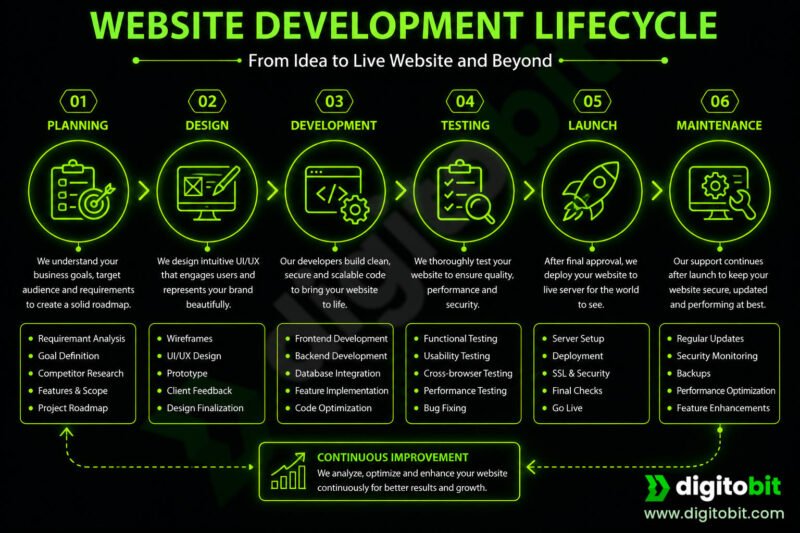
The cost of website development is influenced by much more than the number of pages or the visual design. Every business has unique requirements, and each additional feature increases the planning, development, testing, and maintenance effort. Understanding these factors will help you evaluate quotations more accurately and choose a solution that fits your business goals.
2.1 Type of Website
The type of website is the biggest factor affecting development cost. A simple brochure website that showcases your company requires significantly less effort than an eCommerce platform or a custom business application.
For example, a portfolio website may only require a few informational pages, whereas an online store needs product management, payment gateways, inventory tracking, order processing, and customer accounts. Likewise, a SaaS platform demands user authentication, subscription management, dashboards, APIs, and robust security measures.
As the complexity of the website increases, so do the development time, infrastructure requirements, and overall cost.
2.2 Number of Pages and Content
Although modern websites often use reusable layouts, the amount of content still impacts development costs. Each page requires planning, formatting, optimization, and quality assurance.
A website with 10 pages can typically be completed much faster than one containing hundreds of service pages, blogs, product listings, or knowledge base articles. Businesses should also consider the time required to create or migrate content, optimize images, and structure information for search engines.
2.3 Custom Design and User Experience
Template-based websites are generally more affordable because much of the design work has already been completed. Custom-designed websites, however, require user research, wireframing, interface design, responsive layouts, web accessibility standards, and brand consistency.
A professionally designed interface not only enhances visual appeal but also improves usability, customer engagement, and conversion rates. Investing in good user experience often delivers long-term business value.
2.4 Custom Features and Functionality
Every custom feature adds development effort. Common examples include:
- User registration and login
- Customer dashboards
- Appointment booking systems
- Online quotation forms
- Membership portals
- Multi-language support
- Document management
- Real-time notifications
- Reporting dashboards
- Role-based access control
The more unique the business requirements, the more engineering effort is required to build, test, and maintain these features.
2.5 Third-Party Integrations
Modern websites rarely operate in isolation. Many businesses need integrations with external services such as:
- Payment gateways
- CRM systems
- ERP software
- Accounting platforms
- Shipping providers
- SMS gateways
- Email marketing tools
- Google Maps
- Analytics platforms
- Social media services
Each integration requires development, testing, error handling, and ongoing maintenance, contributing to the overall project cost.
2.6 Content Management System (CMS)
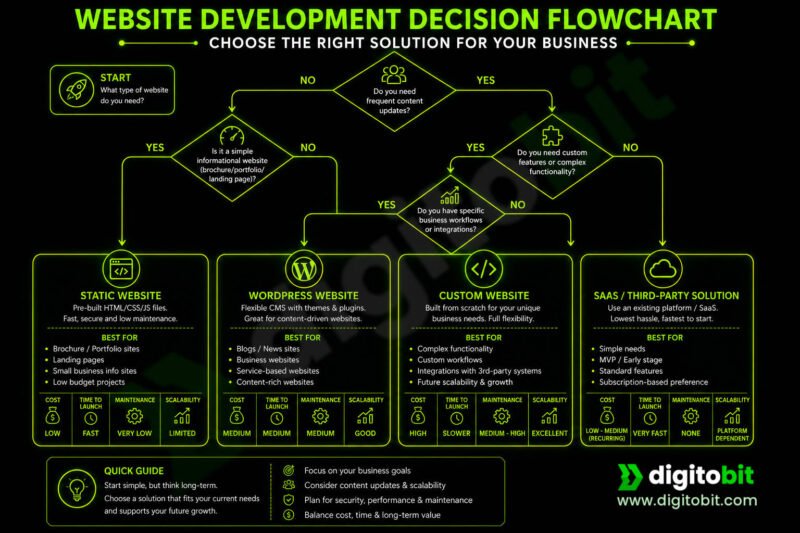
Choosing the right content management system also affects pricing. Platforms like WordPress allow businesses to launch content-driven websites quickly using existing functionality, reducing initial development costs.
On the other hand, businesses with highly specific workflows or performance requirements may benefit from a custom-built CMS or web application. While custom development requires a higher initial investment, it offers greater flexibility, scalability, and control over future enhancements.
2.7 Performance and Scalability
Many businesses focus only on launch costs without considering future growth. A website designed for a few hundred monthly visitors has very different requirements from one expected to serve thousands of concurrent users.
Performance optimization may include efficient database design, caching strategies, image optimization, content delivery networks (CDNs), lazy loading, code optimization, and scalable server architecture. For user-facing performance, Core Web Vitals provide standardized metrics covering loading performance, interactivity, and visual stability.These improvements require additional engineering effort but help ensure fast loading times and a better user experience as traffic grows.
2.8 Security Requirements
Security has become an essential part of website development rather than an optional feature. Depending on the nature of your business, security measures may include:
- SSL encryption
- Secure authentication
- Multi-factor authentication
- Data encryption
- Firewall configuration
- Protection against common web attacks
- Secure backups
- Audit logging
- Compliance with industry regulations
Many of these risks are covered by the OWASP Top 10, a widely used awareness framework for common web application security risks.
Websites handling customer accounts, payments, or sensitive information typically require more comprehensive security measures, increasing development complexity and cost.
2.9 Search Engine Optimization (SEO)
A website that cannot be found on search engines misses valuable business opportunities. Modern website development often includes technical SEO practices such as clean URL structures, optimized metadata, structured data, XML sitemaps, mobile responsiveness, fast page loading, and proper heading hierarchy.
While SEO is an ongoing process, implementing a strong technical foundation during development reduces future optimization costs.
2.10 Ongoing Maintenance and Support
Website development does not end after launch. Regular maintenance is essential to keep the website secure, reliable, and compatible with evolving technologies.
Typical maintenance activities include software updates, security patches, backups, bug fixes, performance monitoring, content updates, feature enhancements, and technical support. Planning for these recurring costs helps businesses avoid unexpected expenses and ensures the website continues to perform effectively over time.
3. Website Cost by Business Type
One of the most common questions businesses ask is, “How much does a website cost?“ The answer depends largely on the type of website you need and the business problems it is intended to solve. A simple informational website requires far less planning and development than an eCommerce platform, customer portal, or enterprise web application.
The following pricing ranges are approximate estimates for professionally developed websites in India as of 2026. Actual costs vary based on project scope, technology stack, custom features, integrations, content availability, and long-term support requirements.
Note: The figures below are indicative and intended to help businesses understand typical investment ranges rather than fixed pricing.
3.1 Portfolio or Personal Website
Estimated Cost: ₹15,000 – ₹50,000
Ideal for freelancers, consultants, artists, photographers, and professionals looking to showcase their work or personal brand.
Typical features include:
- Home page
- About page
- Portfolio or gallery
- Services
- Contact form
- Mobile-responsive design
- Basic SEO setup
- Social media integration
Since these websites focus primarily on presenting information, they are generally the most affordable type of website.
3.2 Small Business Website
Estimated Cost: ₹40,000 – ₹1,50,000
Suitable for local businesses, clinics, educational institutes, agencies, restaurants, and service providers.
Typical features include:
- Custom homepage
- Service pages
- About company
- Contact forms
- Google Maps integration
- Testimonials
- Blog or news section
- Image galleries
- Basic CMS
- Technical SEO
- Performance optimization
Many businesses begin with this type of website and gradually expand functionality as their business grows.
3.3 Corporate Website
Estimated Cost: ₹1,50,000 – ₹5,00,000+
Corporate websites typically require a higher level of planning, branding, security, and content organization.
Common features include:
- Multiple departments or business units
- Investor or media sections
- Career portal
- Advanced content management
- Document downloads
- Multi-language support
- Team management
- Custom enquiry workflows
- Analytics integration
- Enterprise security
These websites often involve collaboration between designers, developers, content teams, and marketing departments.
3.4 eCommerce Website
Estimated Cost: ₹1,00,000 – ₹8,00,000+
An online store requires significantly more engineering than a standard business website because it must manage products, customers, orders, and payments securely.
Typical functionality includes:
- Product catalogue
- Categories and filters
- Shopping cart
- Secure checkout
- Payment gateway integration
- Shipping calculations
- Coupon management
- Customer accounts
- Inventory management
- Order tracking
- Invoice generation
- Product reviews
Large stores with thousands of products or advanced business workflows may require custom development and additional infrastructure.
3.5 Educational Website or Learning Platform
Estimated Cost: ₹2,00,000 – ₹10,00,000+
Educational platforms often combine content management with interactive learning features.
Common functionality includes:
- Student registration
- Course management
- Video lessons
- Online assessments
- Progress tracking
- Certificates
- Teacher dashboards
- Discussion forums
- Live classes
- Payment integration
The complexity increases significantly when supporting large numbers of students or live learning environments.
3.6 Healthcare Website
Estimated Cost: ₹75,000 – ₹5,00,000+
Healthcare providers often require more than a standard business website. Depending on the services offered, features may include:
- Doctor profiles
- Appointment booking
- Online consultation requests
- Department information
- Patient enquiry forms
- Health blogs
- Hospital management integrations
- Secure patient portals
Projects involving sensitive patient information require stronger security and regulatory compliance, which can increase development costs.
3.7 Membership or Subscription Website
Estimated Cost: ₹2,00,000 – ₹8,00,000+
Membership platforms control access to premium content, services, or communities.
Typical features include:
- User registration
- Subscription plans
- Secure login
- Role-based permissions
- Member dashboards
- Payment subscriptions
- Content restrictions
- Renewal management
- Notifications
These websites require careful planning for authentication, authorization, and recurring billing.
3.8 SaaS or Custom Web Application
Estimated Cost: ₹5,00,000 – ₹50,00,000+
Software-as-a-Service (SaaS) platforms are fundamentally different from traditional websites. They function as full-scale software products and often require months of development.
Typical functionality includes:
- User authentication
- Multi-tenant architecture
- Role-based access control
- Subscription management
- Dashboards
- APIs
- Reporting
- Workflow automation
- Notifications
- File management
- Third-party integrations
- Scalable cloud infrastructure
The final investment depends on the complexity of business logic, expected user base, and long-term scalability requirements.
Choosing the Right Investment
Rather than asking, “What is the cheapest website I can build?”, businesses should ask, “What type of website best supports my business goals?”
A well-designed website should not only look professional but also improve customer experience, generate leads, automate business processes, and support future growth. Investing in the right solution from the beginning often reduces maintenance costs, avoids expensive rebuilds, and provides a better return on investment over time.
4. Website Cost Breakdown
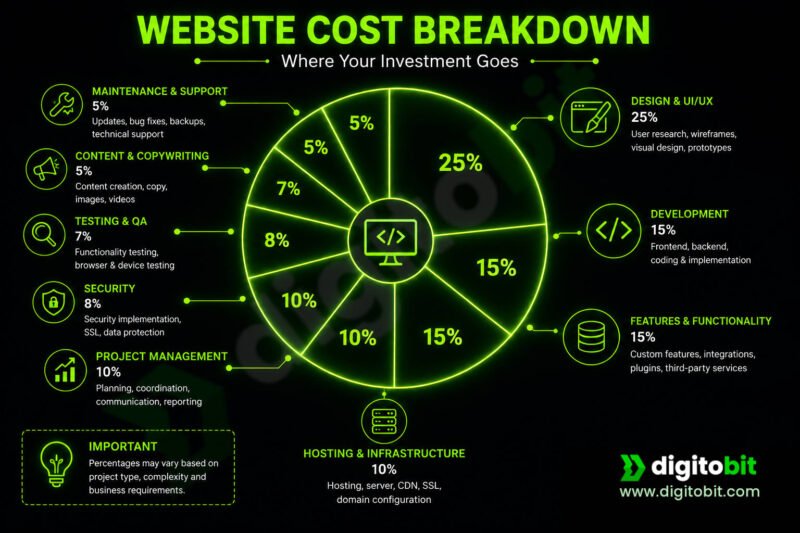
When businesses receive a website development quotation, they often see a single figure without understanding what goes into it. In reality, website development consists of multiple phases, each requiring different skills, tools, and expertise. A transparent cost breakdown helps businesses understand where their investment is going and why seemingly similar websites can have very different price tags.
4.1 Planning and Requirement Analysis
Typical Cost: 5–10% of the project budget
Every successful website begins with proper planning. Before any design or coding starts, developers work with stakeholders to understand business goals, target users, required features, content structure, and technical constraints.
This phase typically includes:
- Requirement gathering
- Competitor analysis
- Feature prioritization
- Sitemap creation
- Technical planning
- Project estimation
Skipping this stage often leads to scope changes, delays, and higher development costs later.
4.2 UI/UX Design
Typical Cost: 15–25% of the project budget
Design is much more than choosing colors and fonts. A well-designed website improves usability, builds trust, and guides visitors toward taking desired actions.
The design phase may include:
- Wireframes
- User interface (UI) design
- User experience (UX) planning
- Responsive layouts
- Brand consistency
- Design revisions
- Accessibility considerations
Custom designs generally cost more than using pre-built templates but offer greater flexibility and a unique brand identity.
4.3 Frontend Development
Typical Cost: 20–30% of the project budget
Frontend development transforms the approved design into an interactive website that users see and interact with.
This includes:
- Responsive layouts
- Navigation menus
- Forms
- Animations
- Interactive components
- Cross-browser compatibility
- Mobile optimization
- Accessibility implementation
The complexity of the interface directly impacts development time and cost.
4.4 Backend Development
Typical Cost: 20–35% of the project budget
The backend powers the functionality behind the website. It processes user requests, manages business logic, stores data, and communicates with external systems.
Typical backend work includes:
- Database design
- User authentication
- Business logic
- Admin dashboard
- API development
- File management
- Security implementation
- System integrations
Web applications with complex workflows or custom business processes usually require significantly more backend development.
4.5 Database Design
Typical Cost: Included in backend or 5–10% separately
A properly designed database ensures data is stored securely, efficiently, and can scale as the business grows.
Database work includes:
- Schema design
- Relationship modelling
- Performance optimization
- Data validation
- Backup strategies
- Migration planning
Good database architecture reduces future maintenance costs and improves application performance.
4.6 Third-Party Integrations
Typical Cost: Depends on the number and complexity of integrations
Modern websites often connect with external platforms to automate business operations.
Examples include:
- Payment gateways
- CRM software
- ERP systems
- Email marketing platforms
- SMS services
- Shipping providers
- Accounting software
- Analytics tools
- Social media platforms
Each integration requires implementation, testing, and ongoing maintenance, adding to the overall project cost.
4.7 Testing and Quality Assurance
Typical Cost: 10–15% of the project budget
Before launch, the website undergoes extensive testing to ensure it functions correctly across different devices and browsers.
Testing typically covers:
- Functional testing
- Responsive testing
- Browser compatibility
- Performance testing
- Security testing
- Form validation
- Broken link checks
- User acceptance testing
Accessibility testing should also be considered during QA, with WCAG providing an established framework for evaluating accessibility.
Investing in quality assurance reduces the risk of post-launch issues and improves user satisfaction.
4.8 Deployment and Launch
Typical Cost: 2–5% of the project budget
Launching a website involves more than simply uploading files to a server.
Deployment tasks may include:
- Server configuration
- Domain setup
- SSL installation
- Database migration
- Performance optimization
- DNS configuration
- Backup setup
- Go-live verification
A carefully planned deployment minimizes downtime and ensures a smooth transition to the live environment.
4.9 Documentation and Training
Typical Cost: Optional, depending on project requirements
Many businesses require documentation to help administrators manage the website independently.
This may include:
- User manuals
- Administrator guides
- Training sessions
- Video tutorials
- Technical documentation
Comprehensive documentation can reduce future support costs and simplify onboarding for new team members.
4.10 Ongoing Maintenance and Support
Typical Cost: Usually billed monthly or annually
A website requires continuous maintenance to remain secure, fast, and compatible with changing technologies.
Maintenance services typically include:
- Security updates
- CMS or framework updates
- Bug fixes
- Regular backups
- Performance monitoring
- Content updates
- Feature enhancements
- Technical support
Businesses should treat maintenance as an ongoing operational expense rather than an optional add-on.
Sample Website Development Budget Allocation
| Development Phase | Approximate Share of Budget |
|---|---|
| Planning & Discovery | 5–10% |
| UI/UX Design | 15–25% |
| Frontend Development | 20–30% |
| Backend Development | 20–35% |
| Database Design | 5–10% |
| Integrations | Varies |
| Testing & QA | 10–15% |
| Deployment | 2–5% |
| Documentation & Training | Optional |
| Maintenance & Support | Recurring |
Important: Every project is unique. A content-focused business website may allocate more budget to design and content management, while a SaaS platform or enterprise application typically invests more in backend architecture, integrations, security, and scalability.
5. Static vs Dynamic Website Cost
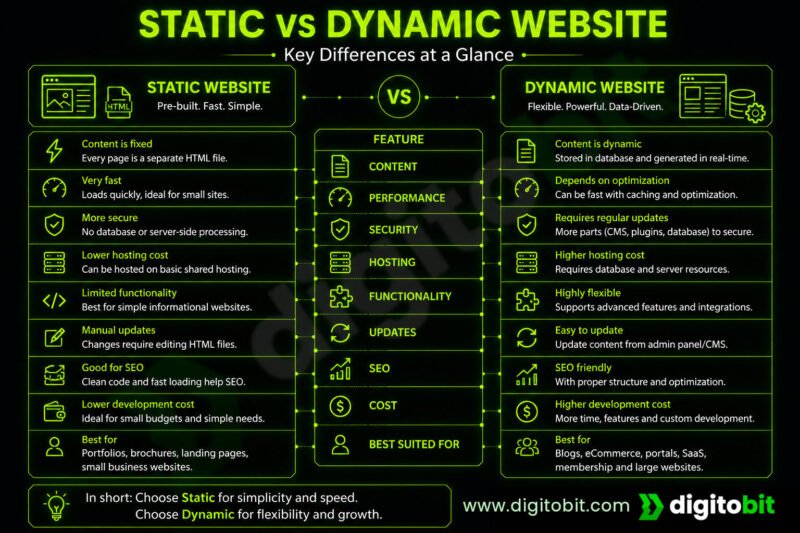
When planning a new website, one of the first technical decisions is whether to build a static website or a dynamic website. While both can look visually similar, they differ significantly in functionality, maintenance, scalability, and development cost. Choosing the right approach depends on your business objectives rather than simply selecting the cheaper option.
What Is a Static Website?
A static website consists of fixed web pages where the content remains the same unless it is manually updated by a developer. Each page is delivered exactly as it is stored on the server, making static websites lightweight, secure, and fast.
Static websites are ideal for businesses that only need to present information and do not require frequent content updates or user interaction.
Typical use cases include:
- Portfolio websites
- Company profile websites
- Landing pages
- Event websites
- Product showcase websites
- Personal websites
Since there is no database or server-side processing involved, static websites are generally quicker to develop and less expensive to host.
What Is a Dynamic Website?
A dynamic website generates content based on user requests, stored data, or business logic. Instead of serving fixed pages, it retrieves information from a database and presents it dynamically.
Most modern business websites are dynamic because they allow administrators to update content through a dashboard without modifying the website’s source code.
Dynamic websites are suitable for:
- Business websites
- Corporate portals
- Blogs
- eCommerce stores
- Educational platforms
- Healthcare portals
- Membership websites
- Customer dashboards
- SaaS applications
Although dynamic websites require more development effort, they provide far greater flexibility and can evolve as your business grows.
Cost Comparison
| Feature | Static Website | Dynamic Website |
|---|---|---|
| Initial Development Cost | Lower | Higher |
| Hosting Cost | Lower | Moderate to High |
| Content Updates | Developer Required | Admin Can Update |
| Database | Not Required | Required |
| User Login | Usually Not Available | Supported |
| Forms & Dashboards | Limited | Fully Supported |
| Scalability | Limited | Excellent |
| Maintenance | Minimal | Regular Updates Required |
| Best For | Small informational websites | Business applications and growing websites |
Advantages of a Static Website
A static website can be an excellent choice when simplicity is the priority.
Some key benefits include:
- Lower development cost
- Faster loading speeds
- Improved security due to fewer attack surfaces
- Minimal server requirements
- Lower maintenance effort
- Easy deployment
For businesses that only need an online presence without frequent updates, a static website often provides excellent value.
Advantages of a Dynamic Website
Dynamic websites are designed to support business growth and operational efficiency.
Their advantages include:
- Easy content management through an admin panel
- Customer login and user accounts
- Online booking and enquiry systems
- Product management
- Blog publishing
- Search functionality
- Business workflow automation
- API integrations
- Personalized user experiences
- Better long-term scalability
As business requirements become more complex, a dynamic website often delivers a much better return on investment despite its higher initial cost.
Which Option Is Right for Your Business?
The decision should be based on your business needs rather than your initial budget.
A static website is suitable if:
- Your content changes infrequently.
- You only need to showcase information.
- You don’t require customer accounts or online transactions.
- You want the lowest ongoing maintenance costs.
A dynamic website is a better choice if:
- You plan to update content regularly.
- You need an admin dashboard.
- Customers will interact with your website.
- You want to add new features over time.
- Your business expects to grow and scale.
Can You Start Small and Upgrade Later?
Many businesses begin with a simple website and add features as they grow. However, this is only practical if the website is built with future expansion in mind. Poorly planned or overly simplistic solutions may require a complete rebuild when new functionality is needed.
Choosing a scalable architecture from the beginning—even if you launch with a limited feature set—can reduce long-term costs and make future enhancements much easier.
Key Takeaway
A static website may be the most economical option for businesses that only need a professional online presence. However, if your website is expected to generate leads, manage customers, process transactions, or support business operations, investing in a dynamic website is usually the better long-term decision.
The goal is not to choose the cheapest solution, but the one that best supports your business today while allowing room for future growth.
6. WordPress vs Custom Website Development Cost
One of the biggest decisions businesses face is whether to build their website using WordPress or invest in custom website development. Both approaches have their advantages, and the right choice depends on your business requirements, budget, growth plans, and long-term goals.
WordPress powers millions of websites worldwide and is an excellent choice for many content-driven websites. However, businesses with unique workflows, high scalability requirements, or complex integrations may benefit more from a custom-built solution.
Instead of asking “Which is better?”, the more useful question is “Which is better for my business?”
What Is WordPress?
WordPress is a popular Content Management System (CMS) that allows businesses to create and manage websites using themes and plugins. It offers a large ecosystem of extensions, making it possible to launch websites quickly without developing every feature from scratch.
WordPress is particularly well suited for:
- Company websites
- Blogs
- News portals
- Portfolio websites
- Small business websites
- Basic eCommerce stores
- Educational websites
- Landing pages
Its popularity means businesses can find developers easily and benefit from a wide range of ready-made solutions.
What Is Custom Website Development?
Custom website development involves building the website specifically for your business requirements using frameworks and programming languages such as PHP, Java, Node.js, Python, or .NET.
Instead of adapting your business to fit existing plugins or templates, a custom website is designed around your business processes.
Custom development is commonly used for:
- SaaS platforms
- Enterprise applications
- Customer portals
- Healthcare systems
- ERP and CRM solutions
- Booking platforms
- Marketplaces
- Membership systems
- Business automation platforms
Although the initial investment is higher, custom solutions provide complete control over functionality, architecture, and future expansion.
Cost Comparison
| Aspect | WordPress | Custom Development |
|---|---|---|
| Initial Development Cost | Lower | Higher |
| Development Time | Faster | Longer |
| Theme Availability | Thousands Available | Designed Specifically for Your Business |
| Plugins | Extensive Ecosystem | Built Only as Needed |
| Flexibility | Moderate | Unlimited |
| Performance | Good when optimized | Can be Fully Optimized |
| Security | Depends on plugins and maintenance | Fully controlled by development team |
| Scalability | Suitable for many businesses | Ideal for complex and high-growth applications |
| Long-term Customization | May become difficult | Easier to extend with proper architecture |
| Ownership | Depends on theme/plugin ecosystem | Full ownership of the application |
When WordPress Is the Right Choice
WordPress is often the best option when:
- You need a business website quickly.
- Your website is primarily content-driven.
- Your budget is limited.
- You require standard features such as blogs, galleries, or contact forms.
- You want non-technical staff to update content easily.
For many small and medium-sized businesses, WordPress offers an excellent balance between cost, functionality, and ease of use.
When Custom Development Makes More Sense
Custom development becomes the better investment when your website is expected to support business operations rather than simply display information.
Examples include:
- Complex business workflows
- Customer dashboards
- Subscription management
- Multi-tenant applications
- Advanced reporting
- Role-based access control
- API-first architecture
- Integration with internal business systems
- High-performance applications
- Large-scale SaaS products
In these cases, custom development avoids the limitations that can arise when trying to adapt generic plugins to highly specific requirements.
The Hidden Cost of Excessive Plugin Dependency
One of WordPress’s greatest strengths is its extensive plugin ecosystem. However, relying on too many plugins can introduce challenges over time.
Potential issues include:
- Plugin conflicts
- Compatibility problems after updates
- Performance degradation
- Increased security risks
- Vendor lock-in
- Difficult troubleshooting
- Dependency on third-party developers
This doesn’t mean plugins should be avoided. Well-maintained, reputable plugins can significantly reduce development time. The key is to use them judiciously and avoid unnecessary dependencies.
Maintenance Considerations
Both WordPress and custom websites require ongoing maintenance, though the nature of that maintenance differs.
For WordPress, maintenance typically involves:
- Core updates
- Theme updates
- Plugin updates
- Security monitoring
- Backups
- Compatibility testing
WordPress recommends keeping plugins and themes updated to maintain site security.
For custom websites, maintenance may include:
- Framework updates
- Security patches
- Feature enhancements
- Performance optimization
- Infrastructure monitoring
- Dependency updates
Regular maintenance is essential regardless of the technology used.
Which Option Offers Better Long-Term Value?
There is no universal answer. The best choice depends on what you expect your website to achieve.
Choose WordPress if your primary goal is to publish content, promote your business, and manage a standard website with a reasonable budget.
Choose custom development if your website is expected to become a core business platform that supports customers, employees, or business operations with unique functionality and room for future growth.
The focus should not be on selecting the most popular technology but on choosing the solution that aligns with your business objectives and can continue to serve your needs as your organization evolves.
Key Takeaway
WordPress and custom development are not competitors—they solve different problems. WordPress is an excellent solution for many businesses because it enables rapid development and straightforward content management. Custom development, on the other hand, provides the flexibility and scalability required for businesses with specialized requirements or long-term growth plans.
Making the right choice at the beginning can reduce future redevelopment costs and ensure your website remains a valuable business asset rather than a technical limitation.
7. Hidden Website Costs Most Companies Ignore
When businesses plan a new website, they often focus only on the initial development cost. However, launching a website is just the beginning. Like any valuable business asset, a website requires ongoing investment to remain secure, reliable, fast, and effective.
Failing to account for these recurring expenses can lead to unexpected costs, security vulnerabilities, poor performance, or even complete website downtime. Understanding these hidden costs helps businesses plan realistic budgets and avoid surprises after launch.
7.1 Domain Name Renewal
A domain name is your website’s online address (for example, yourcompany.com). While registering a domain is relatively inexpensive, it must be renewed periodically—typically every year.
The renewal cost depends on:
- Domain extension (.com, .in, .org, etc.)
- Registrar
- Premium domain pricing
- Additional privacy protection services
Allowing a domain to expire can temporarily make your website and email services unavailable, so timely renewals are essential.
7.2 Website Hosting
Every website needs hosting to make it accessible on the internet. Hosting costs vary widely depending on traffic, storage requirements, performance expectations, and reliability.
Common hosting options include:
- Shared hosting
- VPS (Virtual Private Server)
- Cloud hosting
- Dedicated servers
- Managed hosting
As your business grows, you may need to upgrade your hosting environment to support increased traffic and better performance.
7.3 SSL Certificates
HTTPS protects communication between your website and its visitors by encrypting data transferred between the browser and server. Protecting sensitive information such as login credentials and payment details.
Many hosting providers include basic SSL certificates at no additional cost, while businesses requiring advanced validation or compliance may choose premium SSL certificates.
Regardless of the provider, maintaining HTTPS is no longer optional—it’s a standard expectation for both users and search engines.
7.4 Website Maintenance
Technology evolves continuously. Frameworks, plugins, libraries, browsers, and server software all receive updates that improve security, compatibility, and performance.
Regular maintenance typically includes:
- Security updates
- Software updates
- Plugin or framework upgrades
- Bug fixes
- Performance optimization
- Compatibility testing
Neglecting maintenance can eventually lead to security vulnerabilities, broken functionality, and expensive emergency repairs.
7.5 Security Monitoring
Cybersecurity is an ongoing responsibility, not a one-time setup.
Depending on the website’s complexity, businesses may need:
- Malware scanning
- Firewall protection
- Login monitoring
- Security audits
- Vulnerability assessments
- Intrusion detection
- Activity logging
Websites that process customer information or online payments should allocate a larger budget for ongoing security management.
7.6 Backup and Disaster Recovery
Unexpected events such as hardware failures, accidental deletions, software bugs, or cyberattacks can result in data loss.
A reliable backup strategy typically includes:
- Automated daily backups
- Off-site storage
- Version history
- Disaster recovery planning
- Backup verification
The cost of maintaining regular backups is usually small compared to the potential financial impact of losing critical business data.
7.7 Content Updates
A website should evolve alongside your business. Over time, you’ll likely need to:
- Add new services
- Update pricing
- Publish blog articles
- Replace images
- Refresh branding
- Create landing pages
- Update legal documents
Businesses that rarely update their websites often appear outdated, which can affect customer trust and search engine visibility.
7.8 Search Engine Optimization (SEO)
Many businesses assume SEO is included with website development. In reality, website development usually covers technical SEO, while improving search rankings requires continuous effort.
Ongoing SEO activities may include:
- Keyword research
- Content creation
- Internal linking
- Technical audits
- Performance improvements
- Link building
- Competitor analysis
- Search performance monitoring
Without continuous optimization, even a well-designed website may struggle to attract organic traffic.
7.9 Third-Party Services
Modern websites often rely on external services that charge monthly or annual subscription fees.
Examples include:
- Email marketing platforms
- CRM systems
- Payment gateways
- SMS services
- Live chat software
- Analytics platforms
- Appointment booking tools
- Customer support systems
- Cloud storage
- AI-powered features
These recurring subscriptions should be considered when estimating the total cost of ownership.
7.10 Feature Enhancements
Business requirements rarely remain unchanged after launch.
As your company grows, you may wish to add features such as:
- Online payments
- Customer dashboards
- Mobile applications
- Reporting tools
- Multi-language support
- Advanced search
- API integrations
- Automation workflows
- Customer portals
Planning for future enhancements helps avoid major redevelopment projects later.
Total Cost of Ownership (TCO)
Instead of focusing only on the initial development cost, businesses should evaluate the Total Cost of Ownership (TCO) over the website’s expected lifespan.
A lower upfront cost does not always mean a lower overall investment. For example, a website built using low-quality code or excessive third-party dependencies may require frequent repairs, expensive upgrades, or even a complete rebuild within a few years.
Conversely, a professionally engineered website with a scalable architecture may involve a higher initial investment but often delivers lower maintenance costs, improved performance, and greater flexibility over time.
Budgeting Beyond Launch
When planning your website budget, consider allocating funds not only for development but also for ongoing operational expenses.
A typical annual website budget may include:
| Expense Category | Frequency |
|---|---|
| Domain Renewal | Annual |
| Website Hosting | Monthly or Annual |
| SSL Certificate (if applicable) | Annual |
| Maintenance & Support | Monthly |
| Security Monitoring | Monthly |
| Backups | Monthly |
| SEO Services | Monthly |
| Content Updates | As Needed |
| Third-Party Software | Monthly or Annual |
| Feature Enhancements | As Required |
Key Takeaway
The true cost of a website extends far beyond its launch date. Businesses that plan for ongoing maintenance, security, hosting, content updates, and future enhancements are better positioned to keep their websites reliable, secure, and effective for years to come.
When evaluating website development costs, consider the total cost of ownership, not just the initial quotation. A well-maintained website is more likely to deliver consistent performance, support business growth, and provide a stronger return on investment over its lifetime.
8. Why Cheap Websites Become Expensive Later
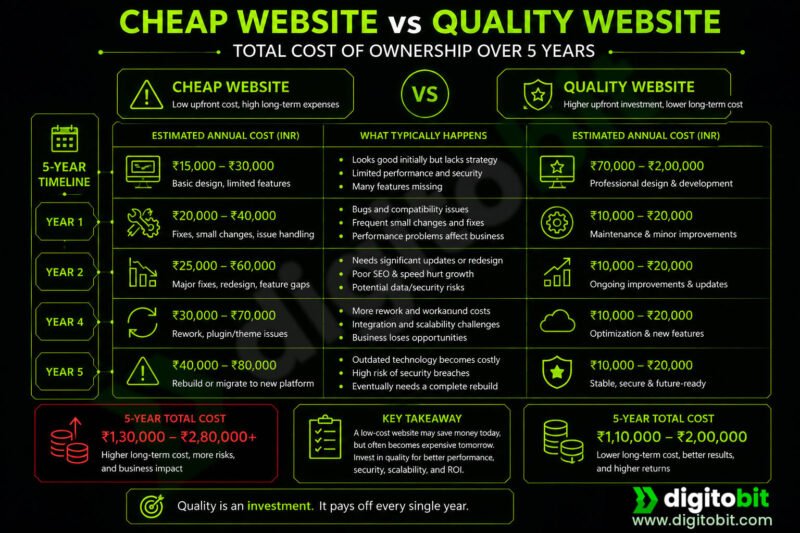
When comparing website development quotations, it’s natural to be attracted to the lowest price. After all, if two websites appear similar, why pay significantly more?
The reality is that the true cost of a website is not measured by its initial price but by its long-term value. A website built with poor planning, low-quality code, or short-term thinking often becomes far more expensive over time due to maintenance, performance issues, security risks, and costly redevelopment.
Choosing a cheaper solution is not always the wrong decision. However, understanding the trade-offs helps businesses avoid investments that ultimately cost more than building the right solution from the beginning.
8.1 Poor Planning Leads to Expensive Changes
Many low-cost projects begin without proper requirement analysis or technical planning. Development starts immediately, often without considering future business needs.
As the business grows, owners commonly request features such as:
- Customer login
- Online payments
- Appointment booking
- Mobile applications
- Reporting dashboards
- CRM integration
Unfortunately, websites that were not designed with scalability in mind may require significant restructuring—or even a complete rebuild—to support these additions.
Proper planning may increase the initial project cost slightly, but it can save substantial time and money in the future.
8.2 Technical Debt Increases Maintenance Costs
Technical debt refers to shortcuts taken during development that make future maintenance more difficult.
Examples include:
- Poorly organized code
- Duplicate functionality
- Hardcoded values
- Lack of documentation
- Inconsistent coding standards
- Ignoring best practices
Initially, these shortcuts may reduce development time. Over the years, however, every small change becomes more complicated, increasing both maintenance costs and development time.
A website should become easier to maintain as it grows—not harder.
8.3 Limited Scalability
Many inexpensive websites are designed only to meet immediate requirements.
They may work well initially but struggle when the business experiences growth, such as:
- Higher visitor traffic
- More products
- Additional employees
- Multiple business locations
- Increased customer accounts
- More complex business processes
Without a scalable architecture, businesses often face slow performance, frequent outages, or costly redevelopment when growth occurs.
Building with future expansion in mind helps protect your investment.
8.4 Performance Problems Affect Business
Website performance is no longer just a technical concern—it directly impacts user experience and business results.
Poorly optimized websites often suffer from:
- Slow page loading
- Large, unoptimized images
- Excessive scripts
- Inefficient database queries
- Poor caching
- Bloated plugins
These issues can lead to:
- Higher visitor abandonment
- Lower search engine rankings
- Reduced conversions
- Increased server costs
- Poor customer satisfaction
Optimizing performance during development is generally more cost-effective than trying to fix architectural problems later.
8.5 Security Vulnerabilities
Security is another area where low-cost projects often cut corners.
Common issues include:
- Outdated software
- Weak authentication
- Missing security headers
- Poor input validation
- Insecure file uploads
- Unpatched vulnerabilities
A security breach can result in:
- Website downtime
- Loss of customer trust
- Data breaches
- Financial losses
- Emergency recovery costs
Investing in secure development practices is considerably less expensive than recovering from a cyberattack.
8.6 Plugin and Theme Dependency
In an effort to reduce development costs, some websites rely heavily on third-party themes and plugins.
While this approach can accelerate development, excessive dependency may create long-term challenges:
- Plugin conflicts
- Compatibility issues
- Performance degradation
- Security vulnerabilities
- Vendor abandonment
- Licensing costs
A balanced approach—using reliable third-party solutions where appropriate and developing custom functionality when necessary—often provides the best long-term outcome.
8.7 SEO Limitations
A website that is difficult for search engines to crawl and understand may struggle to attract organic traffic.
Common issues include:
- Poor URL structure
- Duplicate content
- Missing metadata
- Slow loading speeds
- Mobile usability problems
- Weak internal linking
Fixing these issues after launch is often more expensive than implementing proper technical SEO during development.
8.8 Lack of Documentation
Many businesses only realize the importance of documentation when they decide to change developers.
Without documentation, new developers must spend additional time understanding:
- System architecture
- Database design
- Business logic
- Third-party integrations
- Deployment process
This increases onboarding time and maintenance costs.
Good documentation protects your investment and reduces dependence on a single developer or agency.
8.9 Complete Rebuilds Cost More Than Building Correctly
One of the most expensive outcomes is discovering that the existing website cannot support new business requirements.
Businesses may eventually decide to rebuild because:
- The technology is outdated.
- Performance cannot be improved.
- The codebase is difficult to maintain.
- Security risks are too high.
- New features cannot be integrated effectively.
A complete rebuild often costs significantly more than investing in a well-architected solution from the start.
Think Beyond the Initial Quote
When evaluating proposals, consider more than just the upfront price.
Ask questions such as:
- Can this website scale with my business?
- Is the code maintainable?
- What security measures are included?
- How easy will future updates be?
- What ongoing maintenance is expected?
- Who owns the source code?
- Will this solution still meet my needs in five years?
These questions often reveal the true value behind a development quotation.
The Cost of a Cheap Website
A website that initially saves ₹50,000 but requires a ₹5 lakh rebuild within three years is not an economical solution. Conversely, a professionally engineered website may involve a higher upfront investment while delivering years of reliable performance, easier maintenance, and lower overall ownership costs.
The objective should never be to build the cheapest website. It should be to build the right website—one that supports your business goals today while remaining adaptable for tomorrow.
Key Takeaway
Website development should be viewed as a long-term business investment rather than a one-time purchase. The lowest quotation is not always the most affordable option once maintenance, upgrades, security, and future growth are considered.
By focusing on quality architecture, clean development practices, scalability, and maintainability, businesses can significantly reduce their total cost of ownership and avoid expensive redevelopment projects in the future.
9. How to Reduce Website Development Cost Without Sacrificing Quality
Every business wants to control costs, but reducing the website development budget shouldn’t mean compromising on security, performance, or long-term maintainability. The goal is to spend wisely by focusing on features that deliver real business value while avoiding unnecessary complexity.
Here are practical strategies to reduce website development costs without sacrificing quality.
9.1 Clearly Define Your Requirements
One of the biggest reasons projects exceed their budget is changing requirements during development.
Before requesting quotations, identify:
- Business objectives
- Target audience
- Essential features
- Nice-to-have features
- Content requirements
- Third-party integrations
A clear project scope helps developers provide accurate estimates and reduces expensive change requests later.
9.2 Start with a Minimum Viable Product (MVP)
Many successful websites don’t launch with every planned feature. Instead, they begin with a Minimum Viable Product (MVP) that includes only the core functionality needed to solve the primary business problem.
For example, instead of launching with:
- Customer portal
- Mobile app
- Loyalty program
- AI chatbot
- Advanced analytics
- Multi-language support
You might begin with:
- Professional website
- Service pages
- Contact forms
- Basic CMS
- Lead generation
Additional features can be introduced as the business grows and customer feedback becomes available.
9.3 Prioritize Features Based on Business Value
Not every requested feature contributes equally to business success.
Classify features into three categories:
Essential
- Core business functionality
- Security
- Mobile responsiveness
- Contact forms
- SEO foundation
Important
- Blog
- Testimonials
- Live chat
- Appointment booking
- Analytics
Future Enhancements
- Customer dashboards
- Automation
- Mobile applications
- AI features
- Advanced reporting
This prioritization helps maximize return on investment while keeping the initial project manageable.
9.4 Reuse Proven Solutions Where Appropriate
Not every feature needs to be built from scratch.
For standard functionality such as:
- Payment gateways
- Maps
- Authentication
- Email services
- CAPTCHA
- Analytics
Using well-supported libraries or trusted third-party services can reduce development time without compromising quality.
However, core business logic that differentiates your business should generally be developed specifically for your requirements.
9.5 Invest in Scalable Architecture
Trying to save money by ignoring future growth often leads to expensive redevelopment.
A scalable architecture allows your website to evolve by adding new modules and features without requiring a complete rewrite.
Examples include:
- Modular code structure
- Well-designed database schema
- API-ready architecture
- Clean separation between frontend and backend
- Reusable components
Although this approach may require slightly more planning initially, it usually reduces long-term development costs.
9.6 Prepare Content Before Development Begins
Development often slows down because content is still being written after the website is ready.
Preparing the following in advance can reduce project delays:
- Company profile
- Service descriptions
- Product information
- Images
- Team profiles
- FAQs
- Legal pages
- Brand assets
Having content ready allows developers to complete pages more efficiently and reduces unnecessary revisions.
9.7 Choose the Right Technology
Selecting technology based solely on popularity can increase both development and maintenance costs.
Instead, choose technology that matches your business needs.
For example:
- A content-focused business website may work well with a CMS.
- A customer portal may require custom development.
- A SaaS product should be designed with scalability and maintainability in mind.
The right technology is the one that supports your goals—not necessarily the newest or most widely discussed framework.
9.8 Plan for Maintenance from the Beginning
Maintenance should be considered part of the project rather than an afterthought.
A realistic maintenance plan includes:
- Regular updates
- Security monitoring
- Backups
- Performance optimization
- Bug fixes
- Feature improvements
Planning for these activities early helps avoid emergency expenses and ensures the website continues to perform reliably.
9.9 Choose a Development Partner, Not Just the Lowest Bidder
The cheapest quotation is rarely the best value.
When evaluating developers or agencies, consider factors such as:
- Technical expertise
- Portfolio quality
- Communication
- Development process
- Documentation
- Post-launch support
- Ability to scale the solution
A development partner who understands your business objectives is more likely to deliver a solution that remains valuable for years.
9.10 Think in Terms of Return on Investment (ROI)
A website should generate value—not simply exist online.
Ask yourself:
- Will it generate more enquiries?
- Will it reduce manual work?
- Will it improve customer experience?
- Will it automate business processes?
- Will it support future growth?
A website that helps your business grow is an investment, even if its initial development cost is higher than alternative solutions.
Common Mistakes That Increase Costs
Avoid these common pitfalls:
- Choosing a developer based solely on price
- Adding features without clear business value
- Ignoring scalability
- Delaying content preparation
- Skipping requirement analysis
- Neglecting maintenance
- Expecting every future feature to be included in the initial budget
Avoiding these mistakes can significantly reduce the total cost of ownership over the life of the website.
Key Takeaway
Reducing website development costs is not about removing quality—it’s about making informed decisions. By clearly defining your requirements, prioritizing high-value features, preparing content early, selecting appropriate technology, and planning for future growth, you can build a website that meets your current needs while remaining flexible for tomorrow.
The best projects are not necessarily the least expensive. They are the ones that deliver lasting business value, require less maintenance, and continue to support your organization as it evolves.
10. Questions to Ask Before Hiring a Website Development Company
Choosing the right website development company is about more than comparing prices. Your website is a long-term business asset, and the team you choose will influence its quality, security, scalability, and ongoing success.
Before signing a contract, ask the following questions to ensure you’re making an informed decision.
10.1 Who Will Own the Website and Source Code?
One of the first questions you should ask is whether you will have full ownership of the website after the project is completed.
Clarify:
- Who owns the source code?
- Will you receive all project files?
- Can you move the website to another hosting provider?
- Are there any licensing restrictions?
Having clear ownership reduces vendor lock-in and gives your business greater flexibility in the future.
10.2 What Technology Will Be Used?
Understanding the technology stack helps you assess whether it is suitable for your business.
Ask questions such as:
- Will the website use a CMS or custom development?
- Which programming language and framework will be used?
- Why was this technology selected?
- Is it widely supported?
A good development partner should be able to explain their technical decisions in business terms rather than relying on technical jargon.
10.3 What Features Are Included in the Quotation?
Different companies define project scope differently.
Ask for a detailed breakdown covering:
- Number of pages
- Contact forms
- Blog functionality
- User accounts
- Payment gateway integration
- Mobile responsiveness
- Admin panel
- SEO setup
- Testing
- Deployment
This helps avoid misunderstandings and unexpected charges later.
10.4 Is the Website Mobile Responsive?
Today, a significant percentage of website traffic comes from mobile devices.
Confirm that the website will:
- Adapt to different screen sizes
- Function properly on smartphones and tablets
- Provide a consistent user experience
- Be tested across modern browsers
Mobile responsiveness should be considered a standard requirement rather than an optional feature.
10.5 What Security Measures Are Included?
Security should be built into the website from the beginning.
Ask whether the project includes:
- SSL configuration
- Secure authentication
- Protection against common web vulnerabilities
- Regular security updates
- Backup strategy
- Access control
- Secure hosting recommendations
Understanding the security approach helps protect both your business and your customers.
10.6 Is Technical SEO Included?
A professionally developed website should include a solid technical SEO foundation.
Ask whether the website will include:
- Clean URLs
- XML sitemap
- Meta tags
- Proper heading structure
- Mobile optimization
- Fast loading pages
- Structured data (where applicable)
- Image optimization
While ongoing SEO is a separate activity, implementing these fundamentals during development avoids unnecessary rework later.
10.7 What Happens After the Website Launches?
Many businesses assume support is included indefinitely, only to discover additional charges after launch.
Clarify:
- Is there a warranty period?
- What does post-launch support include?
- How are bugs handled?
- How are feature requests managed?
- What are the maintenance charges?
Knowing what happens after launch helps you budget accurately for ongoing support.
10.8 Can the Website Scale as My Business Grows?
Your business today may be very different from your business in three years.
Ask whether the website can accommodate:
- Additional pages
- More users
- Customer accounts
- Online payments
- Multiple locations
- New integrations
- Business automation
- Mobile applications
A scalable architecture can significantly reduce future redevelopment costs.
10.9 What Is the Development Process?
A structured development process often results in better communication, fewer surprises, and higher-quality outcomes.
Ask about:
- Project milestones
- Design approval process
- Development methodology
- Testing procedures
- Review cycles
- Deployment process
- Communication frequency
A transparent process helps ensure the project stays aligned with your expectations.
10.10 Can You Show Similar Projects?
Past work is one of the best indicators of a company’s capabilities.
Request examples of projects that are similar to yours and discuss:
- Business challenges
- Implemented features
- Technical approach
- Performance considerations
- Results achieved
Rather than focusing only on visual design, try to understand how the solution addressed the client’s business needs.
Quick Evaluation Checklist
Before selecting a website development company, make sure you can confidently answer “Yes” to most of these questions:
| Question | Yes/No |
|---|---|
| Do I understand exactly what is included in the quotation? | ☐ |
| Will I own the website and source code? | ☐ |
| Is the website designed to support future growth? | ☐ |
| Are security measures clearly explained? | ☐ |
| Is mobile responsiveness included? | ☐ |
| Is technical SEO part of the project? | ☐ |
| Is there a maintenance and support plan? | ☐ |
| Are timelines and milestones clearly defined? | ☐ |
| Have I reviewed relevant previous work? | ☐ |
| Do I trust this team to support my business long-term? | ☐ |
Final Thoughts
Hiring a website development company should not be based solely on the lowest quotation or the most attractive design portfolio. The right partner takes the time to understand your business objectives, recommends appropriate technologies, communicates transparently, and builds a solution that continues to deliver value long after launch.
A well-planned website should be an asset that helps your business grow—not a project that requires frequent repairs or complete redevelopment after a short period.
Conclusion
Website development is not a product with a fixed price tag. The final cost depends on your business objectives, required functionality, design expectations, technology choices, integrations, and long-term growth plans. Two websites may look similar on the surface but differ significantly in architecture, performance, security, and maintainability, which is why their development costs can vary substantially.
Instead of focusing only on the initial quotation, evaluate the total cost of ownership. A professionally engineered website may require a higher upfront investment, but it often delivers better performance, stronger security, easier maintenance, and the flexibility to grow alongside your business. On the other hand, choosing the lowest-priced option without considering long-term requirements can lead to frequent maintenance issues, expensive upgrades, or even a complete rebuild.
Whether you need a simple business website, an eCommerce platform, or a custom web application, the most cost-effective solution is one that aligns with your business goals, supports future expansion, and provides measurable value over time. By understanding the factors that influence website development costs and asking the right questions before hiring a development partner, you can make an informed investment that continues to benefit your business for years to come.
A website should not be viewed merely as an expense—it should be regarded as a strategic business asset that helps attract customers, strengthen your brand, improve operational efficiency, and support sustainable growth.
Frequently Asked Questions (FAQ)
1. How much does website development cost in India?
Website development costs in India vary depending on the type and complexity of the project. A basic business website may cost between ₹40,000 and ₹1,50,000, while an eCommerce website can range from ₹1,00,000 to ₹8,00,000 or more. Custom business applications and SaaS platforms typically require a significantly higher investment.
2. Why do website development prices vary so much?
The cost depends on several factors, including the number of pages, custom design, functionality, integrations, security requirements, technology stack, performance optimization, and ongoing maintenance. Two websites that appear similar visually may require very different levels of engineering effort.
3. Is WordPress cheaper than custom website development?
In most cases, yes. WordPress allows developers to use existing themes and plugins, reducing initial development time and cost. However, businesses with unique workflows or advanced functionality may find custom development more cost-effective in the long run due to greater flexibility and scalability.
4. What is included in website development?
A professional website development project typically includes:
- Requirement analysis
- UI/UX design
- Frontend development
- Backend development
- Database setup
- Responsive design
- Basic technical SEO
- Testing
- Deployment
- Initial support
The exact scope depends on the project requirements and the development agreement.
5. What are the ongoing costs after launching a website?
Common ongoing expenses include:
- Domain renewal
- Website hosting
- Maintenance and updates
- Security monitoring
- Backups
- Content updates
- SEO
- Third-party software subscriptions
- Feature enhancements
These costs should be considered when planning your website budget.
6. How long does it take to build a website?
Development timelines vary based on project complexity.
Typical estimates are:
- Portfolio website: 2–4 weeks
- Business website: 4–8 weeks
- eCommerce website: 2–4 months
- Custom web application: 3–12 months or longer
Planning, content availability, and feedback cycles also influence the timeline.
7. Can I upgrade my website later?
Yes. A well-designed website can be expanded over time by adding new features such as customer accounts, payment gateways, booking systems, or mobile applications. Choosing a scalable architecture from the beginning makes future upgrades easier and more cost-effective.
8. Should I choose the cheapest website development company?
Not necessarily. While budget is an important consideration, the cheapest option may not always provide the best value. Consider factors such as technical expertise, communication, security practices, scalability, maintenance support, and previous work before making a decision.
9. Is website maintenance really necessary?
Yes. Regular maintenance helps keep your website secure, compatible with modern technologies, and performing efficiently. It also reduces the risk of security vulnerabilities, downtime, and unexpected repair costs.
10. How can I reduce website development costs?
You can reduce costs by:
- Clearly defining your requirements
- Launching with a Minimum Viable Product (MVP)
- Prioritizing essential features
- Preparing content before development begins
- Choosing appropriate technology
- Planning for future scalability
- Working with an experienced development partner

Author: Neeraj Mourya
Founder, Systems Architect – Digitobit
Specializing in scalable backend architecture and performance-focused SaaS systems