
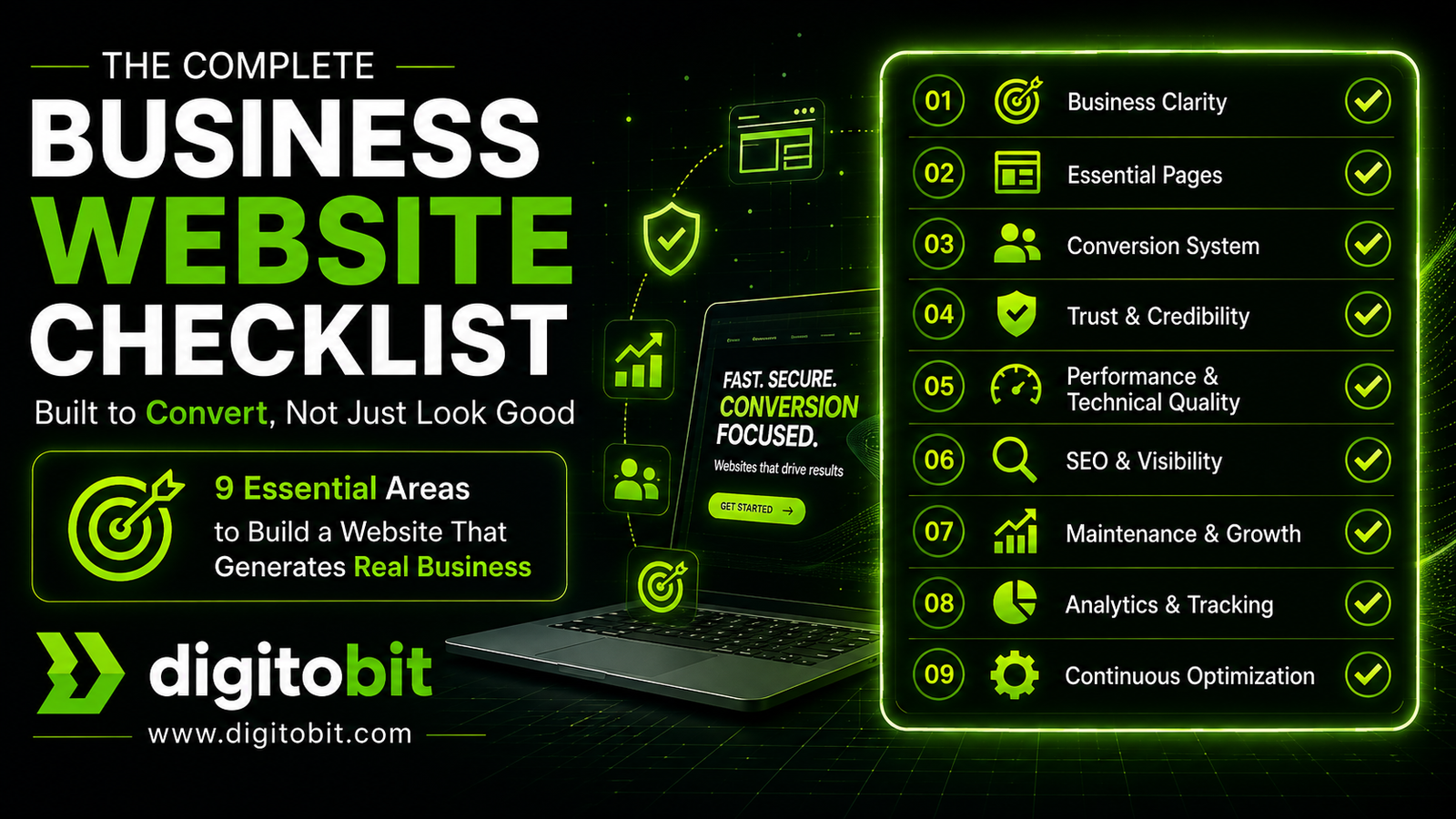
Most business websites look good.
Very few actually generate inquiries.
This checklist is not about design trends or visual appeal.
It’s about building a website that works as a client acquisition system—clear, structured, and conversion-focused.
If your website is not consistently bringing leads, something is missing.
This guide will help you identify exactly what.
✔ What You’ll Learn
- What every business website must include (and why)
- Where most websites fail (even professionally designed ones)
- How to structure your site for conversions, not just traffic
- The technical factors that silently affect results
👉 Need Expert Review?
If you’re unsure whether your website is working as it should:
Get a professional audit and actionable improvements.
Table of Contents
- Introduction
- Business Clarity: The Foundation Most Websites Get Wrong
- Essential Pages Every Business Website Must Have
- Conversion System: Turning Visitors into Inquiries
- Common Conversion Mistakes
- Key Insight
- Practical Test
Introduction
Most business websites are built with the wrong priority.
They focus on how the website looks, not how it performs.
Clean design, animations, and modern layouts can make a strong first impression—but they don’t guarantee inquiries, calls, or sales. That’s where most websites fail.
A business website is not just a digital presence.
It is a decision-making environment for your potential clients.
When someone lands on your website, they are trying to answer a few critical questions:
- What do you do?
- Can you solve my problem?
- Can I trust you?
- What should I do next?
If your website does not answer these clearly within seconds, users leave—no matter how well it is designed.
This is why many professionally designed websites still generate little to no business.
Because they are built as visual assets, not as conversion systems.
What This Checklist Is (and What It Is Not)
This is not a generic checklist filled with design tips.
This is a structured, practical framework based on how real business websites convert visitors into leads.
It focuses on:
- Clarity over decoration
- Structure over randomness
- Performance over heaviness
- Strategy over trends
Who This Is For
- Business owners with an existing website that isn’t generating leads
- Founders planning a new website
- Teams redesigning their current site
- Anyone who wants their website to actually contribute to business growth
What You’ll Get From This
By the end of this checklist, you will be able to:
- Identify gaps in your current website
- Understand what actually matters for conversions
- Prioritize improvements that impact business results
- Avoid common mistakes that waste time and money
Business Clarity: The Foundation Most Websites Get Wrong
Before design, before SEO, before development—
a business website must answer one thing clearly:
Why should someone choose you?
Most websites skip this step.
They jump directly into design or development, which results in a site that looks good but fails to communicate anything meaningful.
If your messaging is unclear, no amount of design, traffic, or optimization will fix it.
What Business Clarity Actually Means
Business clarity is about removing ambiguity.
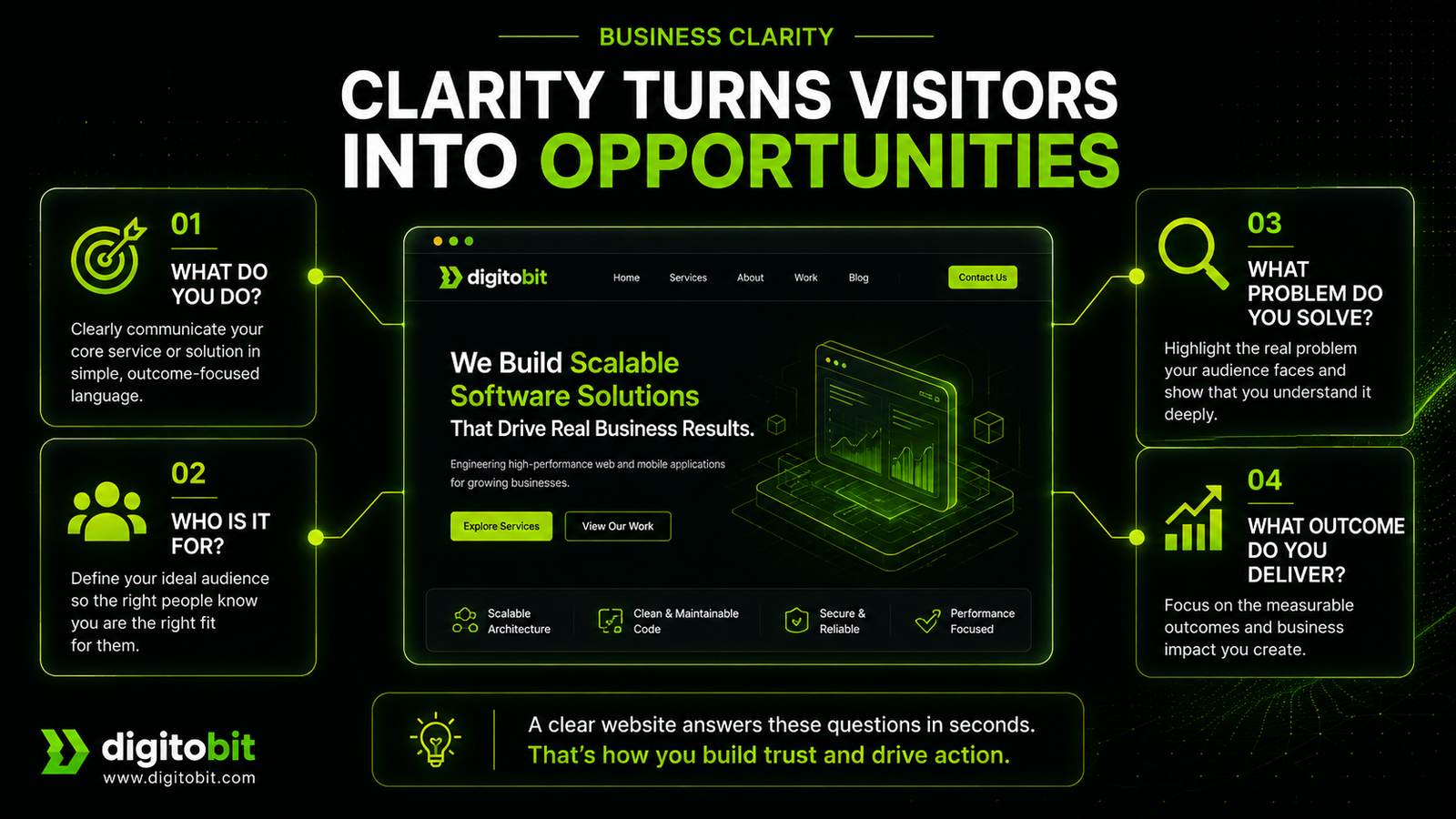
When a visitor lands on your website, they should instantly understand:
- What you do
- Who you do it for
- What problem you solve
- What outcome they can expect
If this takes more than a few seconds, you are losing potential clients.
✔ Business Clarity Checklist
1. Clear Value Proposition (Above the Fold)
Your homepage must immediately communicate:
- Your core service
- The problem you solve
- The outcome you deliver
Weak example:
“We build innovative digital solutions”
Strong example:
“Custom web and SaaS applications built for performance and scalability”
2. Defined Target Audience
Avoid trying to speak to everyone.
Be specific:
- Startups vs Enterprises
- Local businesses vs Global clients
- Technical founders vs Non-technical owners
Why it matters:
Clear targeting makes your messaging sharper and more relatable.
3. Specific Services (No Vagueness)
Generic service lists reduce trust.
Instead of:
- “Web Development”
- “IT Solutions”
Be specific:
- “Custom SaaS Development”
- “Performance Optimization for Existing Applications”
- “WordPress Custom Plugin Development”
4. Outcome-Focused Messaging
Clients care about results, not processes.
Instead of describing what you do, focus on what they get:
- Faster website performance
- More leads and inquiries
- Scalable systems
- Reduced maintenance issues
5. Positioning & Differentiation
Why you over others?
This could be:
- Engineering-first approach
- Performance-focused development
- Experience in specific industries
- Long-term maintainable architecture
You don’t need hype.
You need clarity.
⚠ Common Mistakes
- Trying to impress instead of communicate
- Using buzzwords without meaning
- Copying competitor messaging
- Being too generic to appeal to everyone
🔍 Key Insight
If a visitor cannot clearly understand your offering within 5 seconds,
they will not explore further—no matter how good your design is.
💡 Practical Test
Open your homepage and ask:
- Can a new visitor understand what you do in 5 seconds?
- Is your target audience obvious?
- Are your services clearly defined?
If not, this is the first thing to fix.
Essential Pages Every Business Website Must Have
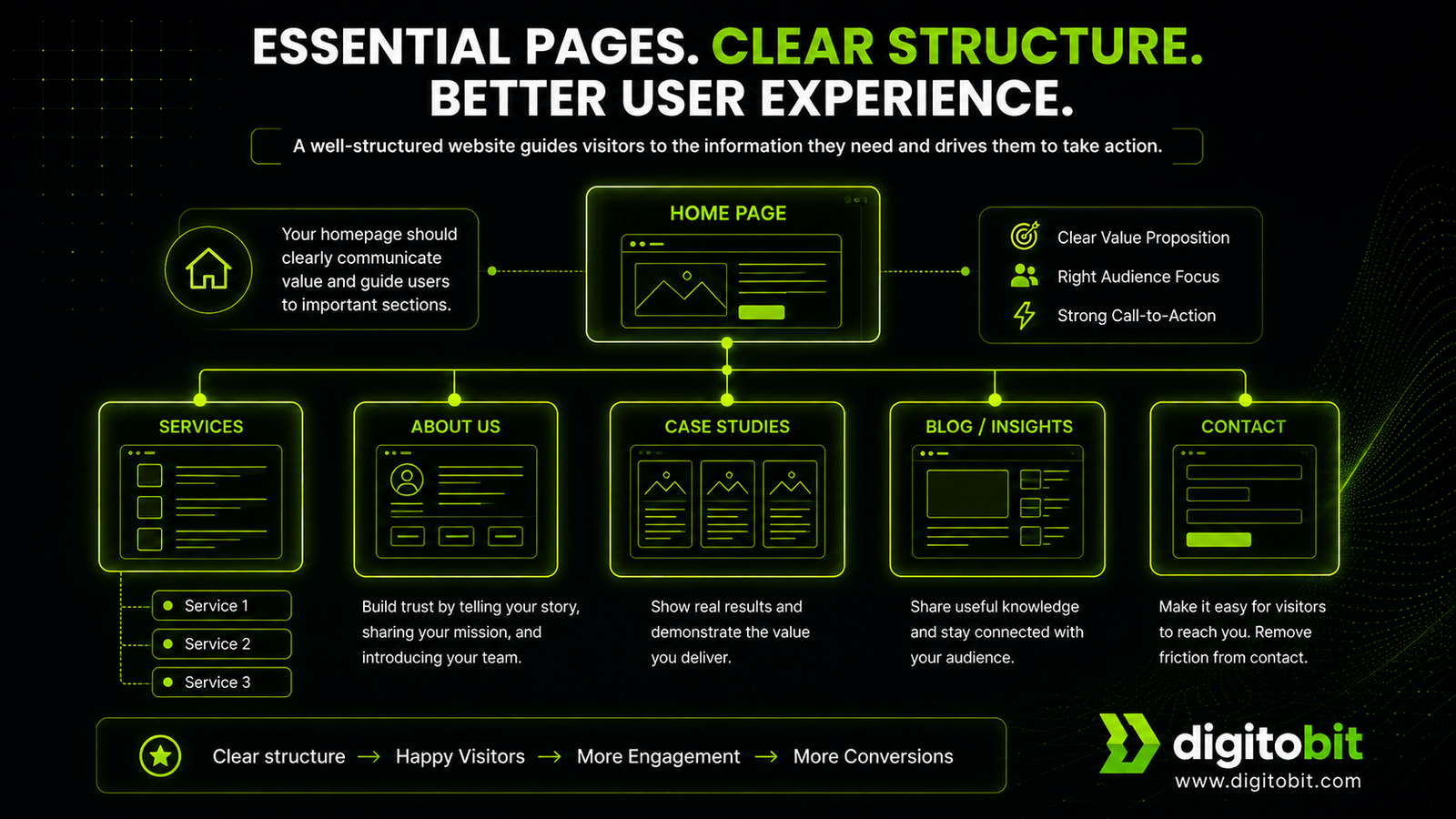
Once your business clarity is in place, the next step is structure.
A website without proper structure creates confusion.
Users don’t know where to go, what to read, or what action to take.
This directly reduces conversions.
A well-structured website guides the user step-by-step—from understanding your service to contacting you.
✔ Core Pages Checklist
1. Homepage (Entry Point, Not Storage Page)
Your homepage is not a place to dump everything.
Its role is simple:
- Clearly explain what you do
- Guide users to the right sections
- Provide a clear next step
Must include:
- Value proposition (top section)
- Short service overview
- Trust signals (clients, testimonials)
- Clear CTA (contact / inquiry)
2. Services Pages (Most Important for Conversions)
This is where decisions happen.
Most businesses make the mistake of keeping service pages too short or too generic.
Each service should ideally have its own page.
Include:
- What the service is
- Who it is for
- Problems it solves
- Process (optional but useful)
- Expected outcomes
- CTA
Key insight:
Service pages are not descriptions—they are decision-making pages.
3. About Page (Trust, Not Storytelling)
This page is often misunderstood.
It’s not about your journey.
It’s about building confidence.
Focus on:
- Who you are
- What experience you bring
- How you approach work
- Why clients can trust you
Keep it relevant to the client—not just your story.
4. Case Studies / Work (Proof Section)
This is where credibility becomes real.
Instead of just showing screenshots or designs, focus on:
- Problem
- Solution
- Approach
- Outcome (very important)
Even 2–3 strong case studies are enough to build trust.
5. Contact Page (Remove Friction Completely)
If users reach here, they are interested.
Don’t lose them due to complexity.
Checklist:
- Simple form (name, email, message)
- Phone / WhatsApp option
- Email address
- Clear expectation (“We’ll respond within 24 hours”)
Avoid long or complicated forms.
6. Blog (Optional but Powerful)
Not mandatory—but highly valuable for:
- SEO
- Authority building
- Long-term traffic
Focus on quality over quantity.
⚠ Common Structural Mistakes
- Too many pages with no clear purpose
- Services hidden or unclear
- No direct path to contact
- Overloaded homepage
- Missing case studies or proof
🔍 Key Insight
A good website structure doesn’t just organize content.
It guides user decisions.
💡 Practical Test
Go through your website and check:
- Can a user easily find your services?
- Is there a clear path to contact you?
- Are important pages visible without searching?
If users have to think too much, they leave.
Conversion System: Turning Visitors into Inquiries
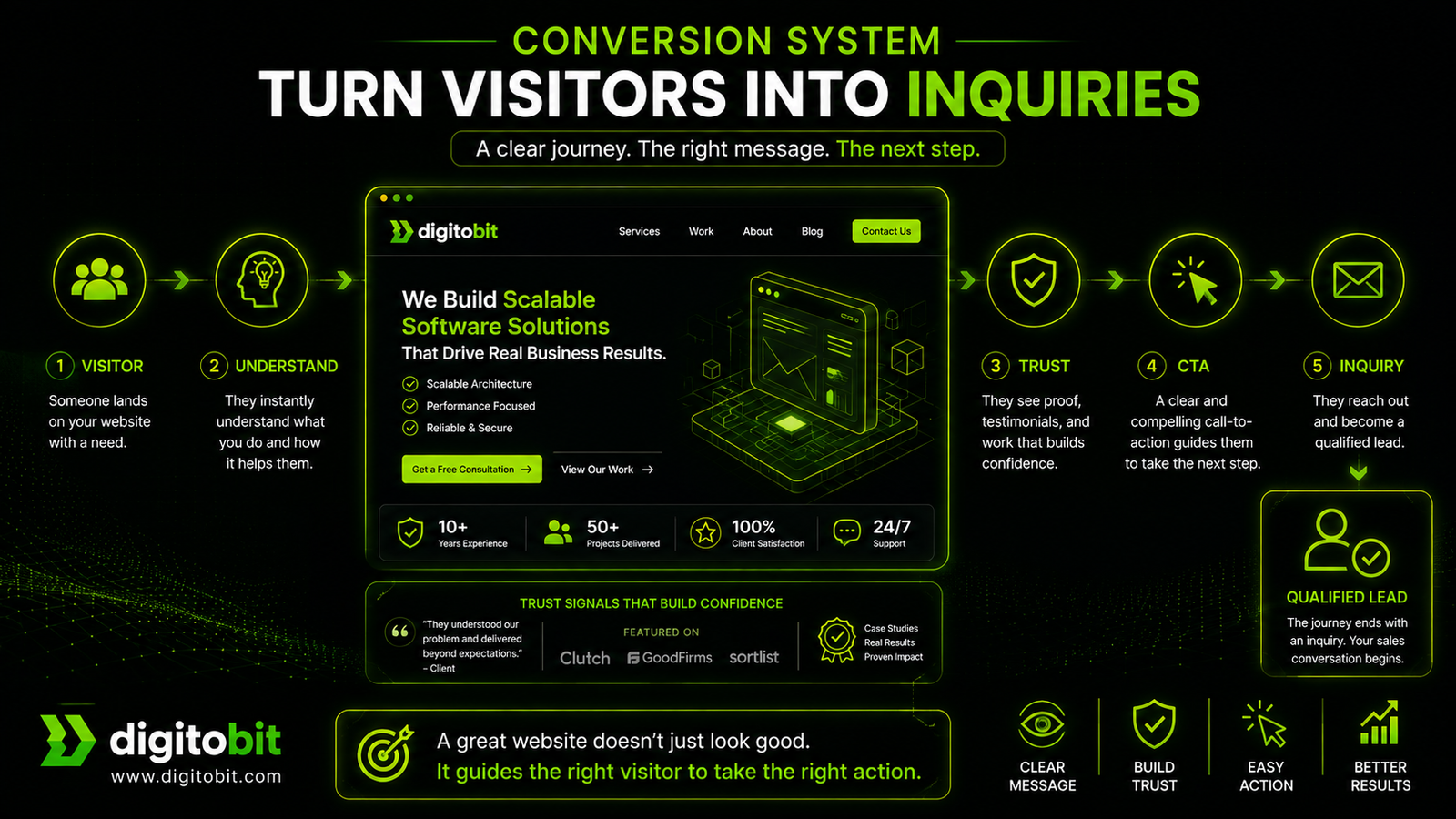
A well-designed website can attract visitors.
But without a conversion system, those visitors leave without taking action.
This is one of the biggest gaps in most business websites.
They provide information—but they don’t guide decisions.
A conversion system ensures that every visitor knows:
- What to do next
- How to take action
- Why they should trust that action
What a Conversion System Actually Means
It’s not just a contact form.
It’s a structured flow that moves a user from:
Interest → Understanding → Trust → Action
If any step is weak, conversions drop.
✔ Conversion Checklist
1. Clear Call-to-Action (CTA) on Every Page
Every page must guide the user.
Examples:
- “Request a Quote”
- “Get a Free Audit”
- “Talk to an Expert”
Avoid vague CTAs like “Learn More” when a stronger action is possible.
Key rule:
No page should leave the user without direction.
2. Strategic CTA Placement
Don’t hide your CTA.
Place it:
- Above the fold (top section)
- Mid-content (after explaining value)
- End of page
This ensures users can act at any stage of their decision.
3. Simple, Frictionless Contact Form
Complex forms reduce conversions.
Keep it minimal:
- Name
- Email / Phone
- Message
Optional fields should not block submission.
Important:
The easier it is to contact you, the higher your chances of getting inquiries.
4. Multiple Contact Options
Different users prefer different methods.
Provide:
- Contact form
- Phone number
- WhatsApp (especially effective for local businesses)
This increases accessibility and comfort.
5. Trust Signals Near Action Points
Right before a user takes action, they hesitate.
Reduce that hesitation with:
- Testimonials
- Client logos
- Case study references
- Short credibility lines (“Trusted by X clients”)
Position these near CTAs—not just in separate sections.
6. Clear Next-Step Expectation
After a user submits a form, remove uncertainty.
Tell them:
- When you’ll respond
- What happens next
- How you’ll contact them
Example:
“We’ll review your request and get back within 24 hours.”
7. No Confusion in User Journey
Avoid:
- Too many CTAs with different meanings
- Conflicting actions
- Dead ends (pages with no next step)
Your website should feel like a guided flow—not a maze.
⚠ Common Conversion Mistakes
- No visible CTA
- Weak or generic CTA text
- Long, complicated forms
- No trust signals near action
- Too many distractions (popups, clutter)
🔍 Key Insight
Traffic without conversion is wasted effort.
A small improvement in conversion rate can significantly increase business results.
💡 Practical Test
Open your website and check:
- Is there a clear CTA visible immediately?
- Can a user contact you within 5–10 seconds?
- Are you guiding users—or leaving them to figure it out?
If not, your conversion system needs improvement.
Trust & Credibility: Why Visitors Decide to Contact You (or Not)
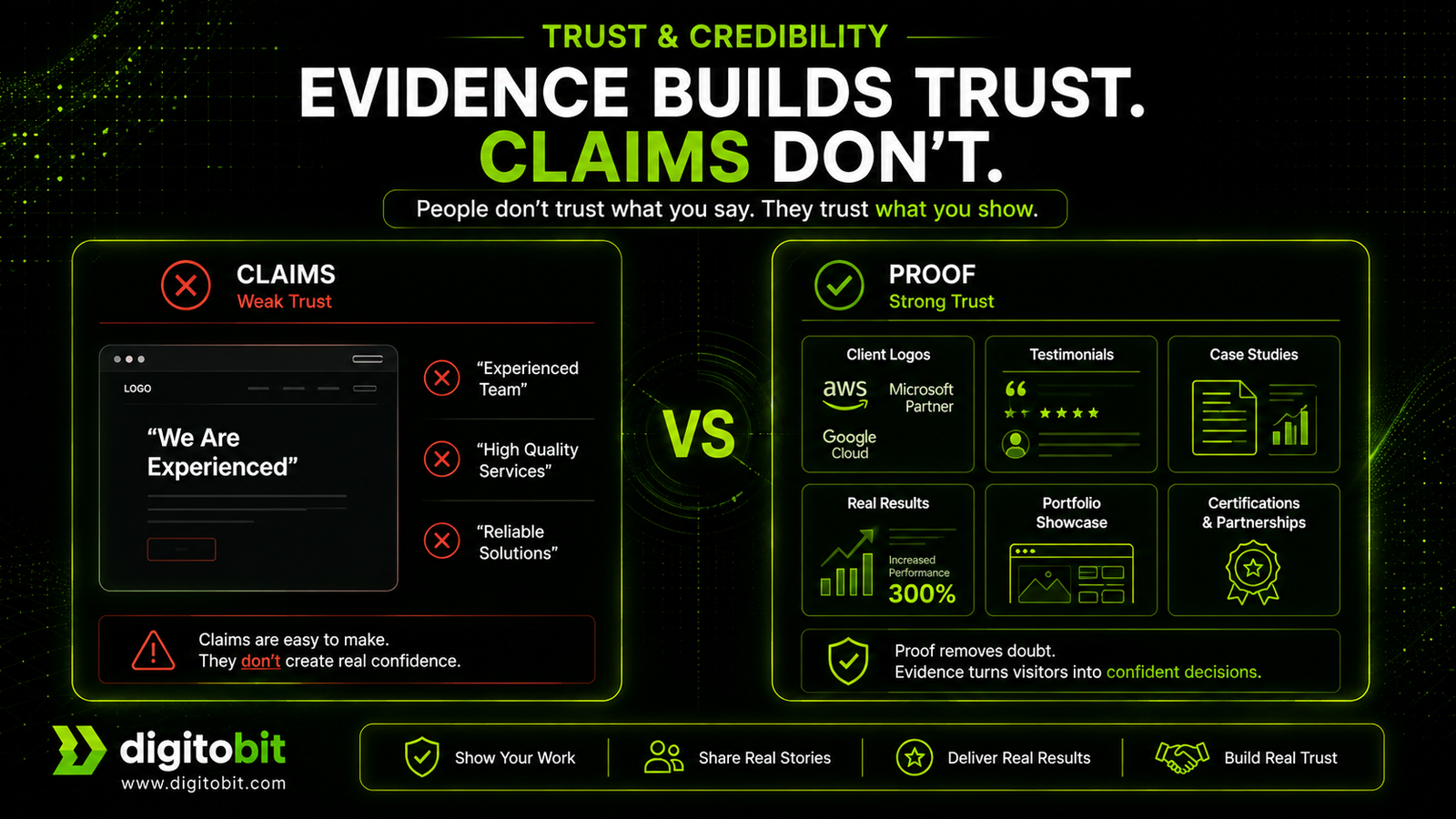
Once a visitor understands what you offer and is interested, the next question becomes:
“Can I trust this business?”
This is the point where most decisions are made.
No matter how good your services are, if your website does not build confidence, users hesitate—and hesitation leads to drop-offs.
Trust is not built through claims.
It is built through evidence.
What Builds Trust on a Website
Trust is created when users see:
- Proof of past work
- Real client experiences
- Clear expertise
- Transparency
Without these, your website feels uncertain—even if everything else is correct.
✔ Trust & Credibility Checklist
1. Testimonials (Real, Specific, and Relevant)
Generic testimonials don’t help.
Avoid:
- “Great service”
- “Highly recommended”
Use:
- Specific feedback
- Problem + result
- Client name (if possible)
Example:
“Improved our website performance and reduced load time by 60%—resulting in better user engagement.”
2. Client Logos / Brands
Even a few recognizable names increase confidence.
- Display logos cleanly
- Place them near key sections (homepage, CTA areas)
This acts as instant social proof.
3. Case Studies (Proof of Execution)
This is one of the strongest trust builders.
Focus on:
- Problem
- Approach
- Solution
- Outcome
Even simple case studies are more effective than generic portfolios.
4. Portfolio / Work Samples
Show actual work—not just claims.
- Screenshots
- Live links (if possible)
- Short descriptions
This helps users visualize your capability.
5. Founder / Team Visibility
People trust people more than companies.
Include:
- Founder introduction
- Team (if applicable)
- Experience highlights
This adds a human layer to your website.
6. Transparent Communication
Clarity builds trust.
Include:
- Clear services
- Honest positioning (don’t overpromise)
- Defined process (optional but helpful)
Avoid exaggerated claims.
7. Trust Signals Near Decision Points
Don’t isolate trust elements.
Place them:
- Near CTAs
- On service pages
- Around contact sections
This reduces hesitation at the moment of action.
⚠ Common Trust Mistakes
- No testimonials or proof
- Fake or generic reviews
- Only design-focused portfolio (no outcomes)
- No visible identity (who is behind the business)
- Overpromising without evidence
🔍 Key Insight
People don’t convert because of features.
They convert because they feel confident in the decision.
💡 Practical Test
Ask yourself:
- Would you trust your own website if you saw it for the first time?
- Is there clear proof of your work and results?
- Does your website feel real—or generic?
If trust is weak, conversions will always remain low.
Performance & Technical Quality: The Silent Conversion Killer
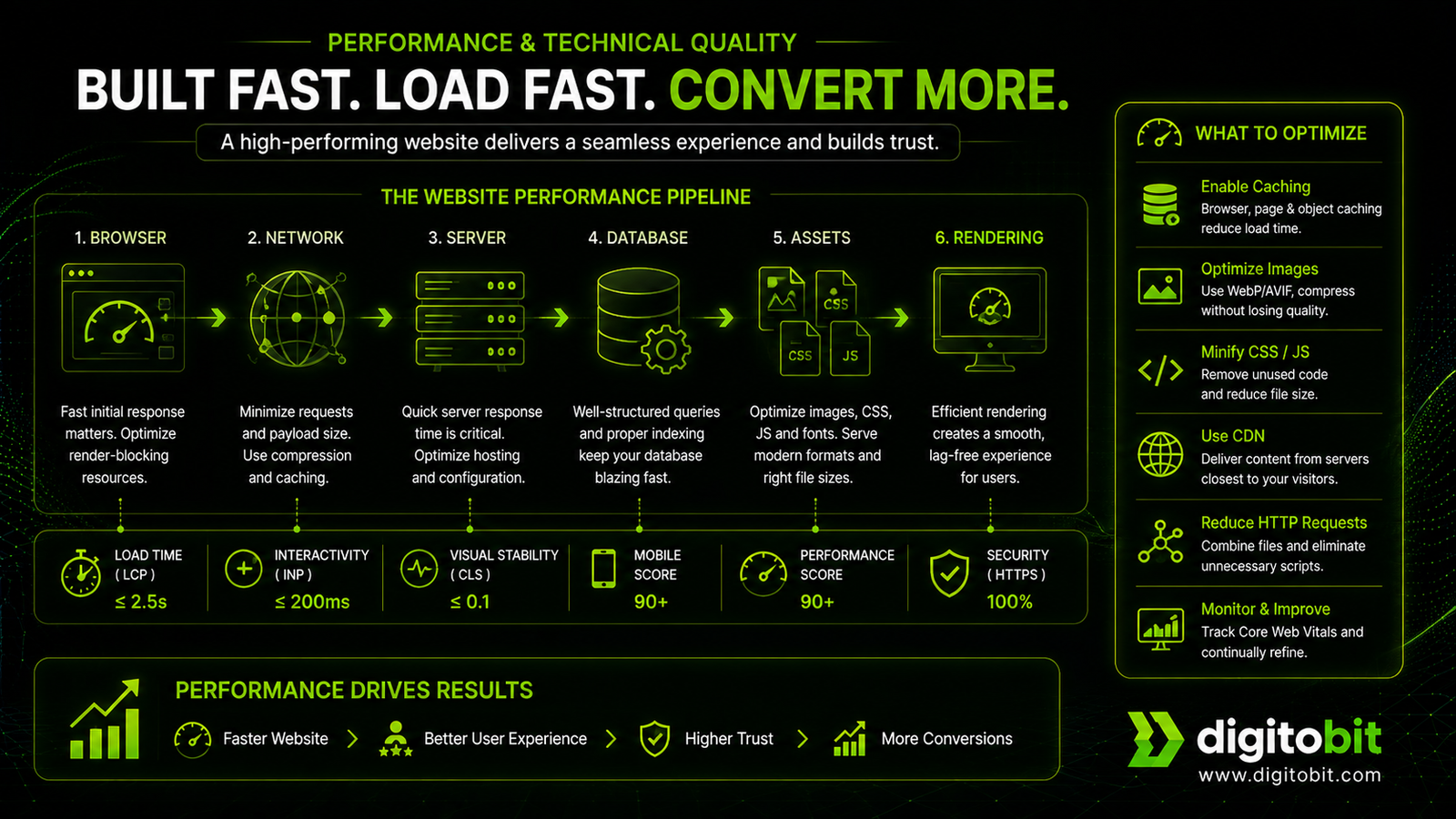
A website can have:
- Clear messaging
- Strong structure
- Good design
- Solid trust signals
…and still fail.
Why?
Because it’s slow, heavy, or technically weak.
Performance and technical quality don’t always get noticed—but when they are poor, they directly impact user behavior and conversions.
Why Performance Matters More Than You Think
Users don’t wait.
If your website takes too long to load or feels laggy:
- They leave before reading anything
- They lose confidence instantly
- Your SEO rankings drop
Even a delay of 1–2 seconds can significantly reduce conversions.
✔ Performance & Technical Checklist
1. Fast Loading Speed (Critical)
Your website should load quickly across devices and networks.
Target:
- Under 2–3 seconds (ideally faster)
Improve by:
- Optimizing images
- Reducing unnecessary scripts
- Using lightweight frameworks
- Proper caching
To identify performance issues and get recommendations for improvement, test your website with Google PageSpeed Insights.
2. Mobile-First Experience
Most users will visit from mobile.
Your website must:
- Load fast on mobile networks
- Be easy to navigate on small screens
- Have readable text without zooming
- Avoid layout shifts
Also check that navigation, forms, buttons, and other interactive elements are accessible to different users by consulting the W3C Web Content Accessibility Guidelines (WCAG).
Key rule:
If your site doesn’t work well on mobile, it doesn’t work.
3. Clean, Lightweight Code
Over-engineered websites become slow and hard to maintain.
Avoid:
- Heavy themes and page builders
- Unnecessary plugins
- Bloated CSS/JS
Focus on:
- Structured, maintainable code
- Minimal dependencies
- Performance-first development
4. Core Web Vitals (User Experience Metrics)
Google evaluates real user experience using metrics like:
- Loading performance
- Interactivity
- Visual stability
For the recommended thresholds and measurement guidance, see Google’s Core Web Vitals documentation.
Poor scores affect:
- SEO rankings
- User trust
5. Technical SEO Basics
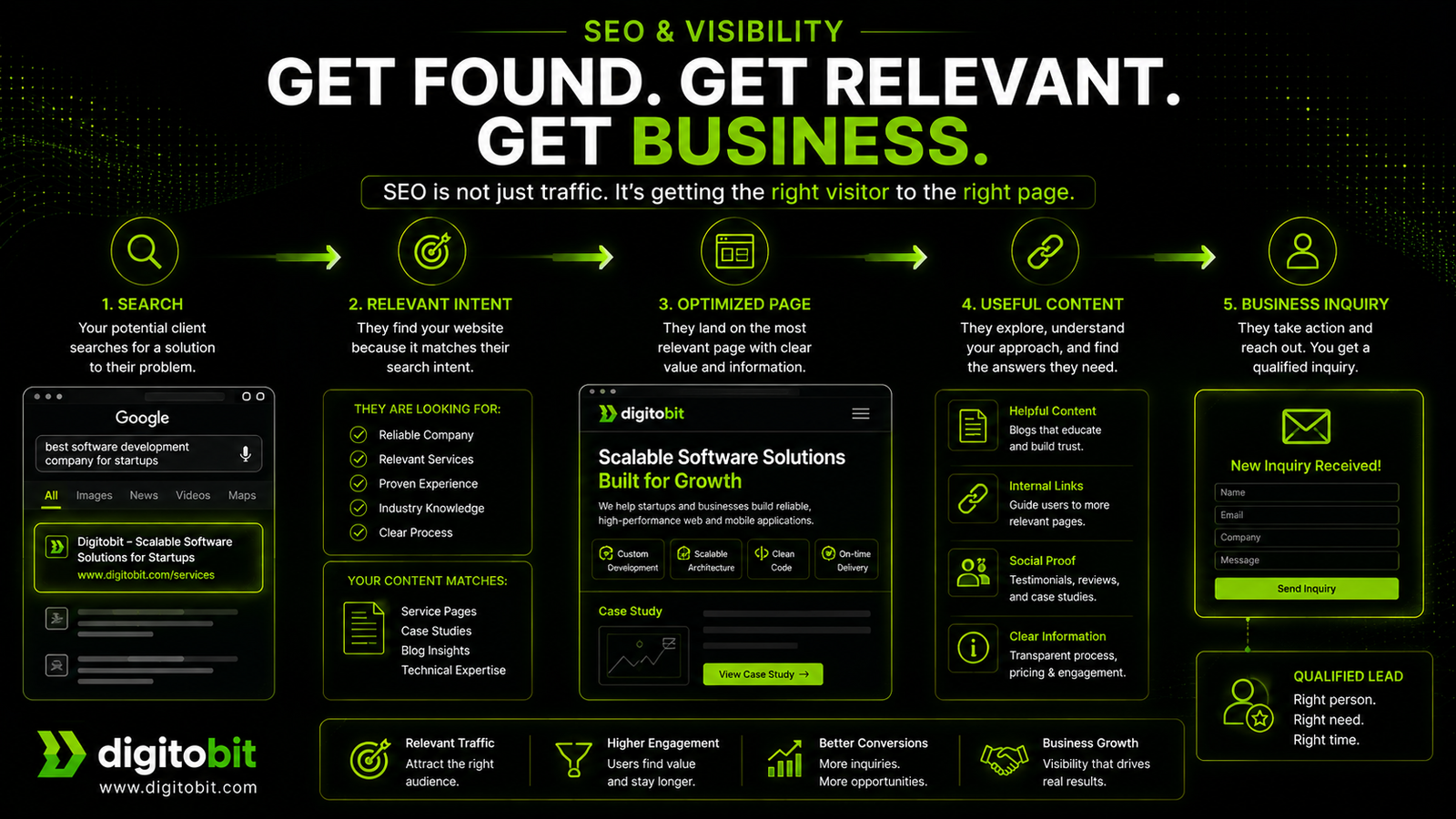
Even a well-written site can fail to reach its intended audience if search engines struggle to discover, crawl, or understand its content. Follow Google’s SEO Starter Guide when reviewing your website’s search optimization basics.
Ensure:
- Proper heading structure (H1, H2, H3)
- Clean URLs
- Meta tags (title, description)
- Image alt text
- XML sitemap
6. Security & Reliability
Trust is also technical.
Your site must:
- Use HTTPS
- Protect forms from spam
- Avoid broken pages or errors
- Have reliable hosting
For an additional security check, review your site’s HTTP security headers using the OWASP Secure Headers Project, which explains headers that can help protect web applications.
⚠ Common Technical Mistakes
- Slow loading due to heavy design
- Overuse of plugins or third-party scripts
- Ignoring mobile performance
- Poor hosting quality
- No technical SEO setup
🔍 Key Insight
Users may not notice great performance—
but they always notice poor performance.
💡 Practical Test
Check your website:
- Does it load instantly on mobile?
- Does it feel smooth while scrolling and clicking?
- Are there delays, jumps, or broken elements?
If yes, performance is affecting your conversions—even if everything else looks fine.
Maintenance & Growth: Keeping Your Website Working Over Time
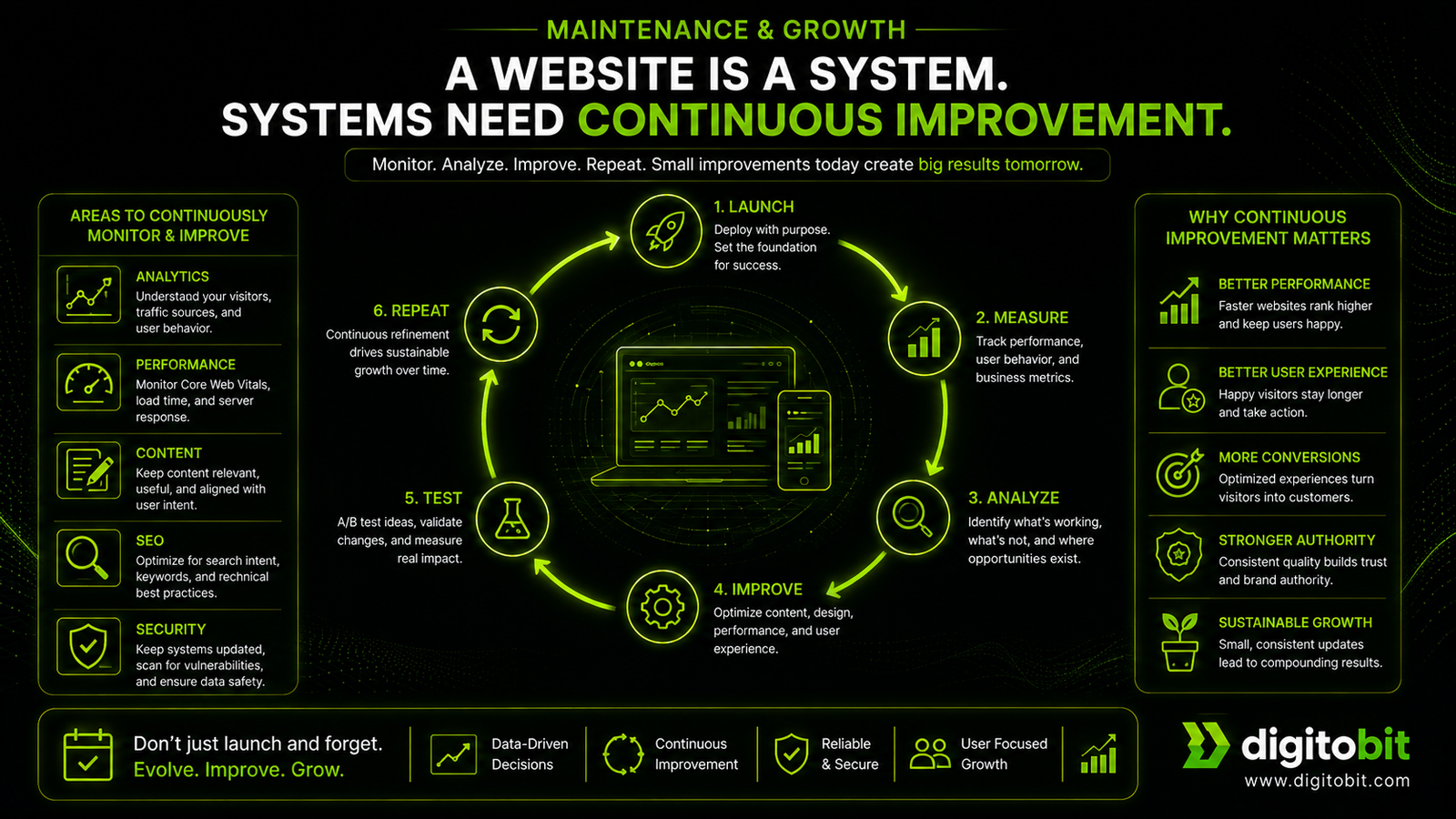
Launching a website is not the finish line.
It’s the starting point.
Most business websites perform poorly not because they were built incorrectly—but because they were never improved after launch.
A website is a system.
And systems need monitoring, updates, and refinement.
Why Ongoing Maintenance Matters
Without maintenance:
- Performance degrades
- Content becomes outdated
- SEO stagnates
- Conversions decline
Over time, even a well-built website can become ineffective if it is not actively managed.
✔ Maintenance & Growth Checklist
1. Analytics & Tracking Setup
You cannot improve what you don’t measure. Configure important actions such as successful form submissions, quote requests, and consultation bookings as key events in Google Analytics so you can measure the actions that matter to your business.
Track:
- Website traffic
- User behavior
- Conversion actions (form submissions, calls)
This helps you understand what is working—and what is not.
2. Conversion Monitoring
Don’t just track visitors.
Track results:
- How many inquiries are coming?
- Which pages are converting?
- Where users are dropping off?
Small improvements here can significantly increase business outcomes.
3. Regular Content Updates
Outdated content reduces credibility.
Keep updated:
- Services
- Case studies
- Blog content
- Business information
Fresh content also helps SEO.
4. Performance Monitoring
Performance is not a one-time task.
Regularly check:
- Page speed
- Mobile experience
- Broken elements
Fix issues before they affect users.
5. SEO Improvements Over Time
SEO builds gradually.
Continuously:
- Add new content
- Improve existing pages
- Strengthen internal linking
- Target new keywords
Use Google Search Console to monitor your website’s search performance, discover indexing issues, and identify opportunities to improve relevant pages.
This increases long-term visibility.
6. Lead Tracking & Follow-Up System
A website generating leads is only half the process.
Ensure:
- Leads are captured properly
- You respond quickly
- There is a follow-up system
Slow responses reduce conversion success.
7. Continuous Optimization
Your website should evolve based on data.
Improve:
- CTAs
- Page structure
- Messaging
- User flow
Even small refinements can produce measurable results.
⚠ Common Maintenance Mistakes
- Treating the website as a one-time project
- Not tracking conversions
- Ignoring analytics data
- Letting content become outdated
- No ongoing improvements
🔍 Key Insight
A website that is not improved over time will slowly lose its effectiveness—regardless of how well it was built initially.
💡 Practical Test
Ask yourself:
- Do you regularly check how your website is performing?
- Are you updating content and improving pages?
- Do you know how many leads your website generates?
If not, your website is running without direction.
Quick Business Website Checklist (Audit Your Site in Minutes)
Use this checklist to quickly evaluate whether your website is built to generate real business results.
✔ 1. Business Clarity
- Clear value proposition above the fold
- Defined target audience
- Specific services (no generic terms)
- Outcome-focused messaging
- Strong positioning and differentiation
✔ 2. Website Structure
- Homepage clearly explains your offering
- Dedicated service pages
- About page builds trust (not just story)
- Case studies or work examples available
- Contact page is simple and accessible
✔ 3. Conversion System
- Clear CTA on every page
- CTA placed strategically (top, middle, end)
- Short, easy contact form
- Multiple contact options (form, phone, WhatsApp)
- Trust signals near action points
✔ 4. Trust & Credibility
- Real testimonials with meaningful content
- Client logos or brand references
- Case studies with outcomes
- Portfolio or work samples
- Visible founder or team presence
✔ 5. Performance & Technical Quality
- Fast loading speed (under 2–3 seconds)
- Mobile-friendly design
- Clean, lightweight code
- Proper technical SEO setup
- Secure and reliable hosting
✔ 6. SEO & Visibility
- Target keywords for each page
- Proper heading structure
- Internal linking between pages
- Content addressing real user queries
- Search engine indexing and presence
✔ 7. Maintenance & Growth
- Analytics and tracking setup
- Conversion monitoring
- Regular content updates
- Performance checks
- Ongoing SEO improvements
- Lead tracking and follow-up system
🔍 How to Use This Checklist
Don’t try to fix everything at once.
- Start with business clarity and structure
- Then improve conversion system
- Finally optimize performance and SEO
This step-by-step approach ensures meaningful improvement without overwhelm.
🔑 Key Takeaway
A successful business website is not built in one step.
It is refined continuously using structure, clarity, and data.
Conclusion: A Website That Works Is Built Intentionally
A business website is not just about being online.
It’s about:
- Communicating clearly
- Building trust
- Guiding decisions
- Converting visitors into real opportunities
Most websites fail not because of design—but because they lack structure, clarity, and purpose.
If your website is not generating consistent inquiries, the issue is usually not traffic.
It’s how your website is built.
What You Should Do Next
Instead of trying to fix everything at once:
- Start with business clarity
- Improve your structure and pages
- Strengthen your conversion system
- Optimize performance and SEO
- Continuously refine based on data
Small improvements in the right areas can create a significant impact.
Final Thought
A good-looking website creates an impression.
A well-structured website creates business.

Author: Neeraj Mourya
Founder, Systems Architect – Digitobit
Specializing in scalable backend architecture and performance-focused SaaS systems
👉 Need Help Improving Your Website?
If you want a clear, professional evaluation of your website:
- Identify what’s missing
- Understand why it’s not converting
- Get actionable improvements
We’ll review your website and suggest practical improvements you can implement.