
A slow WordPress website is not always a hosting problem, and a high PageSpeed score does not automatically mean the site performs well for customers. Performance depends on the entire delivery chain: hosting, server configuration, PHP, databases, themes, plugins, images, CSS, JavaScript, caching, CDNs, and third-party services.
A WordPress performance optimization company can investigate that complete chain, identify the underlying bottlenecks, implement changes safely, and measure whether the work improves real user experience and business outcomes. The important question is not whether every website needs an agency. It is whether the cost, technical risk, and opportunity justify professional intervention.
What does a WordPress performance optimization company do?
Performance specialists do more than install a caching plugin or compress a few images. A proper engagement usually includes four stages:
- Diagnosis: Establish a baseline using real-user data, laboratory tests, server metrics, and representative page templates.
- Prioritization: Separate symptoms from root causes and rank improvements by user impact, business value, risk, and effort.
- Implementation: Change cache architecture, code, queries, assets, hosting configuration, or content delivery as appropriate.
- Validation and monitoring: Test functionality and performance on staging and production, then monitor for regressions.
This differs from generic maintenance or a hosting upgrade. More server capacity can help when resources are saturated, but it will not correct oversized media, inefficient database queries, excessive JavaScript, or a bloated theme.
Start with field data, not a score
Before deciding what to fix, determine how real visitors experience the site. Field and lab performance data answer different questions. Field data reflects actual devices, networks, locations, page variants, and interactions. Lab tests provide repeatable conditions that are useful for debugging.
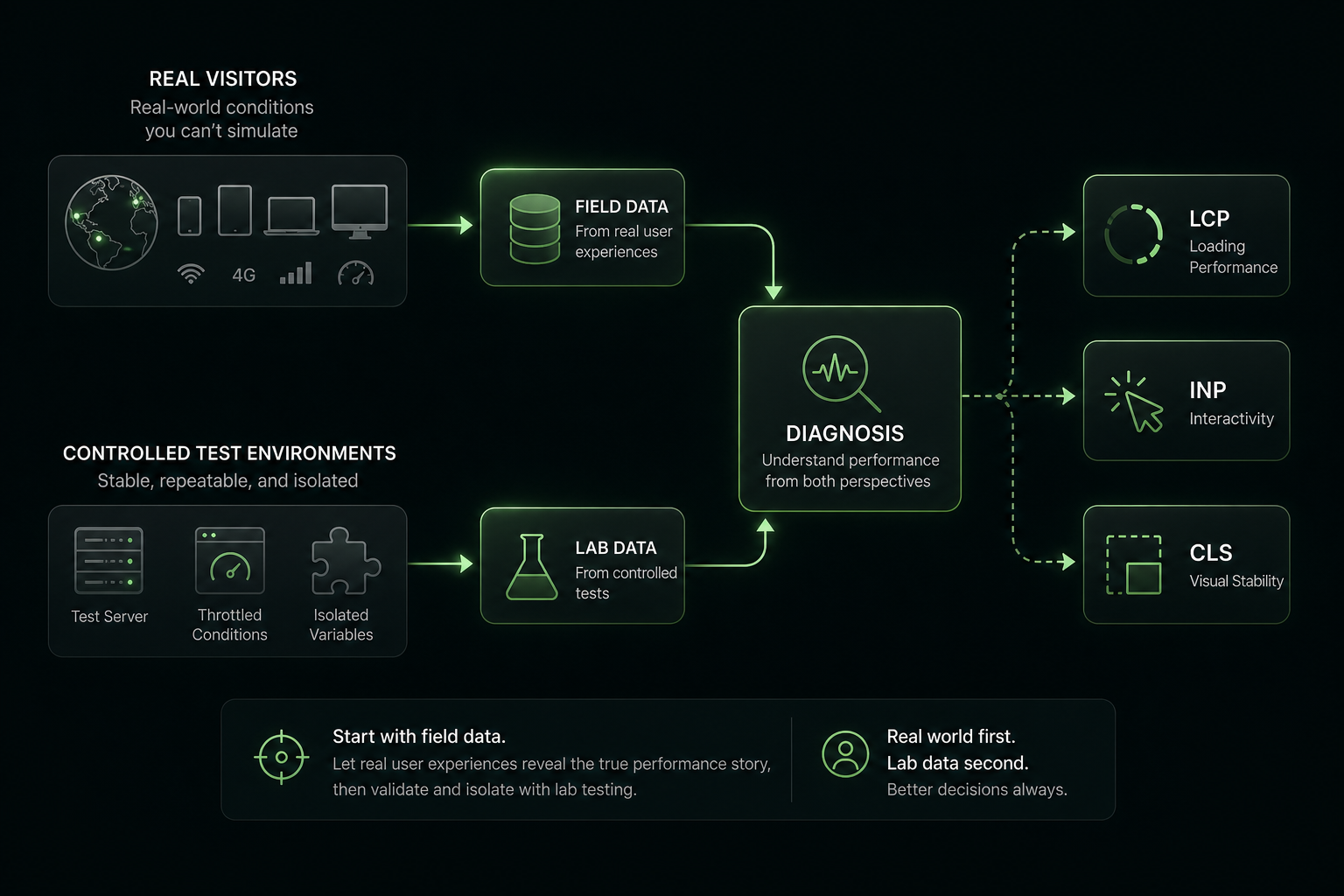
Core Web Vitals measure three important aspects of user experience:
- Largest Contentful Paint (LCP): loading performance. A good result is 2.5 seconds or less at the 75th percentile.
- Interaction to Next Paint (INP): responsiveness after user interactions. A good result is below 200 milliseconds at the 75th percentile.
- Cumulative Layout Shift (CLS): visual stability. A good result is below 0.1 at the 75th percentile.
Search Console, PageSpeed Insights, or a real-user monitoring system can reveal whether important templates perform poorly for mobile visitors. Lighthouse, Chrome DevTools, and WebPageTest can then help explain why.
These metrics matter, but they are not the entire business case. Google uses Core Web Vitals among its page-experience systems, while also making clear that good scores do not guarantee high rankings. A slow checkout, abandoned form, or poor mobile experience may be commercially serious even if a report shows a passing score.
Signs that professional optimization is justified
1. Important pages have persistent poor field data
Basic image compression and caching are worthwhile first steps. However, professional help becomes sensible when mobile field data remains poor across service pages, articles, landing pages, product pages, or other high-value templates.
Persistent problems often involve several layers at once: slow server response, cache misses, render-blocking resources, third-party scripts, or theme and plugin code. Repeatedly changing settings without identifying the cause can create new conflicts while leaving the main problem untouched.
2. Slowness affects revenue or lead generation
Hire based on business impact, not just technical discomfort. Warning signs include:
- Visitors abandon lead forms or contact flows.
- Product pages, cart, or checkout respond slowly.
- Paid campaigns send traffic to pages that load poorly on mobile.
- Support requests mention timeouts, failed actions, or an unreliable site.
- Slow pages reduce the effectiveness of email, advertising, or seasonal campaigns.
For example, a lead-generation business can compare the project cost with the value of additional qualified leads and reduced paid-traffic waste. An ecommerce business should also consider revenue per session, checkout completion, average order value, server capacity, and incident risk.
3. The homepage is fast, but valuable templates are not
A homepage test rarely represents the whole site. Product filtering, internal search, membership dashboards, multilingual pages, personalized content, cart, and checkout may bypass normal page caching or trigger expensive queries.
WooCommerce sites commonly require specialized work involving cache exclusions, image delivery, database maintenance, conditional asset loading, query efficiency, and extension-by-extension testing. WooCommerce performance guidance is useful for understanding why dynamic commerce pages need different treatment from static content.
4. Performance regresses after a site change
A page builder, analytics platform, personalization tool, membership system, advertising tag, theme update, or plugin can introduce a regression. If the cause is unclear, an expert can use a release comparison, dependency review, browser trace, and server profiling to isolate it.
Do not remove plugins simply because the site has many. Measure their front-end assets, database queries, scheduled tasks, and business purpose first. The right solution may be conditional loading, configuration changes, replacement of one component, or code-level optimization.
5. Traffic is growing or the site is moving platforms
Traffic growth can expose inefficient queries, low PHP worker capacity, inadequate object caching, or fragile infrastructure. Migration is another useful time for a performance audit because hosting, DNS, CDN, PHP versions, cache rules, and deployment processes are already being reviewed.
6. Your team cannot safely test the changes
Performance changes can affect SEO crawling, accessibility, analytics attribution, consent management, personalization, security, and checkout behavior. If the team lacks staging, backups, rollback procedures, or regression testing, specialist support reduces operational risk.
What professionals evaluate
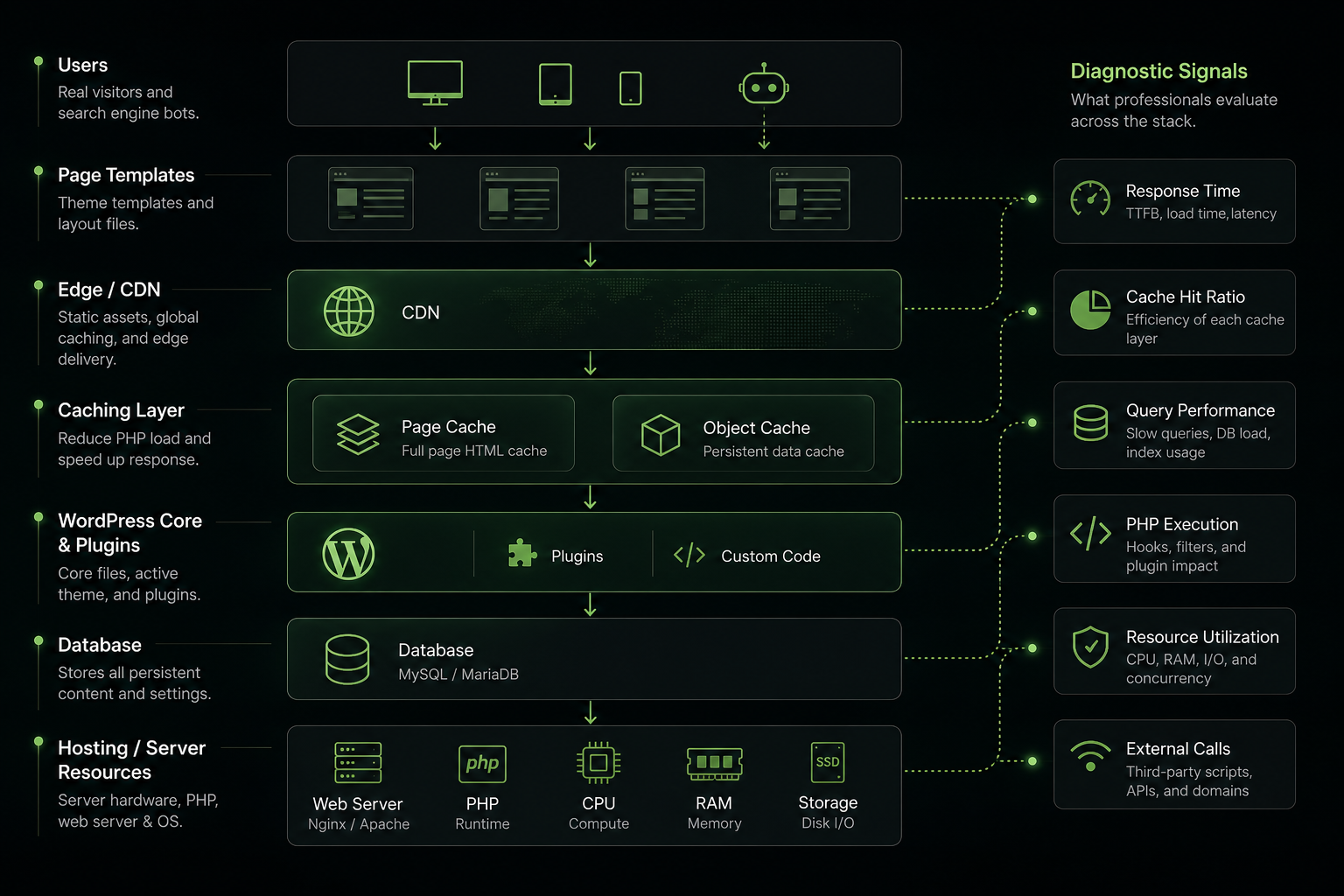
A useful audit examines representative URLs rather than only the homepage. It should include anonymous and logged-in states where relevant, and include pages with different business functions.
Hosting and server execution
The investigation may cover server response time, PHP version and worker capacity, CPU and memory usage, database configuration, storage performance, error logs, scheduled tasks, and resource saturation. High time to first byte (TTFB) can indicate slow application execution, an overloaded server, poor geographic placement, or a cache that is not being used.
Page and object caching
Page caching can serve a stored HTML response instead of repeatedly executing PHP and database requests. Object caching reduces repeated database work inside WordPress. The WordPress object cache documentation explains the role of this layer.
Specialists also verify cache-hit rates, invalidation behavior, exclusions for carts and accounts, logged-in behavior, personalization, and whether a CDN is serving the intended assets and pages.
WordPress, theme, plugin, and database behavior
Profiling can reveal slow queries, excessive autoloaded options, inefficient custom code, repeated API calls, expensive scheduled jobs, plugin conflicts, and unnecessary work during each request. WordPress performance depends on the interaction of these components, not simply on the number of installed plugins. The official WordPress optimization documentation provides a useful overview of the main factors.
Images, fonts, CSS, JavaScript, and third parties
For LCP, common causes include slow initial HTML, late discovery of the hero image or font, render-blocking CSS and JavaScript, and oversized media. The LCP resource should generally be discoverable early and prioritized appropriately; lazy-loading the main hero image can make the experience worse.
INP problems often come from excessive JavaScript, long main-thread tasks, and inefficient event handlers. Total Blocking Time is helpful in lab diagnosis, but it is not a replacement for field INP. CLS problems commonly result from images or embeds without reserved dimensions, dynamically injected content, late fonts, banners, and advertisements.
A performance review should also assess tag managers, chat widgets, A/B testing tools, video embeds, social scripts, and advertising technology. These services may be necessary, but their loading strategy and business value should be explicit.
What the optimization work may include
- Improving hosting, PHP worker allocation, server configuration, or database resources.
- Designing page-cache and object-cache rules that preserve dynamic functionality.
- Optimizing database queries, scheduled tasks, autoloaded options, and custom WordPress code.
- Delivering correctly sized, modern images through responsive markup and a CDN.
- Prioritizing the LCP resource and reducing render-blocking work.
- Removing unused CSS, splitting or deferring nonessential JavaScript, and improving event handlers.
- Reserving dimensions for media and stabilizing dynamically inserted content.
- Loading plugin assets only on the templates where they are needed.
- Reducing or delaying nonessential third-party scripts without breaking consent or attribution.
- Adding monitoring, deployment checks, and documentation so improvements survive future changes.
DIY fixes versus professional intervention
Self-service work is appropriate when the problem is clear and low risk. Owners can often resize images, remove unused media, update supported software, review unnecessary plugins, enable a well-tested cache, and correct missing image dimensions.
A company is more appropriate for server bottlenecks, custom queries, persistent cache misses, WooCommerce behavior, plugin conflicts, long JavaScript tasks, complex CDN rules, or regressions that cannot be reproduced consistently.
A performance plugin can automate caching, minification, and image handling. It cannot reliably diagnose poor hosting, inefficient custom queries, third-party bottlenecks, business-specific cache exclusions, or conflicts between optimization features. Installing several overlapping optimization plugins without testing can make cache invalidation, script execution, and logged-in behavior less predictable.
How to calculate whether the investment is worthwhile
Use a conservative ROI model rather than promising a particular PageSpeed score or conversion increase:
Estimated ROI = (incremental gross profit + avoided costs - project cost) / project and maintenance costDefine a measurement window and compare similar traffic segments before and after release. Track technical outcomes such as field Core Web Vitals, TTFB, error rates, cache-hit behavior, and server usage. Also track leads, qualified leads, revenue per session, checkout completion, form completion, support volume, and downtime.
Use controlled releases where possible, and document test conditions. A before-and-after score without URLs, devices, field segments, traffic sources, or business metrics is not enough to establish value.
How to choose a WordPress performance optimization company
Ask prospective vendors for:
- A baseline covering representative templates, mobile field data, lab tests, server metrics, and key conversion events.
- Experience with your stack, including WooCommerce, page builders, membership, multilingual plugins, CDNs, and hosting platform.
- A prioritized roadmap that distinguishes symptoms from root causes.
- Staging, backups, controlled production releases, rollback procedures, and functional testing.
- Testing for anonymous, logged-in, cart, checkout, personalized, and uncached states where applicable.
- Clear success criteria, implementation details, ownership boundaries, documentation, and monitoring plans.
Be cautious of guaranteed rankings, guaranteed conversion gains, or a report that focuses only on a perfect laboratory score. Good Core Web Vitals are valuable, but relevance, usability, functionality, and broader page experience still matter.
A practical decision checklist
- Proceed independently when the issue is a clear, low-risk image, cache, or content problem.
- Commission an audit when important pages remain slow and the cause is uncertain.
- Hire for implementation when fixes involve infrastructure, database queries, custom code, WooCommerce, or complex caching.
- Use ongoing monitoring when the site changes frequently, runs campaigns, publishes heavily, or handles significant ecommerce traffic.
The right time to hire a WordPress performance optimization company is when performance has become a persistent technical or commercial risk, not merely because a testing tool displays an imperfect score. Start with real-user evidence, connect improvements to business outcomes, and require a safe, measurable path from diagnosis to long-term maintenance.

Author: Neeraj Mourya
Founder, Systems Architect – Digitobit
Specializing in scalable backend architecture and performance-focused SaaS systems