
Your website may look professional, load quickly, and bring in customers every day, but that does not automatically mean it is secure. A vulnerable website can become a target for hackers, malware, automated attacks, spam, data theft, and other security threats that can disrupt your business without warning.
For business owners, website security is not simply a technical issue. A hacked website can mean lost leads, frustrated customers, damaged reputation, unexpected recovery costs, and even a temporary loss of visibility in search results. The good news is that you do not need to become a cybersecurity expert to take practical steps toward protecting your website.
In this guide, we will explain what website security means, why it matters for your business, the most common website security threats, and the essential steps you can take to make your website safer.
Table of Contents
- The Real Problem Business Owners Face With Website Security
- What Is Website Security?
- Why Website Security Matters for Your Business
- Common Website Security Threats
- Website Security Checklist
- Is Your WordPress Website Secure?
- Website Security vs SSL: What’s the Difference?
- Signs Your Website May Have Been Hacked
- What Happens When a Business Website Gets Hacked?
- How to Secure Your Website
- DIY Website Security vs Professional Website Security
- How Much Does Website Security Cost?
- Website Security Best Practices for Long-Term Protection
- Final Verdict: Is Website Security Really Necessary?
- Frequently Asked Questions
The Real Problem Business Owners Face With Website Security
Many business owners think about website security only after something goes wrong. The website suddenly stops working, strange pages appear in Google, customers report suspicious redirects, or the hosting provider sends an alert about malware. By that point, the problem may already be affecting the business.
The biggest challenge is that website security problems are often invisible. A website can continue to look normal to the owner while automated bots or attackers are testing login pages, exploiting outdated software, injecting malicious code, or searching for weaknesses.
This is particularly important for small businesses. A common misconception is that hackers only target large companies with valuable databases. In reality, automated attacks can target thousands of websites at once. Attackers often look for easy vulnerabilities rather than manually choosing one business at a time.
That means the question is not simply, “Is my business important enough to be hacked?” A better question is, “If someone tried to attack my website today, how prepared would I be?”
A Website Is a Business Asset
Your website may be responsible for generating enquiries, collecting contact information, accepting bookings, selling products, answering customer questions, and building trust before someone contacts your business. If the website becomes unavailable or compromised, those business functions can be interrupted.
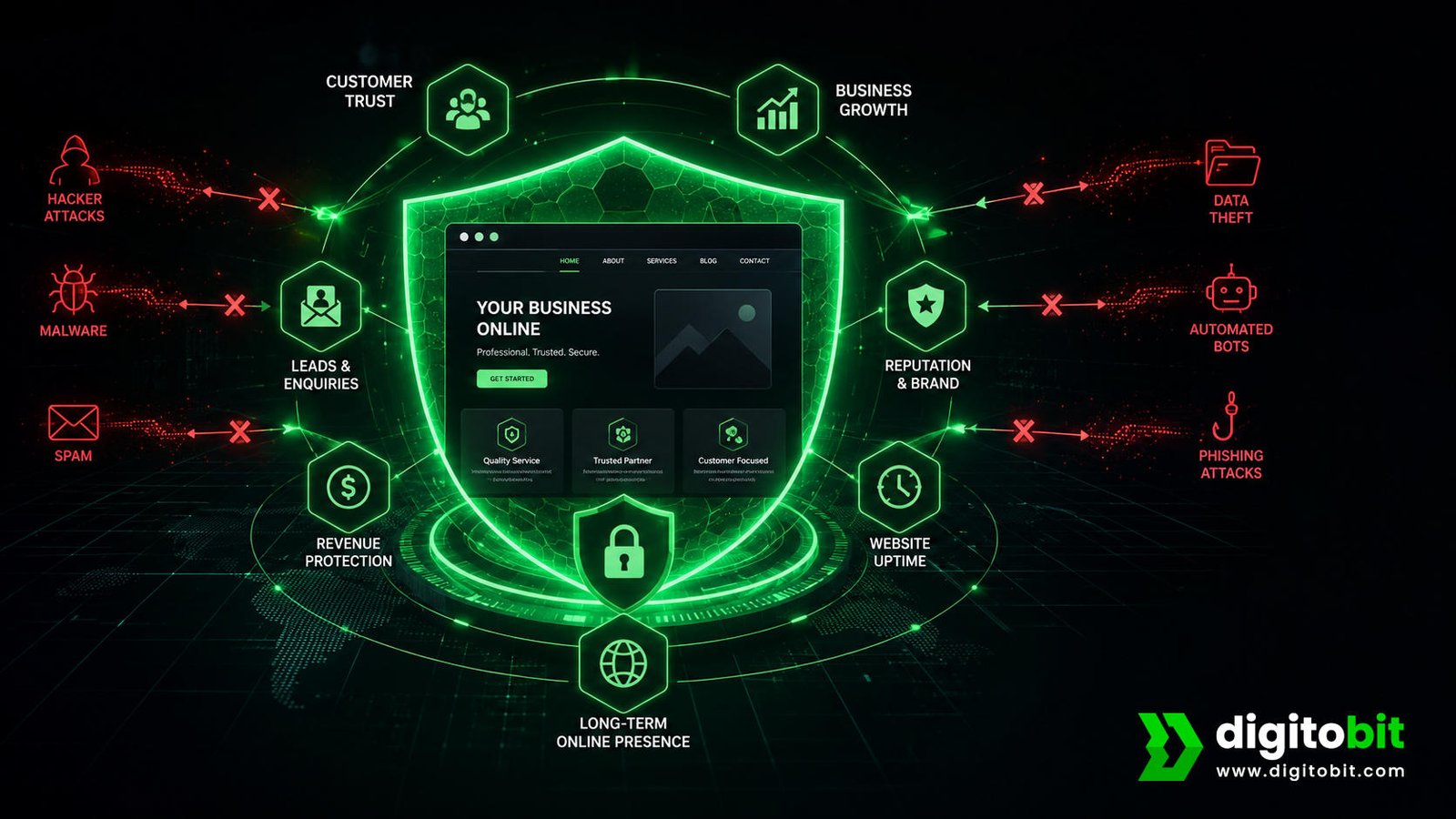
Website security therefore protects more than files and code. It helps protect your leads, customers, reputation, revenue, and long-term online presence.
Security Problems Can Become Business Problems
- A hacked website can create customer trust issues.
- Website downtime can prevent visitors from contacting your business.
- Malware can cause unwanted redirects or suspicious content.
- Compromised accounts can give attackers access to important website functions.
- Recovering a hacked website can require unexpected time and money.
- A serious security incident can damage your brand reputation.
This is why website security should be treated as ongoing business maintenance rather than a one-time technical task. Security needs to be reviewed as your website, software, plugins, users, and business requirements change.
What Is Website Security?
Website security is the process of protecting a website, its users, its data, and its underlying systems from unauthorized access, attacks, malware, vulnerabilities, and other online threats.
It includes the technologies, settings, processes, and ongoing maintenance used to reduce security risks. Website security can involve everything from using HTTPS and strong passwords to keeping software updated, monitoring for malware, creating backups, controlling administrator access, and protecting the website from malicious traffic.
One important point for business owners is that website security is broader than simply having an SSL certificate. HTTPS is an important part of a secure website because it helps protect information transferred between a visitor’s browser and the website. However, HTTPS alone does not prevent every type of attack.
For example, a website can have HTTPS enabled and still have an outdated plugin, weak administrator password, vulnerable software, malicious code, or an insecure user account. Website security requires a broader approach.
What Does Website Security Protect?
Your Website
- Website files and content
- CMS and plugins
- Administrator accounts
- Website functionality
Your Business
- Customer trust
- Business reputation
- Lead generation
- Revenue and continuity
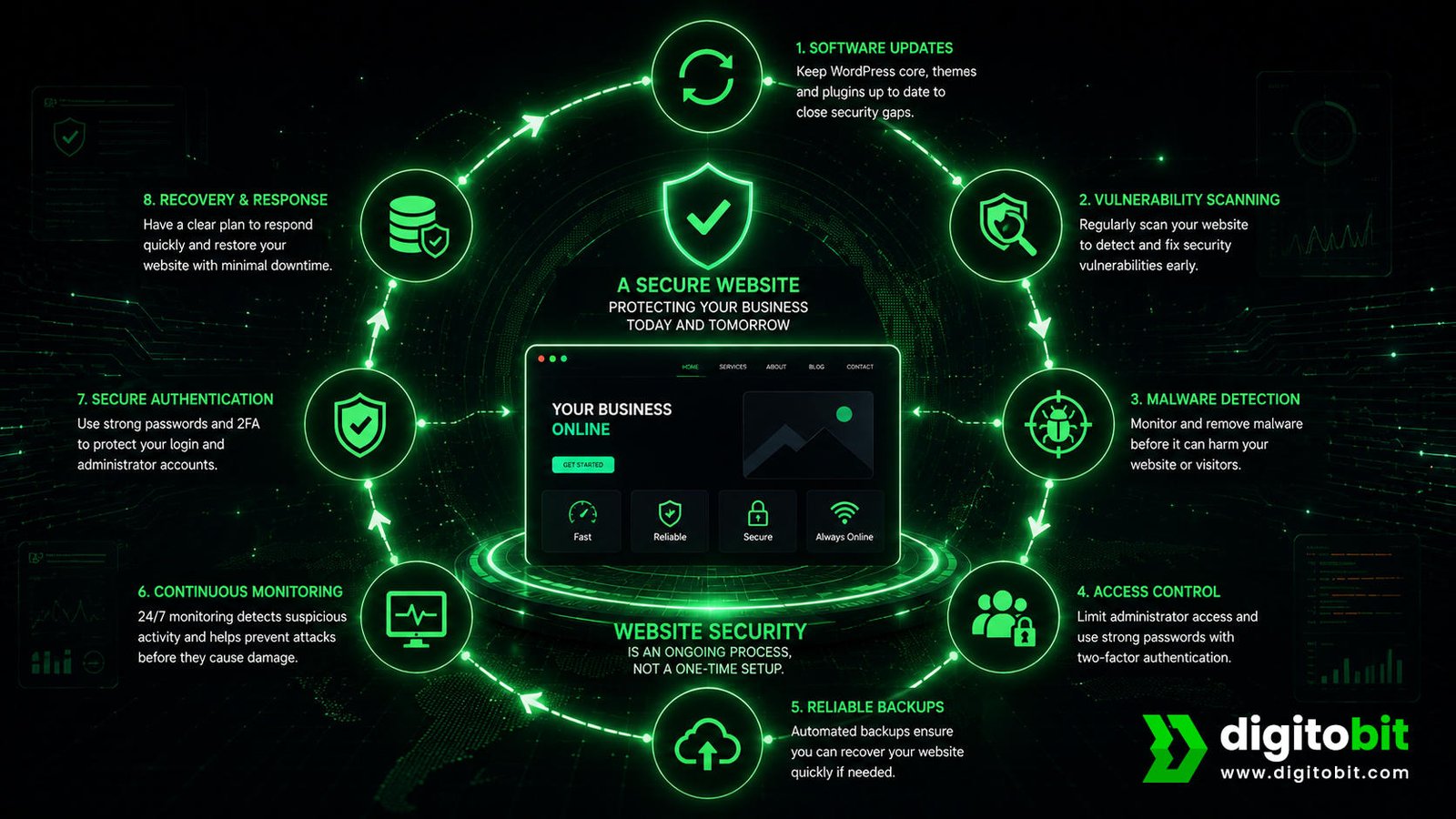
A strong website security strategy combines prevention, monitoring, maintenance, and recovery. Prevention reduces the chance of an incident. Monitoring can help identify suspicious activity. Regular maintenance reduces known vulnerabilities. Backups provide a way to recover when something goes wrong.
Website Security Is an Ongoing Process
Security should not be something you configure once and forget. Websites change constantly. Developers install new plugins, update software, add user accounts, modify integrations, and discover new vulnerabilities.
For this reason, website security works best as an ongoing process. Regular updates, backups, monitoring, access reviews, vulnerability checks, and security maintenance can help keep protection aligned with the current state of the website.
Why Website Security Matters for Your Business
For a business owner, the value of website security becomes clearer when you look beyond the technical side. Your website is often one of the first places potential customers interact with your brand. If that experience is interrupted or appears unsafe, the impact can extend far beyond the website itself.
A secure website supports a more reliable customer experience while reducing the risk of common security problems. It also helps you protect an asset that may have taken years to build through SEO, content, branding, customer relationships, and digital marketing.
1. Protect Customer Trust
Trust is critical online. Customers expect a business website to work properly and provide a safe experience. If visitors encounter browser warnings, suspicious redirects, unexpected pop-ups, or strange content, they may immediately leave the website.
For a small business, losing trust can be particularly expensive because customers may simply choose a competitor instead.
2. Reduce Downtime and Lost Leads
If your website goes offline because of an attack or security incident, visitors may not be able to submit forms, request quotations, make purchases, book appointments, or find important business information.
Even a short period of downtime can become a business problem when your website is an important source of enquiries or sales. Website security therefore supports business continuity as well as technical protection.
3. Protect Your Online Reputation
A compromised website can sometimes display spam, malicious links, inappropriate content, or unwanted redirects. This can create an immediate reputation problem for the business.
Customers do not necessarily know that a website was hacked. They may simply assume the business is unreliable or unsafe. Protecting the website helps protect the credibility you have built around your brand.
4. Protect Your SEO Investment
Businesses invest significant time and money into search engine optimization, content, links, local visibility, and website improvements. A security incident can interfere with that investment if the website becomes compromised or inaccessible.
This is another reason website security and SEO should not be treated as completely separate concerns. A healthy website needs to be both visible to search engines and safe for visitors.
5. Reduce Recovery Costs
Preventing a security issue is generally easier than recovering from a serious compromise. Once hackers have compromised a website, you may need to identify the source of the problem, remove malicious files, restore clean data, reset credentials, inspect accounts, update vulnerable software, and check whether the attackers have returned.
Regular security maintenance can help reduce the likelihood of reaching that point and can make recovery easier when an incident does occur.
6. Protect Business Data
Depending on how a website is built, it may interact with customer information, contact forms, user accounts, databases, payment systems, or third-party services. Protecting these systems is an important part of responsible website management.
Common Website Security Threats
Understanding common website security threats helps you see why regular protection and maintenance matter. Every attack looks different, and attackers can exploit different parts of your technology stack, including the content management system, plugins, themes, administrator accounts, databases, hosting environment, and third-party integrations.
Many of these risks fall within the broader categories covered by the OWASP Top 10, a widely used awareness framework for the most critical web application security risks.
| Threat | What It Means | Potential Business Impact |
|---|---|---|
| Malware | Malicious software or code is introduced to the website. | Reputation damage, redirects, downtime and recovery costs. |
| Brute-force attacks | Attackers repeatedly attempt to guess account credentials. | Unauthorized access to administrator accounts. |
| SQL injection | Malicious input attempts to manipulate database queries. | Potential data exposure or website compromise. |
| Cross-site scripting | Malicious scripts are injected into web content or applications. | Security and customer-experience risks. |
| DDoS attacks | Large volumes of traffic are used to overwhelm a website or service. | Slow performance or website downtime. |
| Outdated software | Old software may contain known vulnerabilities. | Attackers may exploit weaknesses that updates could address. |
Malware
Malware is malicious software or code that can be used to compromise a website or its visitors. A compromised website may contain hidden malicious files, suspicious redirects, unwanted advertisements, spam pages, or other unauthorized changes.
One of the biggest problems with malware is that the website owner may not notice the compromise immediately. Regular malware scanning and monitoring can help identify suspicious changes earlier.
Brute-Force Attacks
Brute-force attacks involve repeated attempts to gain access to an account by guessing credentials. Administrator and login pages can become targets when passwords are weak, reused, or exposed.
Strong passwords, two-factor authentication, login protection, and sensible access controls can reduce the risk associated with compromised credentials.
SQL Injection
SQL injection is an attack technique that attempts to manipulate database queries through malicious input. Websites that interact with databases need appropriate safeguards to ensure user input cannot be used to execute unintended database commands.
Cross-Site Scripting
Cross-site scripting, commonly called XSS, involves injecting malicious scripts into content or applications that other users may access. Proper input handling, output encoding, secure development practices, and appropriate security controls can help reduce this type of risk.
DDoS Attacks
A distributed denial-of-service attack attempts to overwhelm a website or online service with a large volume of traffic. The goal is generally to make the service slow or unavailable to legitimate visitors.
For businesses that depend heavily on their website for leads, bookings, ecommerce, or customer support, unexpected downtime can quickly become a commercial problem.
Outdated Plugins, Themes, and Software
Outdated website software can create security weaknesses when developers discover vulnerabilities and release patches. WordPress recommends keeping plugins and themes updated to help keep WordPress sites secure. This is particularly important for websites that use content management systems such as WordPress, where themes and plugins add additional software components to the website.
Keeping the website platform and its components maintained is therefore one of the most practical website security best practices for business owners.
Website Security Checklist
A website security checklist gives business owners a practical way to review the most important areas of protection. While every website has different requirements, the following measures provide a strong starting point.
- Use HTTPS: Make sure your website uses a valid SSL/TLS certificate and loads securely over HTTPS.
- Use strong passwords: Avoid simple or reused passwords for administrator and hosting accounts.
- Enable two-factor authentication: Add an additional verification step wherever your website platform supports it.
- Keep software updated: Regularly update your CMS, plugins, themes, extensions, and other website components.
- Create regular backups: Maintain reliable backups that can be used to restore the website after a serious incident.
- Monitor for malware: Use appropriate scanning and monitoring to identify suspicious changes.
- Protect login areas: Apply suitable login protection and limit unnecessary administrator access.
- Review user permissions: Give users only the access they actually need.
- Use website protection tools: Depending on the website, consider firewalls, WAF protection, bot controls, and other appropriate security measures.
- Review security regularly: Website security should be maintained continuously rather than checked only after something goes wrong.
Consistency matters most. A security checklist is useful only when you regularly complete and maintain the tasks on it. If you do not manage your website every day, professional website security and maintenance can help you complete these tasks consistently and prevent important security measures from being overlooked.
Is Your WordPress Website Secure?
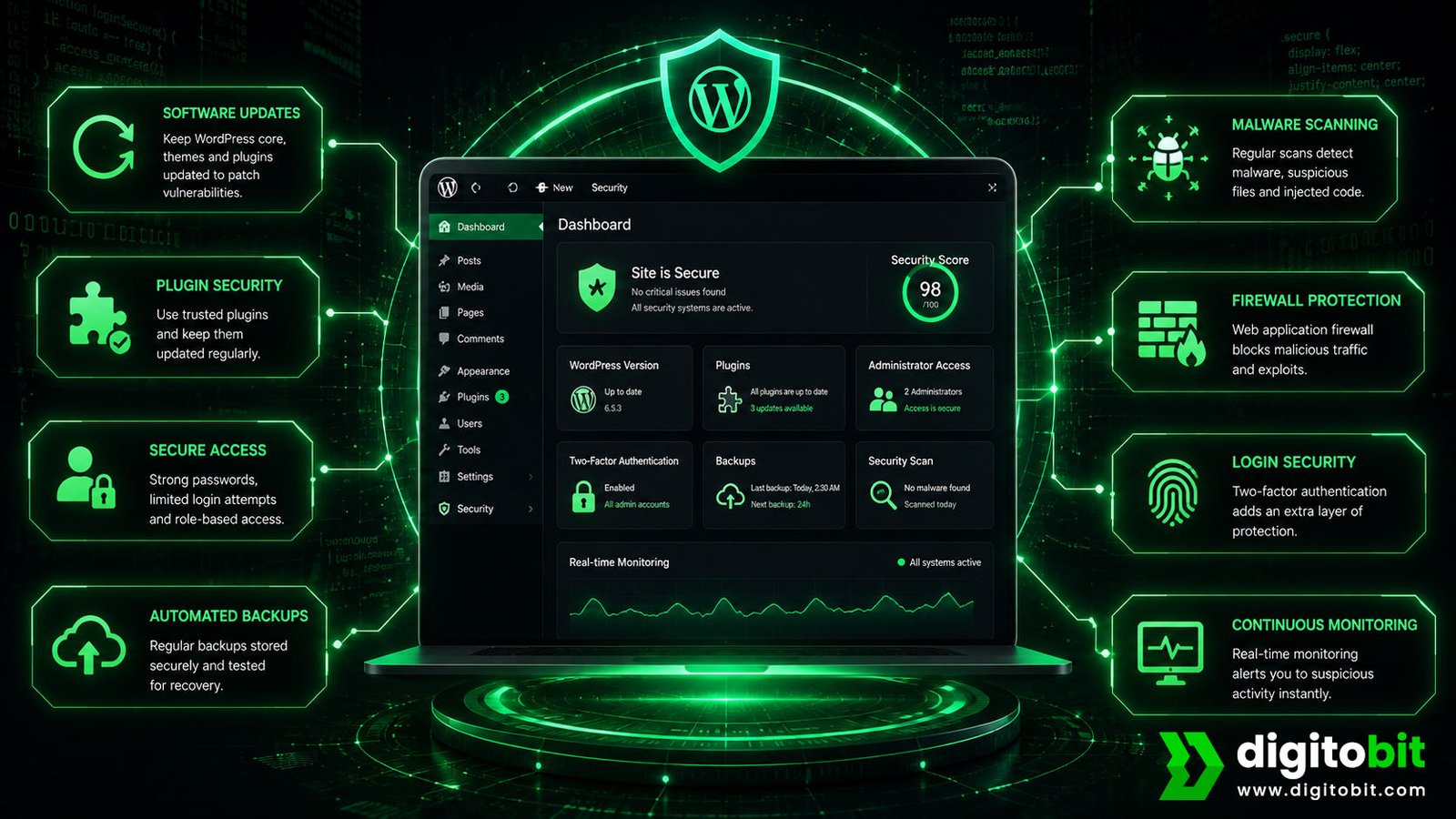
WordPress is one of the most widely used website platforms, making it a popular choice for businesses of all sizes. Its flexibility, large plugin ecosystem, and ease of management make it useful for business websites, ecommerce stores, blogs, and service-based businesses. However, that flexibility also means WordPress websites need regular security maintenance.
Installing WordPress and adding an SSL certificate alone does not create a secure website. You need to maintain the entire website environment, including the WordPress core, themes, plugins, administrator accounts, hosting environment, backups, and security settings.
Keep WordPress Core Updated
WordPress releases updates that can include security fixes, performance improvements, bug fixes, and other changes. Leaving the core software outdated can increase exposure to known vulnerabilities. WordPress recommends keeping the core software up to date to ensure security fixes are applied.
Business owners should therefore make WordPress updates part of their regular website maintenance process. Before applying major changes, reliable backups should also be available so the website can be restored if an update creates an unexpected compatibility issue.
Keep Plugins and Themes Updated
Plugins and themes add functionality and design features to WordPress, but each component also adds software that you need to maintain.
Do not leave unused plugins and themes installed indefinitely. Remove unnecessary components to reduce the number of software elements you need to maintain and monitor.
Use Strong Administrator Accounts
Administrator accounts have significant control over a WordPress website. If an attacker gains access to an administrator account, they may be able to change content, install software, modify settings, create additional accounts, or make other unauthorized changes.
Use strong, unique passwords and enable two-factor authentication where available. Administrator access should also be limited to people who genuinely need it.
Choose Plugins Carefully
Before installing a plugin, consider whether you actually need it and whether it is actively maintained. A website with dozens of unnecessary plugins can become more difficult to maintain and troubleshoot.
Maintain Reliable Backups
Backups are an important part of WordPress website security because prevention is not always perfect. If a website is compromised, a clean and reliable backup can provide an important recovery option.
WordPress’s hardening documentation also recommends maintaining regular backups as part of a broader security strategy.
Ideally, you should perform backups regularly and store them separately from the live website. A backup provides little practical protection if you cannot restore it when needed, so you should also test your restoration procedures regularly.
Monitor the Website
Security monitoring can help identify suspicious changes, malware, unexpected account activity, or other warning signs. The sooner a problem is detected, the sooner it can be investigated and addressed.
Website Security vs SSL: What’s the Difference?
One of the most common misunderstandings among website owners is thinking that an SSL certificate means the entire website is secure. SSL is important, but it is only one part of website security.
SSL/TLS helps encrypt information exchanged between a visitor’s browser and the website. When a website uses HTTPS, information transferred through the connection is protected against certain types of interception.
Website security is much broader. It includes protecting the website from unauthorized access, malicious software, vulnerable components, compromised accounts, attacks, and other threats.
| Factor | SSL / HTTPS | Website Security |
|---|---|---|
| Main purpose | Protect data in transit | Protect the website and its environment |
| Encryption | Yes | Can include encryption as one component |
| Malware protection | No | Can include scanning and protection |
| Login protection | No | Yes |
| Software updates | No | Yes |
| Backups | No | Yes |
Think of SSL as one layer of protection rather than the entire security system. A business website can have HTTPS enabled and still be vulnerable because of outdated software, weak credentials, insecure plugins, malware, or poor access controls.
Why HTTPS Still Matters
Although SSL is not a complete website security solution, HTTPS remains essential for modern websites. It helps protect communication between visitors and the website and provides an important trust signal to users.
For websites that collect contact information, process accounts, accept payments, or provide other sensitive functionality, secure connections are especially important.
The Bottom Line
If your website has HTTPS, that is a good starting point, but it should not be the end of your security checklist. SSL protects the connection; website security protects the broader website environment.
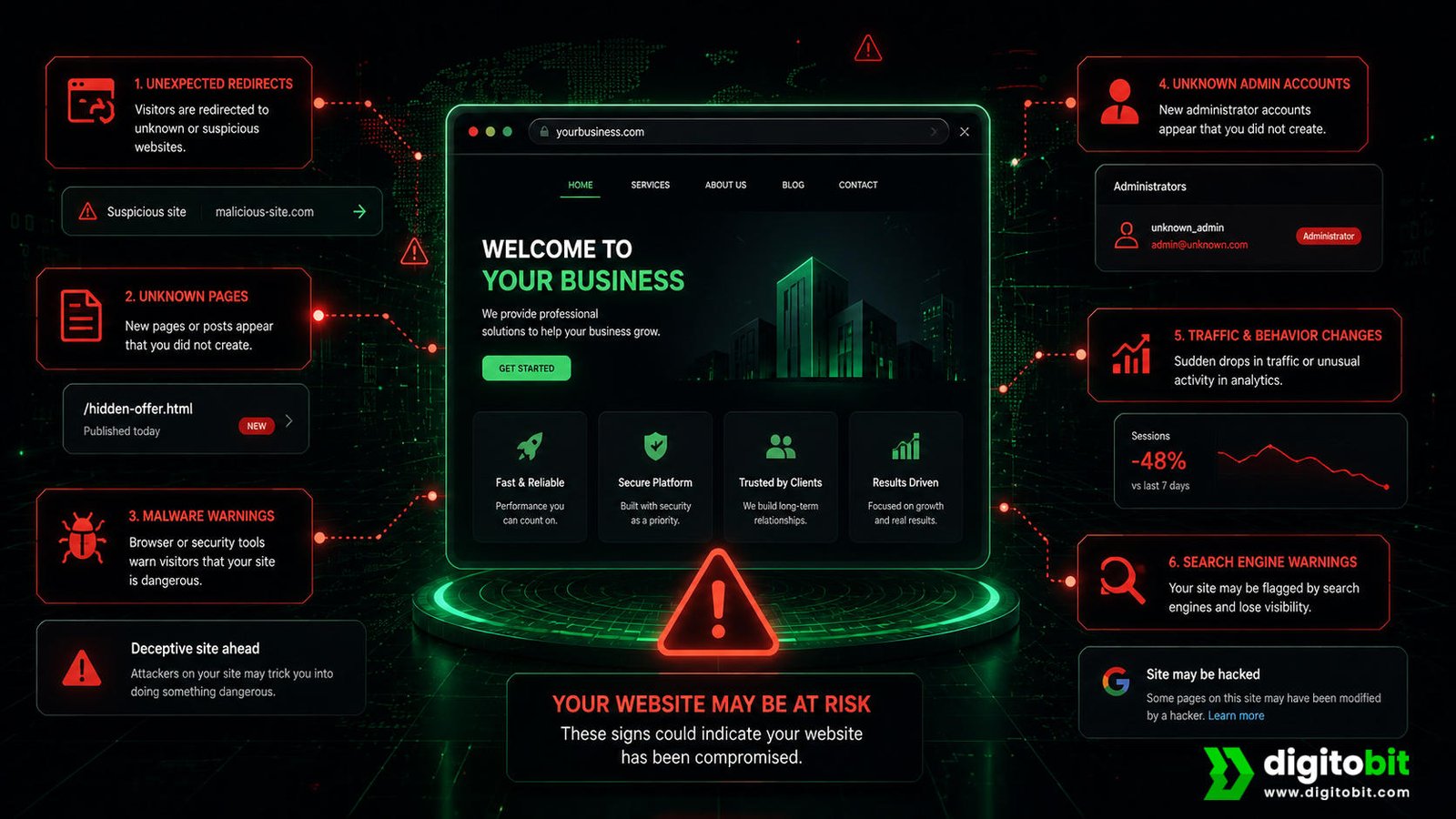
Signs Your Website May Have Been Hacked
A website compromise is not always obvious. Attackers may try to remain hidden, while automated malware can make changes that are difficult for a non-technical website owner to notice.
Knowing the warning signs can help you identify a potential problem earlier. If you notice several unusual changes at the same time, it is worth investigating rather than assuming the issue will disappear on its own.
- Your website redirects visitors to unexpected websites.
- New pages or posts appear that nobody on your team created.
- Strange advertisements or spam content appears on the website.
- Your website becomes unusually slow without an obvious reason.
- Unknown administrator accounts appear in your CMS.
- Your hosting provider reports suspicious files or malware.
- Visitors report browser security warnings.
- Your website suddenly sends unusual amounts of spam.
- Website files or settings change without authorization.
- Search results show unexpected or suspicious pages associated with your domain.
Unexpected Website Changes
If content appears on your website that nobody in your business added, take it seriously. This could include unfamiliar pages, links, images, user accounts, or changes to existing content.
Not every unexpected change indicates a hack. Plugin updates, administrator mistakes, and configuration issues can also cause unexpected behavior. However, investigate any unexplained changes.
Suspicious Redirects
If visitors are redirected away from your website to unrelated pages, this can be a sign that malicious code has been introduced. Redirect attacks can be particularly damaging because the website may appear normal to the owner while behaving differently for certain visitors.
Unknown Administrator Accounts
Unexpected administrator accounts deserve immediate attention. An unknown account may indicate that someone has gained unauthorized access or that credentials have been compromised.
Search Engine Warnings or Strange Results
Security problems can sometimes become visible through search engines. You may notice unusual pages appearing under your domain, unexpected titles, or security warnings affecting visitors.
Google Search Console can also help website owners identify security issues and other problems affecting how their site appears in Google Search.
If you suspect your website has been compromised, avoid making random changes that could destroy evidence or make recovery harder. Secure access, review backups, and seek appropriate technical assistance to identify and resolve the issue.
What Happens When a Business Website Gets Hacked?
When hackers compromise a website, the technical issue can quickly become a business problem. The impact depends on what they compromised, how long they had access, what information they affected, and how quickly you identify and address the issue.
For a business that depends on its website for leads, sales, bookings, or customer communication, even a temporary security incident can create unnecessary disruption.
Step 1: The Website Is Compromised
An attacker may exploit a vulnerable component, compromised credentials, insecure configuration, or another weakness. After gaining access, the attacker may modify files, create accounts, inject malicious code, or perform other unauthorized actions.
Step 2: Customers May Notice Something Is Wrong
Visitors may encounter redirects, unusual pages, warnings, broken functionality, slow loading, or other unexpected behavior. In some cases, the website owner may not discover the problem until a customer reports it.
Step 3: Leads and Sales Can Be Affected
If contact forms stop working or visitors become uncomfortable using the website, potential customers may leave without taking action. For ecommerce businesses, the impact can be even more direct because website availability is closely connected to revenue.
Step 4: Recovery Begins
Recovering a compromised website usually requires identifying the source of the issue, removing malicious changes, securing accounts, updating vulnerable software, checking the website environment, and restoring clean data when necessary.
This is where having reliable backups and an established website maintenance process can make a major difference.
Step 5: The Website Needs Ongoing Monitoring
Removing visible malware does not guarantee that a website is completely secure. If you leave the original vulnerability unresolved, attackers could compromise the website again.
After recovery, review the website carefully, fix vulnerabilities, secure credentials, update software, and implement appropriate monitoring.
| Security Issue | Possible Business Consequence |
|---|---|
| Website downtime | Lost visitors and enquiries |
| Malware | Trust and reputation problems |
| Compromised accounts | Unauthorized website changes |
| Data exposure | Customer and business risk |
| Search visibility problems | Reduced organic traffic opportunities |
The key lesson is simple: Treat website security as an ongoing business responsibility, not an emergency task after a compromise.
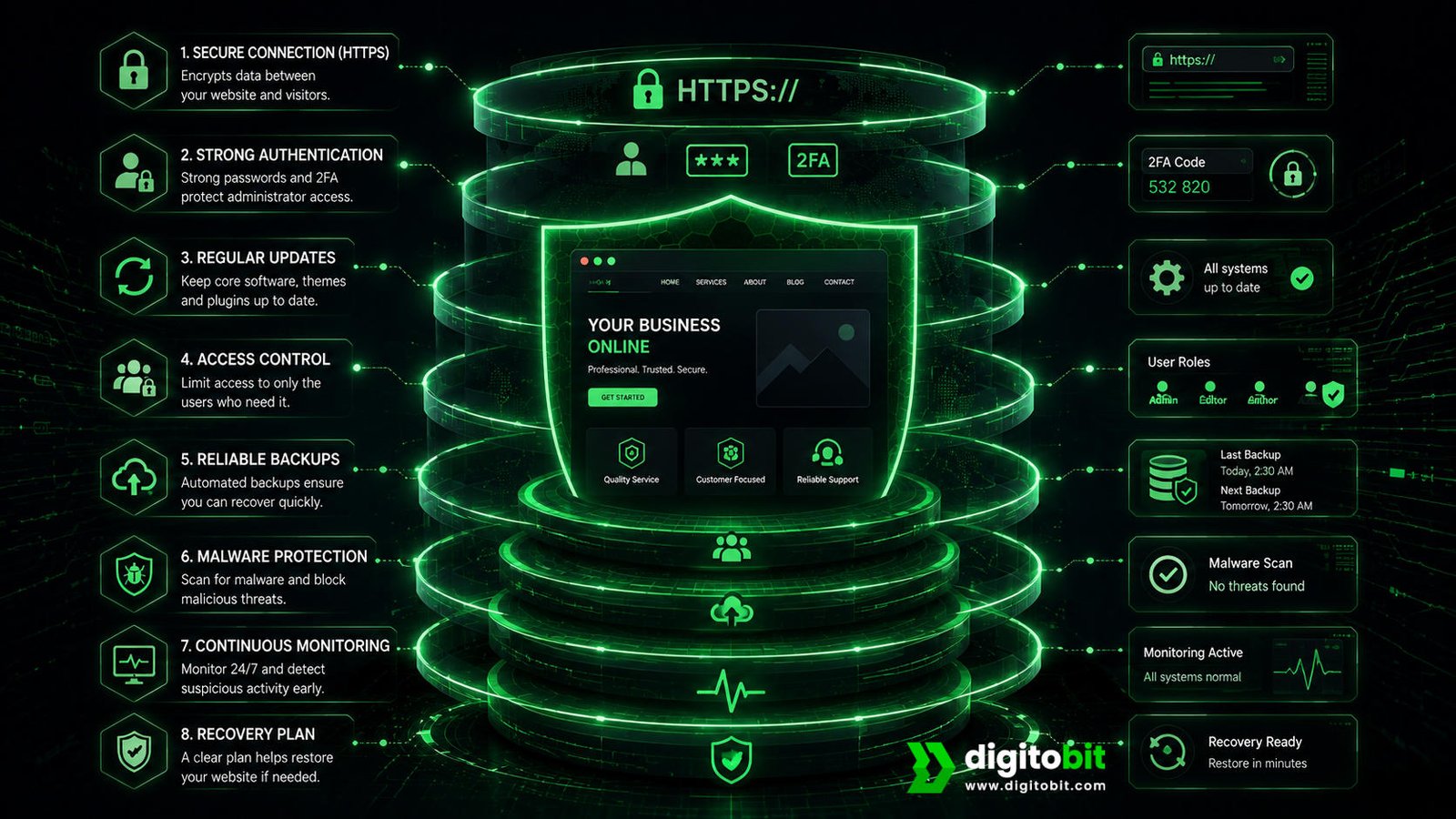
How to Secure Your Website
There is no single setting that makes every website completely secure. Effective website protection comes from combining multiple layers of security and maintaining them consistently.
1. Secure Your Website With HTTPS
Make sure your website uses HTTPS with a properly configured SSL/TLS certificate. This helps protect information transferred between visitors and your website and provides an important foundation for website security.
2. Keep Everything Updated
Keep your CMS, plugins, themes, libraries, and other website components updated. Security updates can address known vulnerabilities, so delaying important updates can leave a website exposed longer than necessary.
3. Use Strong Passwords and Two-Factor Authentication
Use unique, strong passwords for website, hosting, email, and administrator accounts. Enable two-factor authentication where available to add another layer of protection if a password is compromised.
4. Limit Administrator Access
Don’t give every user full administrator access. Assign permissions based on each user’s role and remove access they no longer need.
5. Use Regular Backups
Maintain regular backups of important website files and databases. Use backups to recover your website if an attack, technical issue, or unexpected event damages or compromises it.
6. Monitor for Malware and Suspicious Activity
Regular security scanning and monitoring can help identify suspicious changes earlier. Depending on the website and its risk profile, additional security controls such as a Web Application Firewall, bot protection, or other security services may also be appropriate.
7. Choose Secure Hosting
Website security does not stop at the website itself. Hosting infrastructure, server configuration, account security, backups, and access controls can all affect the overall security of a website.
8. Perform Regular Security Reviews
Review security whenever you make major website changes and as part of regular maintenance. Check user accounts, software versions, backups, security tools, and website behavior to identify issues before they become bigger problems.
For business owners who do not have the time or technical expertise to manage these tasks themselves, professional website security maintenance can provide a practical way to keep protection consistent.
DIY Website Security vs Professional Website Security
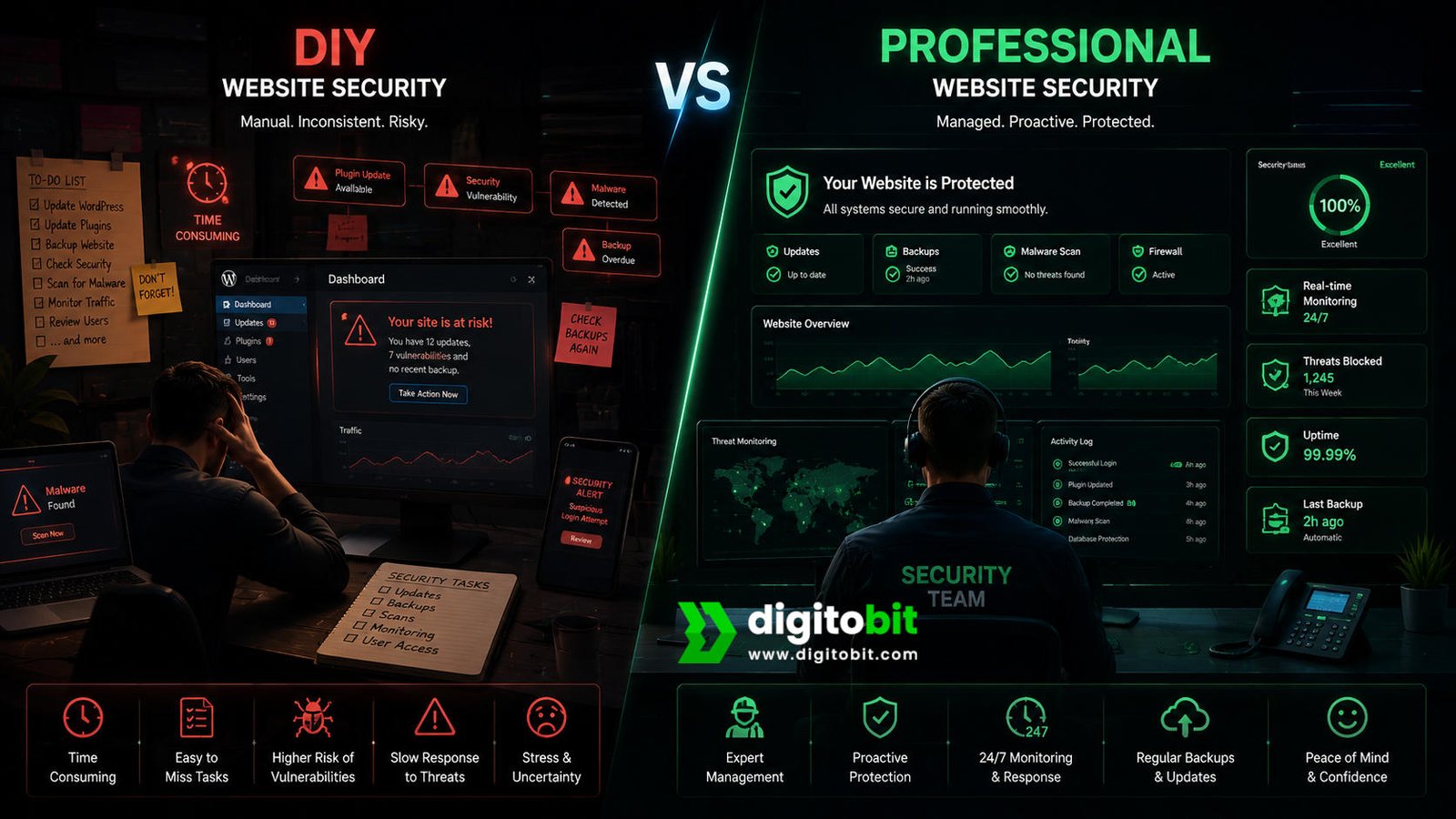
Business owners can handle some basic website security tasks themselves. Installing updates, using strong passwords, enabling two-factor authentication, and checking that backups are working are all useful steps. However, managing website security becomes more difficult as a website grows and becomes more important to the business.
A professional website security service can take responsibility for the ongoing tasks that are easy to overlook when website management is not your primary job. The goal is not necessarily to replace every action you can perform yourself. It is to make sure important security processes happen consistently.
| Factor | DIY Security | Professional Security |
|---|---|---|
| Setup | Managed by the business owner | Managed by security or web specialists |
| Updates | Requires manual attention | Can be included in ongoing maintenance |
| Monitoring | Often inconsistent | Regular or continuous monitoring options |
| Malware response | Owner must investigate or find help | Specialist support may be available |
| Backups | Owner must configure and test | Can be managed as part of maintenance |
| Time required | Higher for non-technical owners | Lower internal workload |
When DIY Security Can Work
DIY website security can be suitable for a simple website when the owner has the time and knowledge to perform regular maintenance. A small brochure website with limited functionality may require fewer security controls than a large ecommerce platform or membership website.
The important point is consistency. If security tasks are repeatedly postponed because you are busy running the business, the DIY approach may leave important gaps.
When Professional Website Security Makes Sense
Professional website security becomes more valuable when your website is an important source of revenue or when its technology is complex. Ecommerce websites, websites with customer accounts, booking systems, payment functionality, large plugin stacks, or multiple administrators can require more careful ongoing management.
- Your website generates regular leads or sales.
- Your website handles customer accounts or sensitive information.
- You use WordPress with multiple plugins and integrations.
- You do not have an internal technical team.
- You do not have time to monitor website security regularly.
- You need help responding to malware or suspicious activity.
- You want reliable backups and recovery procedures.
The real value of professional website security is often time, consistency, and faster response. Instead of waiting until something breaks, your website can be managed with security and maintenance as ongoing priorities.
How Much Does Website Security Cost?
There is no single website security price that applies to every business. The cost depends on the website platform, size, functionality, hosting environment, number of users, security requirements, monitoring needs, and level of professional support required.
A simple informational website may need a different level of protection from an ecommerce website that processes orders, a membership website with customer accounts, or a business website connected to several external systems.
What Determines Website Security Cost?
Website Complexity
- Number of pages
- Website functionality
- Plugins and integrations
- Customer accounts
Security Requirements
- Malware scanning
- Security monitoring
- Firewall protection
- Backup requirements
Prevention vs Recovery Costs
When considering website security cost, it is useful to think about the potential cost of a security incident as well. A website compromise can require emergency technical work, malware removal, restoration, account recovery, investigation, and additional maintenance.
There can also be indirect costs. If the website stops generating leads, customers cannot complete purchases, or visitors lose confidence in the brand, the financial impact may extend beyond the cost of fixing the technical problem.
This does not mean every business needs the most expensive security package available. The better approach is to match your security investment to the importance and risk profile of your website.
What Should a Website Security Service Include?
Before choosing a website security provider, understand what is actually included. Depending on the service, website security may cover areas such as:
- Security monitoring
- Malware scanning
- Malware cleanup
- Website backups
- Software and plugin updates
- Firewall or WAF protection
- Vulnerability checks
- Security alerts
- Recovery assistance
- Ongoing website maintenance
Always compare services based on what your business actually needs rather than choosing solely on price. The cheapest option may not provide the monitoring, response, or recovery support your website requires.
Website Security Best Practices for Long-Term Protection
Securing a website is not a one-time project. A website that is secure today can become vulnerable later if you fail to update software, leave administrator accounts active, stop maintaining backups, or overlook newly discovered vulnerabilities.
Long-term website security therefore depends on building simple security practices into regular website maintenance.
1. Make Updates Part of Regular Maintenance
Do not wait until the website stops working before checking for updates. Regularly review your CMS, themes, plugins, extensions, and other software components. Security updates should be treated as important maintenance tasks rather than optional improvements.
2. Keep Backups Reliable
You should maintain a regular, reliable, and practical backup strategy. Store backups separately from the live website and make sure you know where they are located. Test your backups regularly to confirm that you can restore them when needed, especially during an emergency.
3. Review User Access
Businesses often give website access to former employees, freelancers, developers, agencies, and other team members at different times. Review user accounts regularly and remove access that people no longer need.
4. Protect Every Layer of the Website
Think about security across the entire website environment. This includes the website itself, hosting account, administrator accounts, domain account, email accounts, plugins, third-party integrations, and connected services.
Protecting only the website while leaving associated accounts vulnerable can create unnecessary security gaps.
5. Monitor Instead of Assuming
Do not assume that a website is secure simply because it has not experienced an obvious problem. Security monitoring can provide visibility into suspicious activity and unexpected changes that may otherwise go unnoticed.
6. Remove Unnecessary Components
Every plugin, integration, user account, and external connection adds another component that you need to maintain. If you no longer need a feature, remove it instead of leaving it unused.
7. Have a Recovery Plan
Even strong security measures cannot guarantee that an incident will never happen. A recovery plan helps your business respond more quickly if something goes wrong.
- Know who is responsible for website security.
- Know where clean backups are stored.
- Know how website access can be secured after an incident.
- Keep hosting and administrator credentials under control.
- Have a technical contact available for emergency support.
The goal of these website security best practices is not to make your business website impossible to attack. No security strategy can promise that. The goal is to reduce avoidable vulnerabilities, detect problems sooner, limit potential damage, and improve your ability to recover.
Final Verdict: Is Website Security Really Necessary?
Yes. Website security is necessary for businesses that rely on their website for visibility, leads, sales, customer communication, or credibility.
The key point is that website security is not a single product or setting. An SSL certificate, security plugin, firewall, backup, or strong password can improve protection, but you should not rely on any one of them as your entire security strategy.
A safer business website combines multiple layers of protection: secure connections, strong authentication, updated software, controlled access, reliable backups, malware scanning, monitoring, and a clear recovery process.
For business owners, the biggest benefit is peace of mind and lower business risk. Instead of discovering security problems after they affect customers, you can take proactive steps to protect your website and keep it running reliably.
If managing all of these tasks yourself is difficult, professional website security and maintenance can help. The right approach depends on the size, complexity, and importance of your website, but investing in protection is generally far easier than dealing with an avoidable security emergency.
Your website is a business asset. Protecting it protects more than your website—it helps protect your customers, reputation, leads, and long-term online growth.
Protect Your Website Before Security Becomes a Business Problem
Digitobit can help keep your business website secure, maintained, monitored, and ready to support your growth.
Frequently Asked Questions
Yes. Attackers can target small businesses with automated attacks, malware, credential attacks, and other common website threats. Strong security protects your website, customers, reputation, leads, and business continuity.
Start by checking HTTPS, software updates, administrator accounts, passwords, backups, malware scanning, monitoring, and access controls. A professional security review can provide a more detailed assessment.
No. SSL/TLS and HTTPS protect data transmitted between the visitor and website, but complete website security also requires updates, access controls, malware protection, backups, monitoring, and other security measures.
You should treat website security as an ongoing maintenance process. Review your software, user accounts, backups, vulnerabilities, and website configurations regularly instead of waiting for a security incident.
Yes. WordPress websites face risks from outdated software, vulnerable plugins or themes, compromised credentials, and insecure configurations. Regular updates, strong access controls, reliable backups, monitoring, and ongoing maintenance help reduce these risks.

Author: Neeraj Mourya
Founder, Systems Architect – Digitobit
Specializing in scalable backend architecture and performance-focused SaaS systems